


 You monster

- Posts: 12135
- Thank you received: 522


October Challenge: Horror rework
September entries: Legend
The shoutbox is unavailable to non-members
Shoutbox History
5 tattered cloth, 2 starry sunstones, one aged cheese and over 40 bugs later... I think my soul is entirely gone 
8 hours ago
Wow. 1 tattered cloth. The massacres we're forced to do makes me worry about my soul...
9 hours ago
Dang I forgot to go past Zeki's. (And before that I forgot to water my crops...)
10 hours ago
Important, change your password!
Go here for further information: https://cgartnexus.com/index.php/forum/announcements/840-hacked
Gaming


03 Feb 2025 21:02 #53463
by Charlotte
Any an all misspellings are henceforth blamed on the cats.
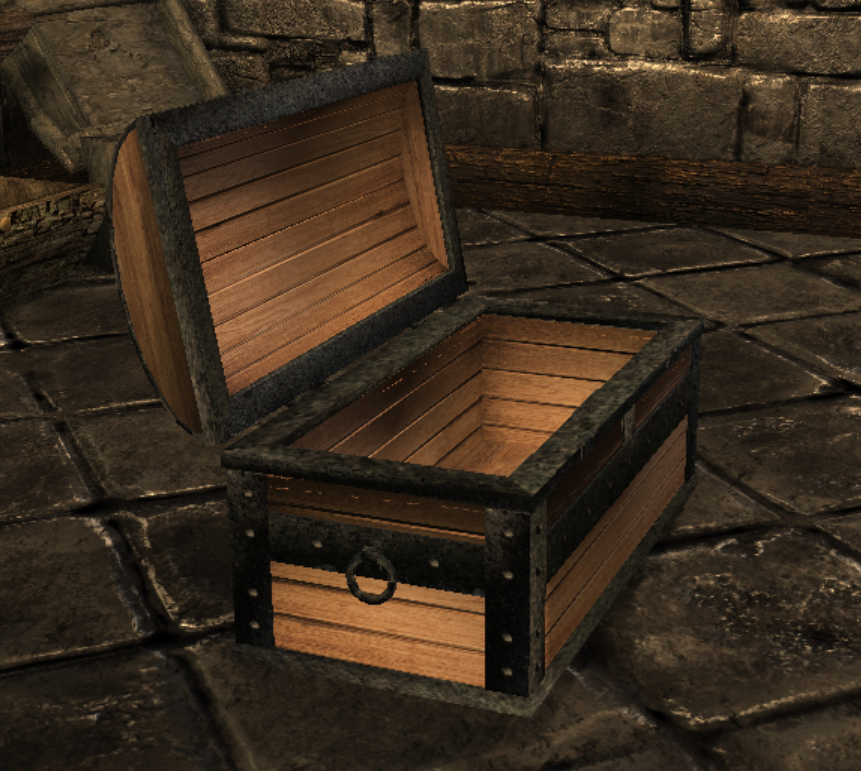
A bit further along, though the wood is too bright and clean and the iron is a bit dark (and also shifts between light grey and almost black for whatever reason). The diffusemap is probably wonky, which doesn't help either...
I think I need to learn how to see the textures in Blender rather than picturing it in my head while mapping and then fixing the texture links in nifskope and THEN being able to load the item and see what the textures look like in the CK
I think I need to learn how to see the textures in Blender rather than picturing it in my head while mapping and then fixing the texture links in nifskope and THEN being able to load the item and see what the textures look like in the CK
Any an all misspellings are henceforth blamed on the cats.
Please Log in or Create an account to join the conversation.

03 Feb 2025 21:29 - 03 Feb 2025 21:29 #53466
by Valence
Speaking from a position of complete ignorance here... 
I think you should be able to see the diffuse textures but all that extra stuff with the normal/specular in the alpha channels (or however it's done in the game engine) would be difficult to do with the nodes.
You'd have to use a separate image for each one in Blender.
Or do you combine all that stuff afterwards?
I think you should be able to see the diffuse textures but all that extra stuff with the normal/specular in the alpha channels (or however it's done in the game engine) would be difficult to do with the nodes.
You'd have to use a separate image for each one in Blender.
Or do you combine all that stuff afterwards?
Last edit: 03 Feb 2025 21:29 by Valence.
Please Log in or Create an account to join the conversation.

03 Feb 2025 21:40 #53469
by Charlotte
Any an all misspellings are henceforth blamed on the cats.
I suspect it's a case of my complete ignorance being greater than yours...
I don't use nodes, you should know that my now.
To make the materials work with Skyrim I tend to load in something from the game - preferably something which texture I can use as is... Then I set my pieces, even if they're brand new meshes, to use that material. So all those alphas and speculars and stuff are the same as a game object.
I can load an image in the UV mapping preview so I know which part of the image ends up on which part of the mesh. But I can't get anything but the grey solid view or the wireframe view (or the blue/orange view that shows which side of mesh faces are the visible side in game) for the 3D model itself.

I don't use nodes, you should know that my now.
To make the materials work with Skyrim I tend to load in something from the game - preferably something which texture I can use as is... Then I set my pieces, even if they're brand new meshes, to use that material. So all those alphas and speculars and stuff are the same as a game object.
I can load an image in the UV mapping preview so I know which part of the image ends up on which part of the mesh. But I can't get anything but the grey solid view or the wireframe view (or the blue/orange view that shows which side of mesh faces are the visible side in game) for the 3D model itself.
Any an all misspellings are henceforth blamed on the cats.
Please Log in or Create an account to join the conversation.
03 Feb 2025 22:01 - 03 Feb 2025 22:03 #53470
by Valence
To add the texture to the material you need to click the "Shading" workspace at the top. The default workspace is "Layout".
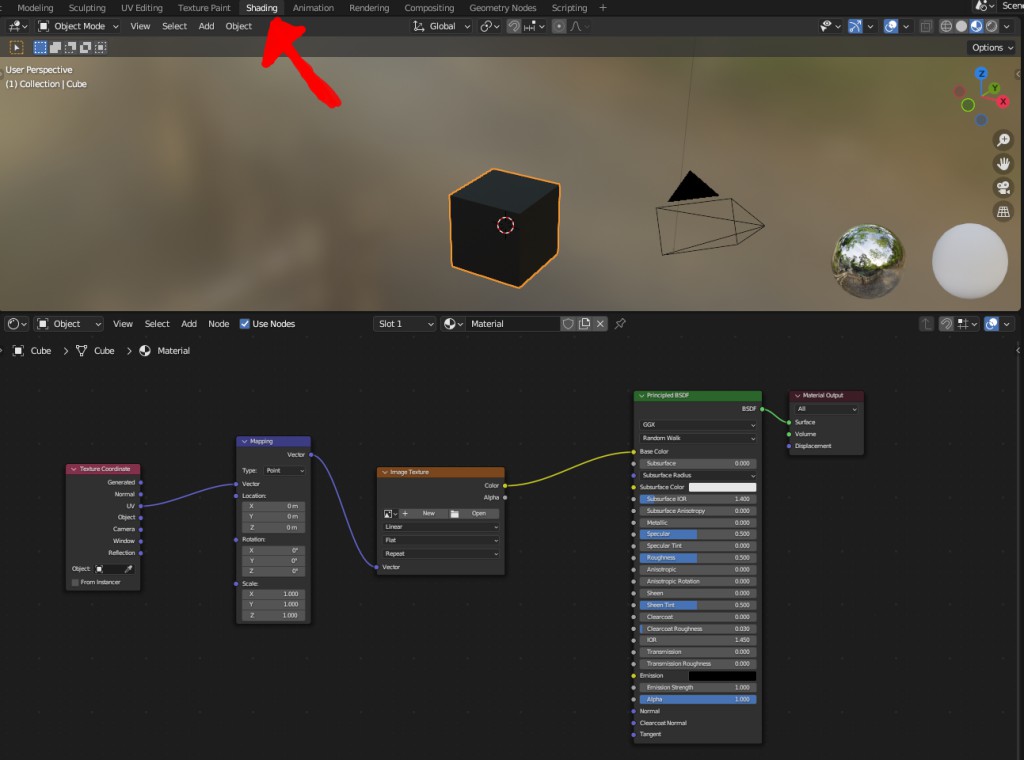
At the bottom in the Node window you will probably only have the Principled Shader and the Output, so create this setup and connect it as shown in the picture.
In the menus they should be under...
Add>Input>Texture Coordinate.
Add>Vector>Mapping
Add>Texture>Image Texture
and if the other two aren't already there then...
Add>Shader>Principled BSDF
Add>Output>Material Output.
And as you can see at the top the workspace automatically defaults to the material view with a lo-res, blurry environment.
EDIT. Oh, and I forgot to say that you load in your texture by clicking Open on the image texture node.
At the bottom in the Node window you will probably only have the Principled Shader and the Output, so create this setup and connect it as shown in the picture.
In the menus they should be under...
Add>Input>Texture Coordinate.
Add>Vector>Mapping
Add>Texture>Image Texture
and if the other two aren't already there then...
Add>Shader>Principled BSDF
Add>Output>Material Output.
And as you can see at the top the workspace automatically defaults to the material view with a lo-res, blurry environment.
EDIT. Oh, and I forgot to say that you load in your texture by clicking Open on the image texture node.
Last edit: 03 Feb 2025 22:03 by Valence.
Please Log in or Create an account to join the conversation.


Facebook Feed
Member Statistics
- Total Users: 228
- Latest User: DanielWilson
- Online Users: 0
- Users Today: 0
- Users this Week: 0
- Users this Month: 0
- Users this Year: 2
NOTE! This site uses cookies and similar technologies.
By using this website you agree to the use of cookies and related data storage as detailed in our privacy policy. Learn more
I understand
Site design Mad Hamster Studios. All content is protected under © and the property of the various contributers and not to be reproduced without permission of the creator.