


 You monster

- Posts: 12135
- Thank you received: 522


October Challenge: Horror rework
September entries: Legend
The shoutbox is unavailable to non-members
Shoutbox History
5 tattered cloth, 2 starry sunstones, one aged cheese and over 40 bugs later... I think my soul is entirely gone 
8 hours ago
Wow. 1 tattered cloth. The massacres we're forced to do makes me worry about my soul...
9 hours ago
Dang I forgot to go past Zeki's. (And before that I forgot to water my crops...)
10 hours ago
Important, change your password!
Go here for further information: https://cgartnexus.com/index.php/forum/announcements/840-hacked
Gaming
03 Feb 2025 22:13 - 03 Feb 2025 22:15 #53472
by Valence
OK, then. Try this with no nodes. Maybe. 
Stay in the layout workspace and on the right side click on the Materials tab...
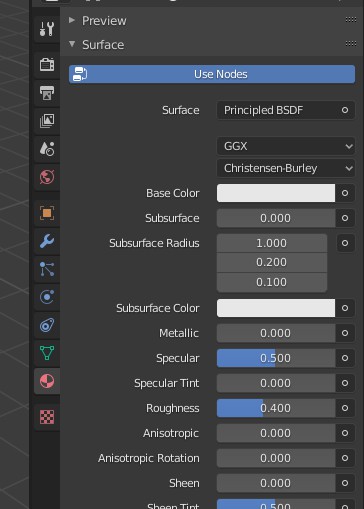
Now click on Base Color and select Image Texture from the popup. This should allow you to then load in your texture.
You should then get a Vector option underneath. Click that and select UV from the popup.
Maybe.
EDIT: Of course I meant click on the little button next to Base Color.
Stay in the layout workspace and on the right side click on the Materials tab...
Now click on Base Color and select Image Texture from the popup. This should allow you to then load in your texture.
You should then get a Vector option underneath. Click that and select UV from the popup.
Maybe.
EDIT: Of course I meant click on the little button next to Base Color.
Last edit: 03 Feb 2025 22:15 by Valence.
Please Log in or Create an account to join the conversation.


03 Feb 2025 22:18 #53473
by Charlotte
Any an all misspellings are henceforth blamed on the cats.
I'm reluctant to mess with those settings on Skyrim stuff but that's where I set imagetextures when I did founders fortune stuff and I never saw any textures back then either...
Then again I accidentally clicked a keyboard key (not sure which one) earlier today while texturemapping and suddenly a texture (the wrong one sort of - actually the one the material was referencing in a mod, not sure why that one popped in automatically when the mesh I used to get the material was the original unmodded one...) did appear. Very very dark, though. And I think as soon as I left either UV mapping or maybe edit mode it reverted to the normal grey.
So I guess there is a way to see textures, that doesn't require either of the above approaches. I just haven't a clue what I did or why it was almost black.
Anyway, it's bedtime for me. No more nodes. *nods off*
Then again I accidentally clicked a keyboard key (not sure which one) earlier today while texturemapping and suddenly a texture (the wrong one sort of - actually the one the material was referencing in a mod, not sure why that one popped in automatically when the mesh I used to get the material was the original unmodded one...) did appear. Very very dark, though. And I think as soon as I left either UV mapping or maybe edit mode it reverted to the normal grey.
So I guess there is a way to see textures, that doesn't require either of the above approaches. I just haven't a clue what I did or why it was almost black.
Anyway, it's bedtime for me. No more nodes. *nods off*
Any an all misspellings are henceforth blamed on the cats.
Please Log in or Create an account to join the conversation.

04 Feb 2025 16:32 - 04 Feb 2025 16:37 #53475
by Banj
RPG Maker VX Ace is currently free for a limited time on Steam if anyone wants an oldish game maker thing (I seem to recall another version was given away a while back**).
EDIT - **Yes there was, it was the even older RPG Maker XP
EDIT - **Yes there was, it was the even older RPG Maker XP
Last edit: 04 Feb 2025 16:37 by Banj.
Please Log in or Create an account to join the conversation.
04 Feb 2025 16:34 #53476
by Charlotte
Any an all misspellings are henceforth blamed on the cats.
Yup I got the other version. Haven't even installed it yet. Just really wanted that thing (probably another version) many many years ago.... 
Any an all misspellings are henceforth blamed on the cats.
Please Log in or Create an account to join the conversation.

04 Feb 2025 16:59 #53478
by Charlotte

On second thought... the pixelly look tends to give me a headache... at least initially. That's part of why I don't care for those games anymore. But I guess they don't actually have to look pixelly anymore.
Any an all misspellings are henceforth blamed on the cats.
On second thought... the pixelly look tends to give me a headache... at least initially. That's part of why I don't care for those games anymore. But I guess they don't actually have to look pixelly anymore.
Any an all misspellings are henceforth blamed on the cats.
Please Log in or Create an account to join the conversation.

06 Feb 2025 23:51 - 06 Feb 2025 23:55 #53520
by Valence
The Crew 2 is one of those games where it takes a moment or two to actually quit when you're finished for the day. A few of those online games are like this, maybe because it has to log you off the server... or something. 
Anyway you have to either go all the way back to the main menu or be in the free-drive mode to open up the side menu and then looong press the quit option by holding down the button for a second or two.
So I'd done my live races for the week (I may return to retry the Touring Car one if I fall too far down the leaderboard as I feel I can go faster) and I returned to the free-drive on my Harley in order to quit from there. I park it at the side of the road so I don't get in anyone's way and start to open up the right menu when I hear an odd noise.
And just as I start to do the loooong press of the button I see another player in a helicopter (a helicopter!?) coming in to land next to my bike.

Sorry, whoever you are, you're a bit late cos I'm slowly quitting the game here.
I'll never know what they wanted from me but I imagine they were a bit disappointed as I disappeared in front of their eyes.
Anyway you have to either go all the way back to the main menu or be in the free-drive mode to open up the side menu and then looong press the quit option by holding down the button for a second or two.
So I'd done my live races for the week (I may return to retry the Touring Car one if I fall too far down the leaderboard as I feel I can go faster) and I returned to the free-drive on my Harley in order to quit from there. I park it at the side of the road so I don't get in anyone's way and start to open up the right menu when I hear an odd noise.
And just as I start to do the loooong press of the button I see another player in a helicopter (a helicopter!?) coming in to land next to my bike.
Sorry, whoever you are, you're a bit late cos I'm slowly quitting the game here.
I'll never know what they wanted from me but I imagine they were a bit disappointed as I disappeared in front of their eyes.
Last edit: 06 Feb 2025 23:55 by Valence.
Please Log in or Create an account to join the conversation.
07 Feb 2025 00:09 #53521
by Banj
You must be new to Harley's, every other Harley rider just dumps it wherever they feel likeI park it at the side of the road so I don't get in anyone's way...
Please Log in or Create an account to join the conversation.
07 Feb 2025 00:22 #53522
by Valence
Oh, that reminds me...
Yes, I did some splendid "parking" the other day. Let me find that screenshot...
Here it is. Look at that!
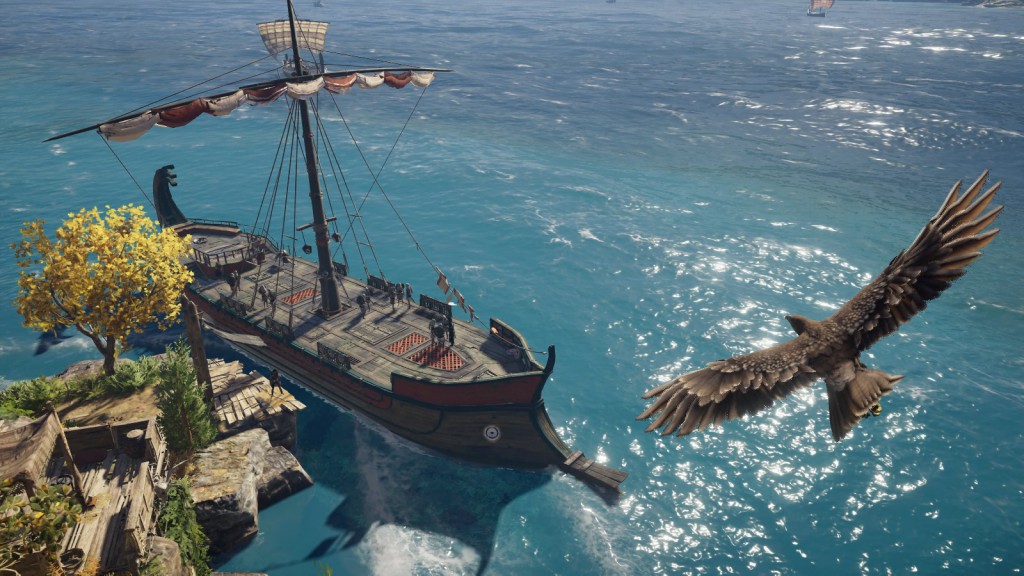
That's more like it. No more smashing into other Ancient Greek ships as the screams drown out the sound of sea shanties.
And how did I achieve this?
Well, this time I went to the correct island and it docks there automatically.
Yes, I had previously been sailing all around the wrong areas of the landscape. It's my own fault for turning off the compass to get those immersive views.
Yes, I did some splendid "parking" the other day. Let me find that screenshot...
Here it is. Look at that!
That's more like it. No more smashing into other Ancient Greek ships as the screams drown out the sound of sea shanties.
And how did I achieve this?
Well, this time I went to the correct island and it docks there automatically.
Yes, I had previously been sailing all around the wrong areas of the landscape. It's my own fault for turning off the compass to get those immersive views.
Please Log in or Create an account to join the conversation.
Facebook Feed
Member Statistics
- Total Users: 228
- Latest User: DanielWilson
- Online Users: 0
- Users Today: 0
- Users this Week: 0
- Users this Month: 0
- Users this Year: 2
NOTE! This site uses cookies and similar technologies.
By using this website you agree to the use of cookies and related data storage as detailed in our privacy policy. Learn more
I understand
Site design Mad Hamster Studios. All content is protected under © and the property of the various contributers and not to be reproduced without permission of the creator.