




- Posts: 11987
- Thank you received: 514


June challenge here: The Leprechaun
May entries - Submarine
Adventures across the 3rd dimension
18 Nov 2024 22:44 #52566
by Valence
Replied by Valence on topic Adventures across the 3rd dimension
After reading through the post again, is the shadow appearing only where the extra triangles were added?
If so then it's might just be a topology issue. It'd be interesting to see the wireframe of it in Blender just to see if you can relax the internal edges somehow.
If so then it's might just be a topology issue. It'd be interesting to see the wireframe of it in Blender just to see if you can relax the internal edges somehow.
Please Log in or Create an account to join the conversation.


18 Nov 2024 23:04 #52568
by Charlotte

The wooden wall didn't get any weird triangle shapes. But like the stone wall it does have a "trim" of shadow around it and I'm pretty sure there's no geometry to cause it so I guess they have indeed managed to do something with normals or vectors or something else mysterious, to produce shadows. And I messed them up on the stone wall. But I've no idea how they're done so also no idea how to fix them.
And also, when I added collision to my wooden wall (which reminds me I should have changed the collision material from stone to wood... ) I noticed that the chunkmerge thingy had reverted from "static" to "clutter" template which means it might have used the wrong template last time I changed the stone wall, which means I'll need to redo it just in case... Or wait and check it in game, I guess... If I can kick it off the building, it's set to clutter...
Any an all misspellings are henceforth blamed on the cats.
Replied by Charlotte on topic Adventures across the 3rd dimension
The wooden wall didn't get any weird triangle shapes. But like the stone wall it does have a "trim" of shadow around it and I'm pretty sure there's no geometry to cause it so I guess they have indeed managed to do something with normals or vectors or something else mysterious, to produce shadows. And I messed them up on the stone wall.
But I've no idea how they're done so also no idea how to fix them.And also, when I added collision to my wooden wall (which reminds me I should have changed the collision material from stone to wood...
) I noticed that the chunkmerge thingy had reverted from "static" to "clutter" template which means it might have used the wrong template last time I changed the stone wall, which means I'll need to redo it just in case... Or wait and check it in game, I guess... If I can kick it off the building, it's set to clutter... Any an all misspellings are henceforth blamed on the cats.
Please Log in or Create an account to join the conversation.
18 Nov 2024 23:05 - 18 Nov 2024 23:06 #52569
by Charlotte
Any an all misspellings are henceforth blamed on the cats.
Replied by Charlotte on topic Adventures across the 3rd dimension
It's a flat surface so I doubt it's topology, but yep it's only within the area I've made changes to.
Edit: Here you go:
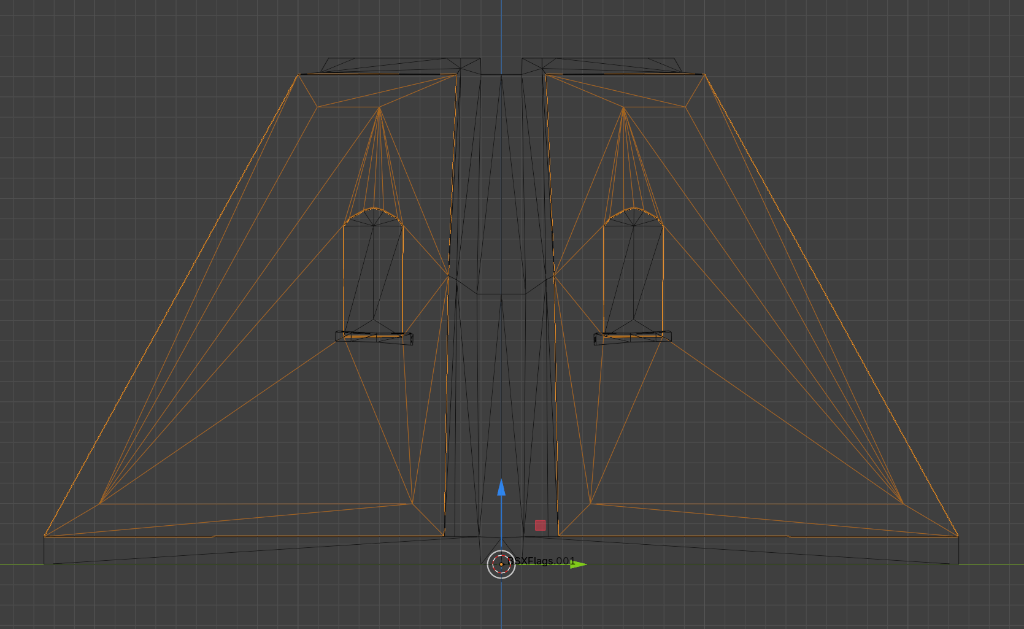
Edit: Here you go:
Any an all misspellings are henceforth blamed on the cats.
Last edit: 18 Nov 2024 23:06 by Charlotte.
Please Log in or Create an account to join the conversation.
18 Nov 2024 23:10 #52570
by Charlotte
Any an all misspellings are henceforth blamed on the cats.
Replied by Charlotte on topic Adventures across the 3rd dimension
Actually, that "edge" around the wall shape is where the shadow is, and in my last change I removed the "edge faces" along the wooden column in the middle, to enable the "center" vertex to be moved - and avoid very very slim triangular faces. So I guess that's got something to do with it, although the shadow was obviously there before I messed up that edge...
Any an all misspellings are henceforth blamed on the cats.
Please Log in or Create an account to join the conversation.
18 Nov 2024 23:20 - 18 Nov 2024 23:23 #52571
by Valence
Replied by Valence on topic Adventures across the 3rd dimension
It will be topology, even if it's flat. Vertex shaders don't really like long narrow triangles so it may be worthwhile to subdivide those edges or maybe slide the apex vertex (EDIT: that's probably not the right word, I mean the corner with the smallest angle) closer to the window.
Last edit: 18 Nov 2024 23:23 by Valence.
Please Log in or Create an account to join the conversation.
18 Nov 2024 23:29 #52573
by Charlotte
Any an all misspellings are henceforth blamed on the cats.
Replied by Charlotte on topic Adventures across the 3rd dimension
It would be a lot easier to try various things if I could see the shading in Blender and not only after I have passed the file through a couple of other apps and moved it into the CK...
But maybe I can learn something tomorrow...
But maybe I can learn something tomorrow...
Any an all misspellings are henceforth blamed on the cats.
Please Log in or Create an account to join the conversation.
19 Nov 2024 00:44 #52574
by Valence
Replied by Valence on topic Adventures across the 3rd dimension
Do you mean with the textures as well?
I tried to recreate the topology with Blender's smooth shader and I get those darker areas in similar places too...
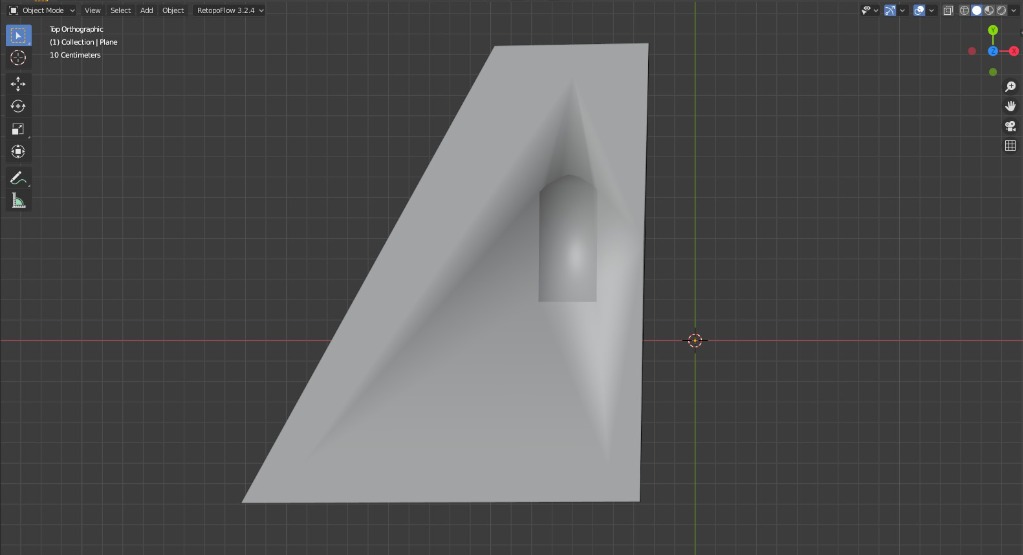
Moving the small angled points did reduce it a little bit but they were always there in some form. You'll probably have to add some extra vertices in the flat plane and reform some of the triangles to get rid of it completely.
I tried to recreate the topology with Blender's smooth shader and I get those darker areas in similar places too...
Moving the small angled points did reduce it a little bit but they were always there in some form. You'll probably have to add some extra vertices in the flat plane and reform some of the triangles to get rid of it completely.
Please Log in or Create an account to join the conversation.
19 Nov 2024 12:01 #52575
by Charlotte
Any an all misspellings are henceforth blamed on the cats.
Replied by Charlotte on topic Adventures across the 3rd dimension
I could see a faint shadow originally, in Blender, but not anymore. It looks completely flat.
I can't view it with textures in blender because I am afraid of messing up skyrim's material settings.
I can't view it with textures in blender because I am afraid of messing up skyrim's material settings.
Any an all misspellings are henceforth blamed on the cats.
Please Log in or Create an account to join the conversation.
19 Nov 2024 12:55 - 19 Nov 2024 13:16 #52576
by Valence
Replied by Valence on topic Adventures across the 3rd dimension
I had an idea last night while trying to sleep.
When I was trying to read stuff about Nifskope earlier I noticed a few references to "smoothing groups" and I thought this sounded a bit like Blender's smooth/flat shading options. And then I wondered if that was what all those unconnected double vertices were. I initially thought that they'd be a glitch in the import/export process but it would make more sense if each separate piece was a single "smoothing group" to calculate the shading and the double vertices were deliberate ways to make hard edged corners.
If this is true then you could create this by selecting all the vertices in that loop where the recessed window connects to the flat wall and using the Rip Vertex function from the menu.
This would unlink the window from the flat wall so the shading wouldn't calculate around the corner and then the topology of the flat wall would be irrelevant.
Maybe.
When I was trying to read stuff about Nifskope earlier I noticed a few references to "smoothing groups" and I thought this sounded a bit like Blender's smooth/flat shading options. And then I wondered if that was what all those unconnected double vertices were. I initially thought that they'd be a glitch in the import/export process but it would make more sense if each separate piece was a single "smoothing group" to calculate the shading and the double vertices were deliberate ways to make hard edged corners.
If this is true then you could create this by selecting all the vertices in that loop where the recessed window connects to the flat wall and using the Rip Vertex function from the menu.
This would unlink the window from the flat wall so the shading wouldn't calculate around the corner and then the topology of the flat wall would be irrelevant.
Maybe.
Last edit: 19 Nov 2024 13:16 by Valence.
Please Log in or Create an account to join the conversation.

19 Nov 2024 13:01 #52577
by Banj
Replied by Banj on topic Adventures across the 3rd dimension
You need to reduce the number of edges going to single verts, you have the star above the window and the corner at the bottom where several edges converge. If you redirect some of those edges it should sort out the problem.
Please Log in or Create an account to join the conversation.
Facebook Feed
Member Statistics
- Total Users: 226
- Latest User: norajohnson
- Online Users: 2
- Users Today: 0
- Users this Week: 0
- Users this Month: 0
- Users this Year: 0
NOTE! This site uses cookies and similar technologies.
By using this website you agree to the use of cookies and related data storage as detailed in our privacy policy. Learn more
I understand
Site design Mad Hamster Studios. All content is protected under © and the property of the various contributers and not to be reproduced without permission of the creator.