




- Posts: 11987
- Thank you received: 514


June challenge here: The Leprechaun
May entries - Submarine
Adventures across the 3rd dimension
21 Nov 2024 21:28 #52629
by Valence
Replied by Valence on topic Adventures across the 3rd dimension
I don't really understand it either but the darker/lighter thing refers just to the alpha channel (which would look like a greyscale image when you view it) rather than darker colours in the normal map.
Please Log in or Create an account to join the conversation.


21 Nov 2024 21:33 #52630
by Charlotte
Any an all misspellings are henceforth blamed on the cats.
Replied by Charlotte on topic Adventures across the 3rd dimension
I know but I made a greyscale image with darker areas... I guess not in an alpha channel? How the heck do I find that? I can only set overall alpha for an entire layer in paint net, and I have combined four textures in one... Anyway, I figured if the greyscale was overall darker in one part and overall lighter in another, it would affect transparency in the resulting normalmap but the transparency seem to be the same all over. So do I need to make 4 different ones and stitch them together afterwards? And would it work? I mean, even if I haven't got the alpha quite right, the result so far is absolutely FLAT. Which it shouldn't be. 
I think previously I've even just used a regular texture (though pale) and it's worked fine. But then again, I guess in my image the darker areas aren't actually transparent to begin with. Though in that other image I'm thinking of, I had transparent areas and textured areas and the texture shows through. *sigh* I am so confused.
I've almost eaten 200 g of 90% chocolate today. Being confused is not good for my wallet.
I think previously I've even just used a regular texture (though pale) and it's worked fine. But then again, I guess in my image the darker areas aren't actually transparent to begin with.
Though in that other image I'm thinking of, I had transparent areas and textured areas and the texture shows through. *sigh* I am so confused.I've almost eaten 200 g of 90% chocolate today. Being confused is not good for my wallet.
Any an all misspellings are henceforth blamed on the cats.
Please Log in or Create an account to join the conversation.
21 Nov 2024 21:38 - 21 Nov 2024 21:40 #52631
by Charlotte
Any an all misspellings are henceforth blamed on the cats.
Replied by Charlotte on topic Adventures across the 3rd dimension
I'm sure I've been able to view various colour channels before, but how did I do that? Was that in Photoshop??? I don't think it was that long ago.
Edit: And I found where the cclours are on the greenish bottle; unfortunately they have to be changed one at a time - for every. single. vertex.
Edit: And I found where the cclours are on the greenish bottle; unfortunately they have to be changed one at a time - for every. single. vertex.
Any an all misspellings are henceforth blamed on the cats.
Last edit: 21 Nov 2024 21:40 by Charlotte.
Please Log in or Create an account to join the conversation.
21 Nov 2024 21:49 #52632
by Valence
Replied by Valence on topic Adventures across the 3rd dimension
Gimp lets you view and work on the Alpha channel. I was gonna also suggest the online Photopea but to my surprise that doesn't handle transparencies very well. 
So I guess it's just Gimp or expensive Photoshop thing.
Can you see/edit the vertex colours in Blender too?
So I guess it's just Gimp or expensive Photoshop thing.
Can you see/edit the vertex colours in Blender too?
Please Log in or Create an account to join the conversation.
21 Nov 2024 21:52 #52633
by Valence
Replied by Valence on topic Adventures across the 3rd dimension
...there's apparently a fiddly way of doing it in Krita too using some kind of option called Split Alpha which creates a transparency mask but I don't really understand Krita. It crashes to much for me to learn stuff. 
Please Log in or Create an account to join the conversation.
21 Nov 2024 21:58 #52634
by Charlotte
Any an all misspellings are henceforth blamed on the cats.
Replied by Charlotte on topic Adventures across the 3rd dimension
I might try Krita then.
And yes, one could remove vertex colours in Blender
And yes, one could remove vertex colours in Blender
Any an all misspellings are henceforth blamed on the cats.
Please Log in or Create an account to join the conversation.
21 Nov 2024 22:29 #52635
by Valence
Replied by Valence on topic Adventures across the 3rd dimension
I think Gimp would be the easiest to check with because the Alpha channel is automatically just "there" with the RGB channels like this on the foreground of my cat picture...
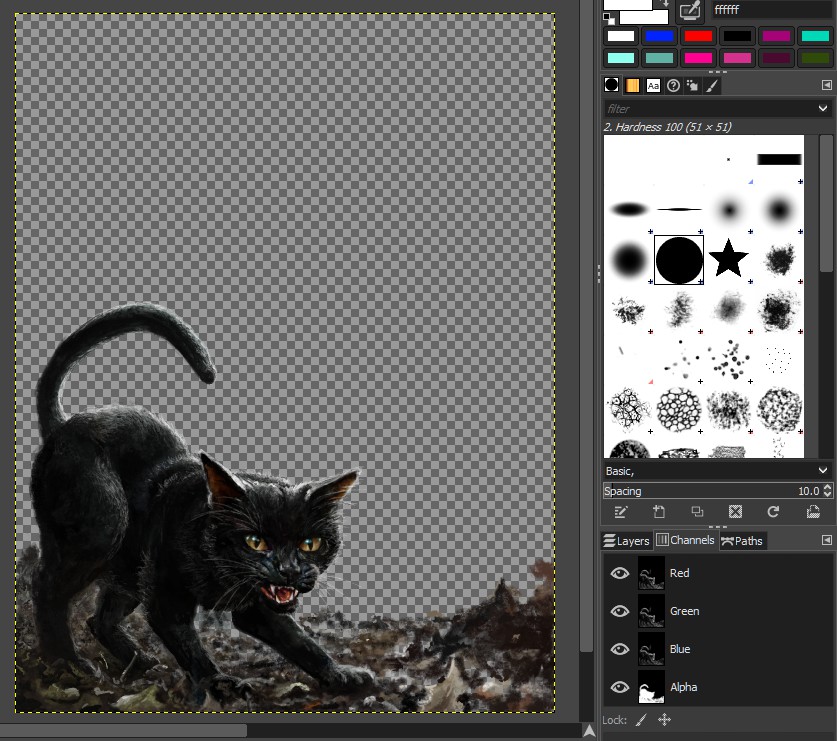
...and you can just click it to edit the transparency without doing any other fiddly things that I don't understand.
...and you can just click it to edit the transparency without doing any other fiddly things that I don't understand.
Please Log in or Create an account to join the conversation.
21 Nov 2024 22:32 #52636
by Charlotte
Any an all misspellings are henceforth blamed on the cats.
Replied by Charlotte on topic Adventures across the 3rd dimension
Well what I need to do is make a greyscale image transparent, depending on exactly how much grey it is. Or repaint the whole bloody thing in detail with all currently dark areas being left out. I don't think I can do that, but surely there must be an easy way to just CONVERT a greyscale or blend it or something to make a partially transparent image?????????
Any an all misspellings are henceforth blamed on the cats.
Please Log in or Create an account to join the conversation.
21 Nov 2024 22:51 #52637
by Valence
Replied by Valence on topic Adventures across the 3rd dimension
Ignore my last message. It's just as fiddly in Gimp to edit the alpha.
It's simple to view the channel but you apparently have to mess around with layer masks to edit it.
It's simple to view the channel but you apparently have to mess around with layer masks to edit it.
Please Log in or Create an account to join the conversation.
21 Nov 2024 22:54 - 21 Nov 2024 22:57 #52638
by Charlotte
Any an all misspellings are henceforth blamed on the cats.
Replied by Charlotte on topic Adventures across the 3rd dimension
Yeah I've been googling and it seems there isn't an easy way to convert a greyscale image to a semi-transparent one without masks. And artrage don't have those. Krita does... Anyway I tried something else, just to see if it worked but CK wouldn't update the texture preview so I renamed it and the whole thing froze
Edit: I managed to rename the extension (added 01 at the end of the name but on the wrong side of the period...)
Edit: I managed to rename the extension
(added 01 at the end of the name but on the wrong side of the period...) Any an all misspellings are henceforth blamed on the cats.
Last edit: 21 Nov 2024 22:57 by Charlotte.
Please Log in or Create an account to join the conversation.
Facebook Feed
Member Statistics
- Total Users: 226
- Latest User: norajohnson
- Online Users: 3
- Users Today: 0
- Users this Week: 0
- Users this Month: 0
- Users this Year: 0
NOTE! This site uses cookies and similar technologies.
By using this website you agree to the use of cookies and related data storage as detailed in our privacy policy. Learn more
I understand
Site design Mad Hamster Studios. All content is protected under © and the property of the various contributers and not to be reproduced without permission of the creator.