



- Posts: 12127
- Thank you received: 521


October Challenge: Horror rework
September entries: Legend
Important, change your password!
Go here for further information: https://cgartnexus.com/index.php/forum/announcements/840-hacked
CGAN Jan 2015 Challenge - White as Snow - WIPs
22 Jan 2015 12:34 #8281
by Valence
Replied by Valence on topic CGAN Jan 2015 Challenge - White as Snow - WIPs
I only painted the "exposure" to try and get the proportions right; there's supposed to be one head measurement between the chin and the nipple line, but as everyone's mentioned I still didn't get it right. 
I was intending to crop it out at the end but I think the dark crease between the breast and the arm may act as an important balance to the darks in the face. I'm also considering some extra glare/snowflakes down in that bottom corner too.
I was intending to crop it out at the end but I think the dark crease between the breast and the arm may act as an important balance to the darks in the face. I'm also considering some extra glare/snowflakes down in that bottom corner too.
Please Log in or Create an account to join the conversation.

22 Jan 2015 17:51 - 22 Jan 2015 17:52 #8302
by Kodabble

Dom Yes you are the clear winner.
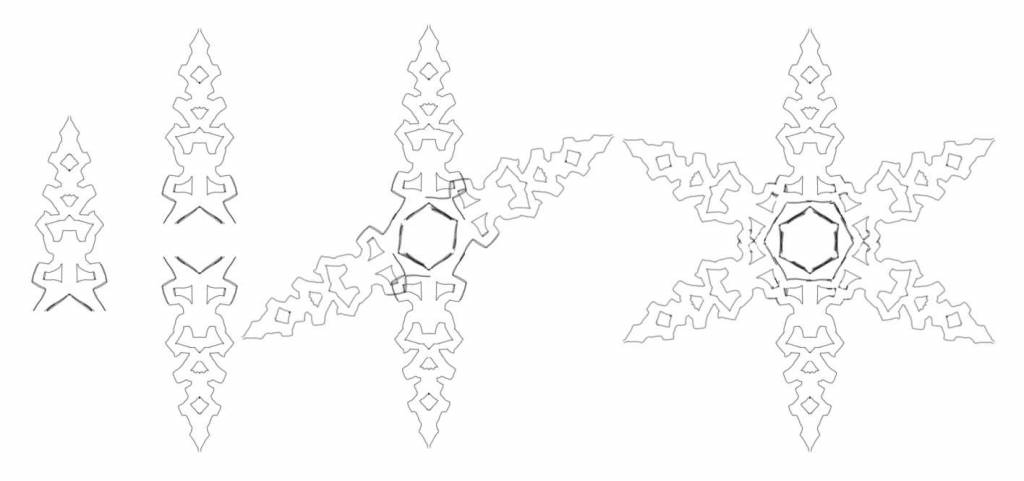
Valence: Actually the snowflake was the easiest part. If interested here is how I did it. I'm using Sketchbook Pro (a really nice, fun and inexpensive program). So on a new layer using the symmetry tool I make one arm of the flake starting at the tip and getting wider. Duplicate the layer and flip vertically. Move the two close leaving a small center and merge the two layers. Copy this layer and rotate it 60 degrees and move it to the center of the original vertical arms. Copy the 60 rotated layer and flip it horizontally and move it to the center. Merge down, do a little cleanup and SNOWFLAKE (hopefully ).
).
Replied by Kodabble on topic CGAN Jan 2015 Challenge - White as Snow - WIPs
Domtopia wrote: Kod: Snooze you loose dude!! My "white" piece was just too good!! ...
Dom Yes you are the clear winner.
Valence: Actually the snowflake was the easiest part. If interested here is how I did it. I'm using Sketchbook Pro (a really nice, fun and inexpensive program). So on a new layer using the symmetry tool I make one arm of the flake starting at the tip and getting wider. Duplicate the layer and flip vertically. Move the two close leaving a small center and merge the two layers. Copy this layer and rotate it 60 degrees and move it to the center of the original vertical arms. Copy the 60 rotated layer and flip it horizontally and move it to the center. Merge down, do a little cleanup and SNOWFLAKE (hopefully
).
Last edit: 22 Jan 2015 17:52 by Kodabble.
The following user(s) said Thank You: Valence
Please Log in or Create an account to join the conversation.
22 Jan 2015 19:17 - 22 Jan 2015 21:42 #8306
by Valence
Replied by Valence on topic CGAN Jan 2015 Challenge - White as Snow - WIPs
Kodabble: That's how I've been trying to do snowflakes too in PhotoShop, but mine certainly didn't look like yours! There's a certain skill to drawing the right shape at the start and you certainly have it.
It all makes me yearn nostalgically for Deluxe Paint on the Amiga which had the greatest symmetry tool ever! There's still nothing like it now. The only thing with "live" symmetry that I have is Infinite Painter and my fingers are a bit too fat and clumsy for the intricacy of a snowflake.
But your advice and demonstration is inspiring me to keep at it. I'll get there eventually!
EDIT: Just been having another go in Infinite Painter using a combination of the straight line tool and messy freehand scrawl with 12-fold mirror symmetry and I think I've got something now. They're still a bit grubby but I might be able to clean them up tomorrow in Photoshop.
It all makes me yearn nostalgically for Deluxe Paint on the Amiga which had the greatest symmetry tool ever! There's still nothing like it now. The only thing with "live" symmetry that I have is Infinite Painter and my fingers are a bit too fat and clumsy for the intricacy of a snowflake.
But your advice and demonstration is inspiring me to keep at it. I'll get there eventually!
EDIT: Just been having another go in Infinite Painter using a combination of the straight line tool and messy freehand scrawl with 12-fold mirror symmetry and I think I've got something now. They're still a bit grubby but I might be able to clean them up tomorrow in Photoshop.
Last edit: 22 Jan 2015 21:42 by Valence.
Please Log in or Create an account to join the conversation.

23 Jan 2015 08:15 #8311
by Charlotte
Any an all misspellings are henceforth blamed on the cats.
Replied by Charlotte on topic CGAN Jan 2015 Challenge - White as Snow - WIPs
I thought you had ArtRage Valence? The symmetry tool there could be set to 6 segments and you wouldn't have to work with layers at all... Just a thought
Any an all misspellings are henceforth blamed on the cats.
Please Log in or Create an account to join the conversation.
- SchizophreniaWolf
-
- Offline
- Junior Member
-

Less
More
- Posts: 170
- Thank you received: 10
23 Jan 2015 09:06 #8312
by SchizophreniaWolf
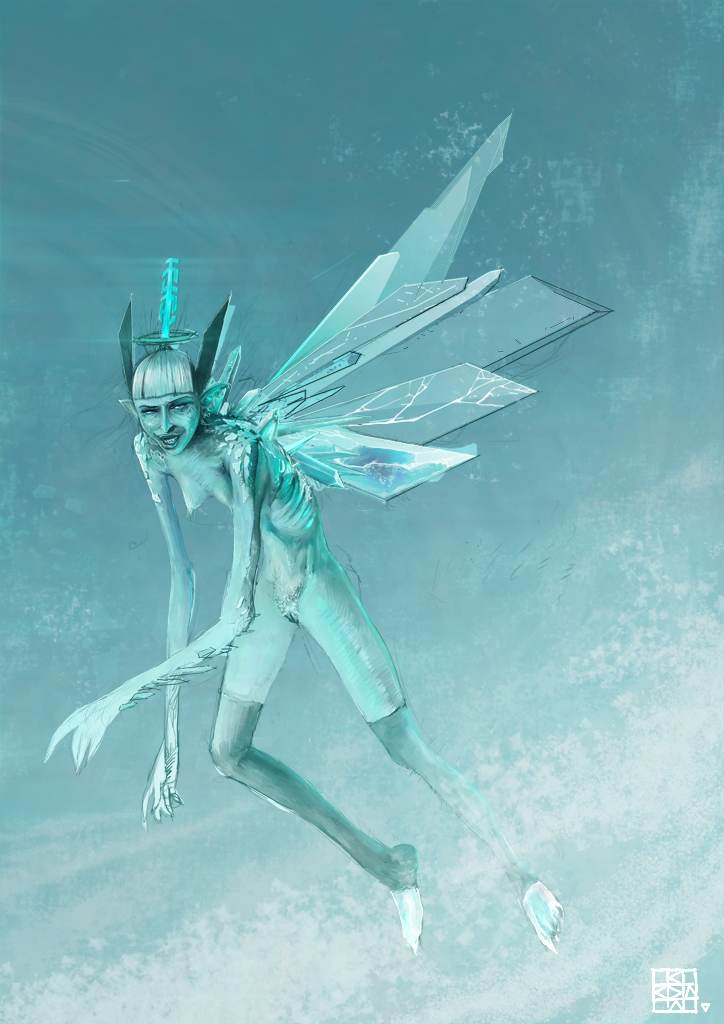
Ha yes, you are right. but my boobs are smaller than those of Valence ... but wait! mine as hairy nipples aha!!! Looks like I'm back in the game, thx Charlotte.
Thx to everyone that commented my entries.
Here's my update:
I'm looking for a nice stormy atmosphere, before I go into detail to much.
Replied by SchizophreniaWolf on topic CGAN Jan 2015 Challenge - White as Snow - WIPs
Charlotte wrote:
SchizophreniaWolf wrote: yep yep it's decided, Valence wins again, boobs, pretty face, hair white as snow, done, succes doesn't need more than that. I realy love it.
Don't be too sure. Your fairy has boobs too.
Ha yes, you are right. but my boobs are smaller than those of Valence
... but wait! mine as hairy nipples aha!!! Looks like I'm back in the game, thx Charlotte. Thx to everyone that commented my entries.
Here's my update:
I'm looking for a nice stormy atmosphere, before I go into detail to much.
Please Log in or Create an account to join the conversation.
23 Jan 2015 12:38 - 23 Jan 2015 14:14 #8313
by Valence
I have ArtRage version 3.5. The symmetry is only in the latest version which (like Krita) doesn't like my old thing.
I'm now getting the hang of these snowflakes though. They look awfully scribbly in Infinite Painter but Photoshop's Find Edges filter (edit: or is it Glowing Edges ) cleans them up nicely and even adds a little crystalline effect.
Schizo: Forget about boobs, having cracked icy shards for fairy wings is just brilliant! Brilliant!
Replied by Valence on topic CGAN Jan 2015 Challenge - White as Snow - WIPs
Charlotte wrote: I thought you had ArtRage Valence? The symmetry tool there could be set to 6 segments and you wouldn't have to work with layers at all... Just a thought
I have ArtRage version 3.5. The symmetry is only in the latest version which (like Krita) doesn't like my old thing.
I'm now getting the hang of these snowflakes though. They look awfully scribbly in Infinite Painter but Photoshop's Find Edges filter (edit: or is it Glowing Edges
) cleans them up nicely and even adds a little crystalline effect.Schizo: Forget about boobs, having cracked icy shards for fairy wings is just brilliant! Brilliant!
Last edit: 23 Jan 2015 14:14 by Valence.
Please Log in or Create an account to join the conversation.
- CherryGraphics
-
- Offline
- Junior Member
-
Less
More
- Posts: 366
- Thank you received: 33
23 Jan 2015 14:06 #8329
by CherryGraphics
Replied by CherryGraphics on topic CGAN Jan 2015 Challenge - White as Snow - WIPs
Wow lovely start Thomgirl! Hope to see more progress from you
Kodabble thats a great little fairy and I really like your snowflake. As Valence said I would have be in trouble if i want to paint such a lovely snowflake. ^^ thanks for the little tutorial!
Schizo I like her icy wings - but her smile makes me shiver.... really
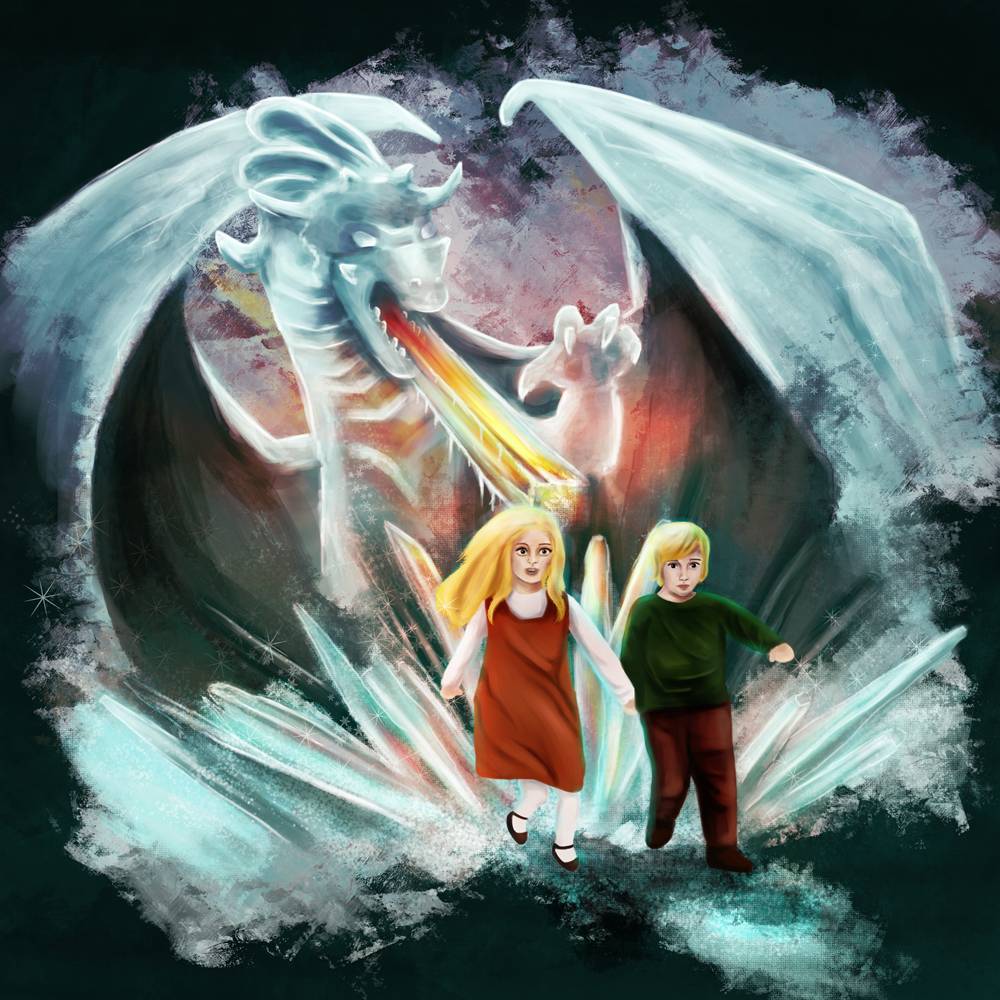
Next update from me: kiddis and light.
(If we ever have a black&white challenge I'll be in a big trouble )
)
Hope to see more progress from you Kodabble thats a great little fairy
and I really like your snowflake. As Valence said I would have be in trouble if i want to paint such a lovely snowflake. ^^ thanks for the little tutorial!Schizo I like her icy wings - but her smile makes me shiver.... really
Next update from me: kiddis and light.
(If we ever have a black&white challenge I'll be in a big trouble
)
The following user(s) said Thank You: Mindbender
Please Log in or Create an account to join the conversation.
- Mindbender
-
- Offline
- Junior Member
-
23 Jan 2015 17:46 #8340
by Mindbender
Replied by Mindbender on topic CGAN Jan 2015 Challenge - White as Snow - WIPs
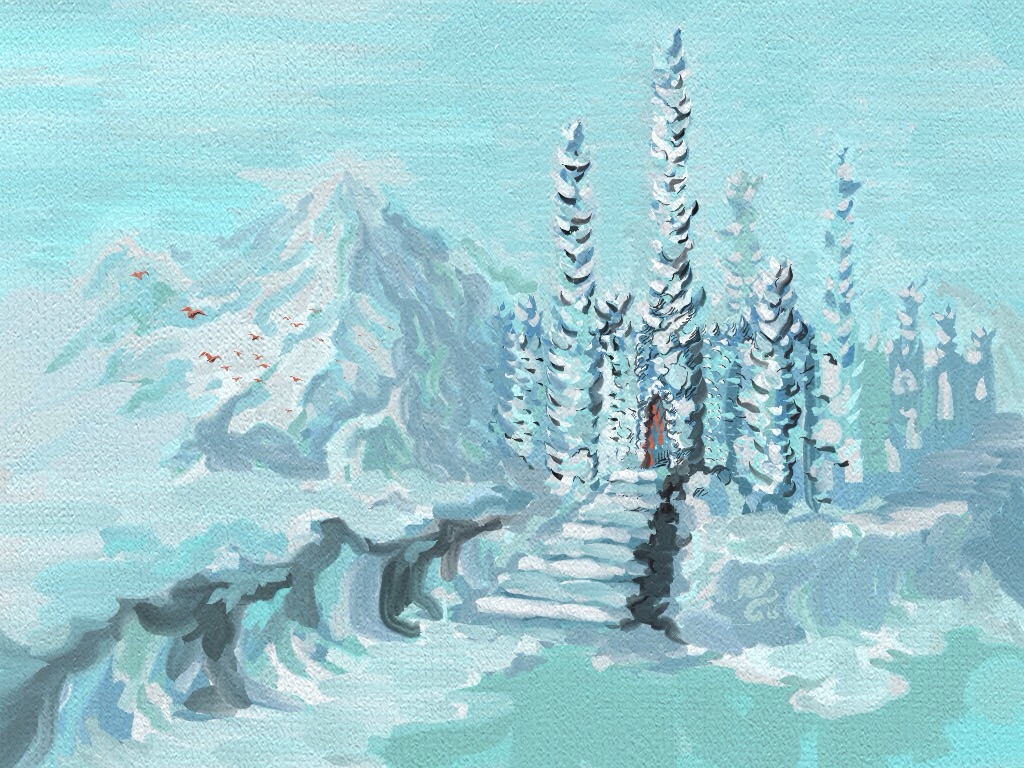
Beautiful progress all. I've decided to consider my painting finished after this almost final update (signed, but postadjustments remain before posting it as final) Really tried to simplify parts of it, keeping much of the great feedback in mind while taking it for a final spin. Thanks for a great challenge, hope to find time to join more of these in the future.
Please Log in or Create an account to join the conversation.
23 Jan 2015 21:13 #8343
by Valence
Replied by Valence on topic CGAN Jan 2015 Challenge - White as Snow - WIPs
Painting hair is very tedious. <bored face>
But my snowflakes are working and I've made them into custom brushes! <excited face>
Mindbender: Well Done! Don't forget to post it in the finals thread before the deadline.
Cherry: That's amazing the way you've painted warm and cold colours together! The dragon fire is inside the ice. Fire... Inside... Ice! And it works! I wouldn't think it was possible to do that but you have, you really have.
This thread is turning into masterclass in how to draw and paint ice.
But my snowflakes are working and I've made them into custom brushes! <excited face>
Mindbender: Well Done! Don't forget to post it in the finals thread before the deadline.
Cherry: That's amazing the way you've painted warm and cold colours together! The dragon fire is inside the ice. Fire... Inside... Ice! And it works! I wouldn't think it was possible to do that but you have, you really have.
This thread is turning into masterclass in how to draw and paint ice.
Please Log in or Create an account to join the conversation.
24 Jan 2015 16:55 #8352
by Kodabble
Replied by Kodabble on topic CGAN Jan 2015 Challenge - White as Snow - WIPs
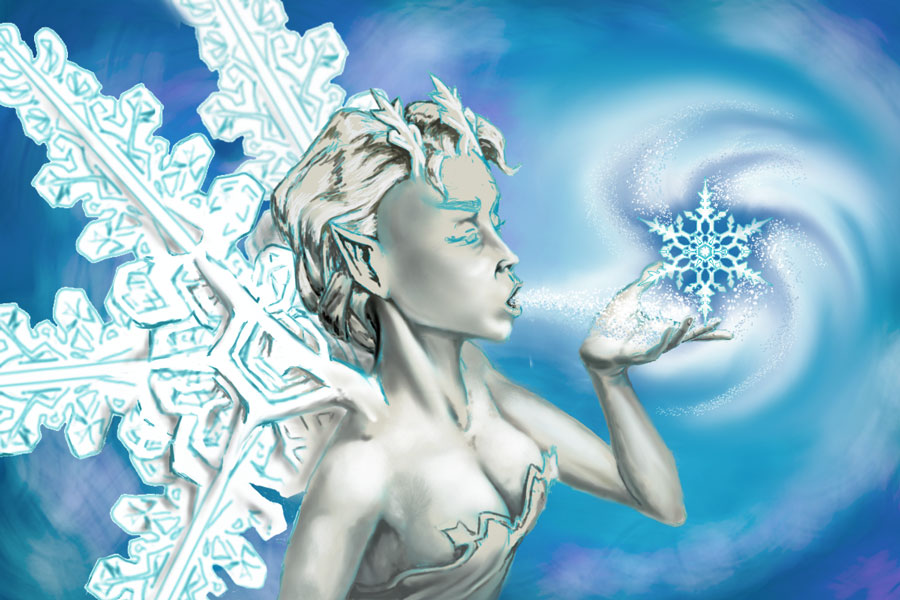
Time for quick update. WIP 2.
Please Log in or Create an account to join the conversation.
Facebook Feed
Member Statistics
- Total Users: 228
- Latest User: DanielWilson
- Online Users: 1
- Users Today: 0
- Users this Week: 0
- Users this Month: 0
- Users this Year: 2
Members Online
NOTE! This site uses cookies and similar technologies.
By using this website you agree to the use of cookies and related data storage as detailed in our privacy policy. Learn more
I understand
Site design Mad Hamster Studios. All content is protected under © and the property of the various contributers and not to be reproduced without permission of the creator.