


- Posts: 2247
- Thank you received: 163


October Challenge: Horror rework
September entries: Legend
The shoutbox is unavailable to non-members
Shoutbox History
Important, change your password!
Go here for further information: https://cgartnexus.com/index.php/forum/announcements/840-hacked
The Nexus Coloring Book
- Digital Dave
-
 Topic Author
- Offline
- Platinum Member
-

Less
More
08 Jul 2014 02:39 - 08 Jul 2014 07:52 #1003
by Digital Dave
I get sketchy around pencils! ...
The Nexus Coloring Book was created by Digital Dave
The Nexus Coloring Book thread will be dedicated to sharing color application methods to a greyscale image, and is open to anyone who would like to participate. There are no limitations as to how many members can join in with each supplied image. Actually, the more participants that join in, the better! There is also no time frame for each piece to be done, but we can make one if everyone feels there should be. TBD
This is not a challenge nor contest, but a place where we can all share our personal methods, tips and techniques for adding color to a greyscale image. Everyone who decides to join in will simply take a copy of the submitted greyscale image, open it in their choice of application, and start coloring. They will choose their own color palette that they feel works best with said image, and create the pic in their own eyes. (How fun is that! )
)
Once you have finished the piece to your liking, simply post it back into the thread along with any information you can provide that would be beneficial to others. This could include your insight as to your color choice, methods used, (not limited to just layer modes for adding color, but also adjustment layers that were used to produce certain effects, etc.) NOTE: I also think if you would like to break this down even further, you could provide WIPS showing your process, or how each steps looks between methods. I would just suggest though that if you choose to do so, that you wait until the image is completed so you can post all the wips together for better viewing. (This works even better with the new multiple posting allowed with this great site! I'm just not sure how many you can post? I would suggest trying to limit it to 3 or 4 per post, unless someone can clarify this. Just make sure to take screen shots for the posting!) - If you don’t feel comfortable providing a step by step process to your work, that’s ok too. You can still participate and have some fun. Just post the finished pic when you’re done. If anything, it will give that many more version to enjoy and learn from. You may still have other members who might provide feedback on your image, which is just a helpful.
I'm sure those who are interested and/or participate will have lots to talk about once finished images are posted. The whole idea here is to have some fun and learn & grow together.
I know that members are still coming in with the site being new and are somewhat limited at the moment, but If anyone would like to submit a piece they created to get the ball rolling, by all means please do so. If nobody has submitting an image by the time I get home tomorrow night, I will put one up there that I created.
This is not a challenge nor contest, but a place where we can all share our personal methods, tips and techniques for adding color to a greyscale image. Everyone who decides to join in will simply take a copy of the submitted greyscale image, open it in their choice of application, and start coloring. They will choose their own color palette that they feel works best with said image, and create the pic in their own eyes. (How fun is that!
)Once you have finished the piece to your liking, simply post it back into the thread along with any information you can provide that would be beneficial to others. This could include your insight as to your color choice, methods used, (not limited to just layer modes for adding color, but also adjustment layers that were used to produce certain effects, etc.) NOTE: I also think if you would like to break this down even further, you could provide WIPS showing your process, or how each steps looks between methods. I would just suggest though that if you choose to do so, that you wait until the image is completed so you can post all the wips together for better viewing. (This works even better with the new multiple posting allowed with this great site! I'm just not sure how many you can post? I would suggest trying to limit it to 3 or 4 per post, unless someone can clarify this. Just make sure to take screen shots for the posting!) - If you don’t feel comfortable providing a step by step process to your work, that’s ok too. You can still participate and have some fun. Just post the finished pic when you’re done. If anything, it will give that many more version to enjoy and learn from. You may still have other members who might provide feedback on your image, which is just a helpful.
I'm sure those who are interested and/or participate will have lots to talk about once finished images are posted. The whole idea here is to have some fun and learn & grow together.
I know that members are still coming in with the site being new and are somewhat limited at the moment, but If anyone would like to submit a piece they created to get the ball rolling, by all means please do so. If nobody has submitting an image by the time I get home tomorrow night, I will put one up there that I created.
I get sketchy around pencils! ...
Last edit: 08 Jul 2014 07:52 by kazky.
The following user(s) said Thank You: Anbienn
Please Log in or Create an account to join the conversation.


08 Jul 2014 03:39 - 08 Jul 2014 03:42 #1011
by Kynamh
Replied by Kynamh on topic The Nexus Coloring Book
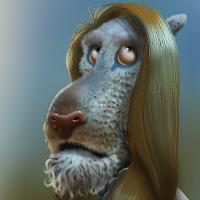
This is the first digital grayscale painting that I made specifically to try colorization in Photoshop CS4. I figure this was a decent first sample for this thread  I can show the colored version too, which just used an Overlay layer with flat colors.

I can show the colored version too, which just used an Overlay layer with flat colors.
Last edit: 08 Jul 2014 03:42 by Kynamh.
Please Log in or Create an account to join the conversation.


08 Jul 2014 08:15 #1029
by kazky
Replied by kazky on topic The Nexus Coloring Book
this looks like Cher Kynamh, really nice.
Please Log in or Create an account to join the conversation.

08 Jul 2014 09:14 #1055
by Stuart
Replied by Stuart on topic The Nexus Coloring Book
Nice idea, I'll try to get involved on this one.
Please Log in or Create an account to join the conversation.
- Digital Dave
-
Topic Author
- Offline
- Platinum Member
-
Less
More
- Posts: 2247
- Thank you received: 163
08 Jul 2014 12:07 - 08 Jul 2014 12:08 #1099
by Digital Dave
Actually, that's not a bad idea Kynamh. Maybe the person who submits their image for use could post their finished color version, once participants have posted their 'visions' of it? This would ensure that they are not influenced in anyway by the original color choices of that artist? Also agree with Kaz, she does indeed favor Cher.
Also, thinking more on it from last night, I think there will need to be some type of time frame on these, so participants would know when they might be able to submit the next image to be worked up. (entirely up to the consensus.)
I get sketchy around pencils! ...
Replied by Digital Dave on topic The Nexus Coloring Book
Kynamh wrote: This is the first digital grayscale painting that I made specifically to try colorization in Photoshop CS4. I figure this was a decent first sample for this thread
Actually, that's not a bad idea Kynamh. Maybe the person who submits their image for use could post their finished color version, once participants have posted their 'visions' of it? This would ensure that they are not influenced in anyway by the original color choices of that artist? Also agree with Kaz, she does indeed favor Cher.
Also, thinking more on it from last night, I think there will need to be some type of time frame on these, so participants would know when they might be able to submit the next image to be worked up. (entirely up to the consensus.)
I get sketchy around pencils! ...
Last edit: 08 Jul 2014 12:08 by Digital Dave.
Please Log in or Create an account to join the conversation.
08 Jul 2014 17:21 #1146
by Stuart
Replied by Stuart on topic The Nexus Coloring Book
Those sound like good ideas.
Please Log in or Create an account to join the conversation.
09 Jul 2014 04:45 - 09 Jul 2014 06:17 #1212
by evilrobot
Replied by evilrobot on topic The Nexus Coloring Book
This really helped me out trying to avoid those muddy colors. The key is the Photoshop setting he shows you. You need to turn the value all the way up when picking colors because you've already added the value in your drawing so adding any more just gives you muddy colors. Turn the B value to 100% then just worry about your hue, and saturation. Also remember when shifting from your mid tone to your light or dark color to shift the hue just a tiny bit towards red or blue on the color wheel.
How to add color in with multiply layers
I just messed with this for a few minutes I added pale low saturation colors on a multiply layer B value of all colors was 100% In just a few minutes I was able to get these results. And if the values were adjusted just a shade lighter I think it would look really good. Hope you don't mind I used your image to test this out Kynamh.
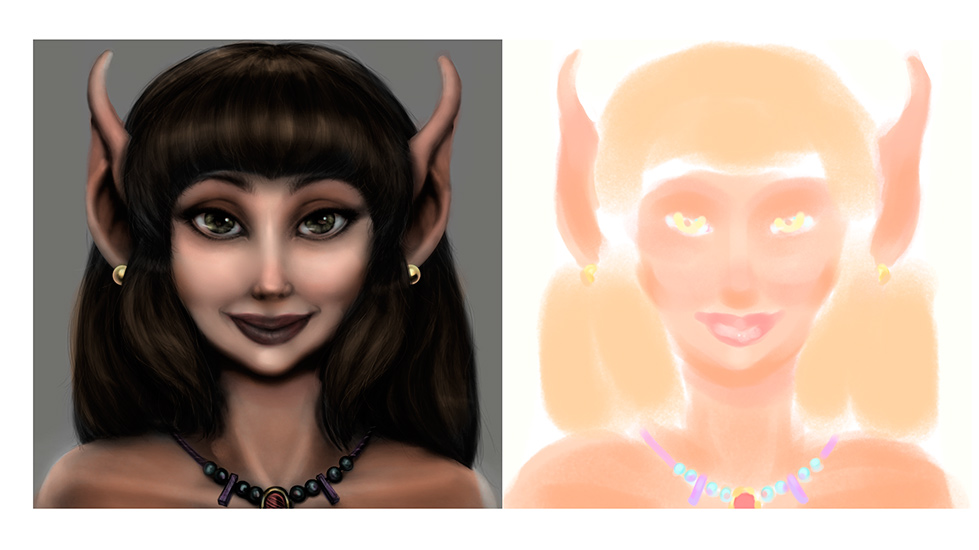
How to add color in with multiply layers
I just messed with this for a few minutes I added pale low saturation colors on a multiply layer B value of all colors was 100% In just a few minutes I was able to get these results. And if the values were adjusted just a shade lighter I think it would look really good. Hope you don't mind I used your image to test this out Kynamh.
Last edit: 09 Jul 2014 06:17 by evilrobot. Reason: more adjustments
Please Log in or Create an account to join the conversation.

09 Jul 2014 08:03 #1219
by Charlotte
Any an all misspellings are henceforth blamed on the cats.
Replied by Charlotte on topic The Nexus Coloring Book
Using Kyna's image was the whole idea Evil
Though I have to admit I still don't quite understand how it's done. Not currently using Photoshop so I can't poke around and look at what you're talking about and I might be totally daft but what's a "B value"?
Though I have to admit I still don't quite understand how it's done. Not currently using Photoshop so I can't poke around and look at what you're talking about and I might be totally daft but what's a "B value"?
Any an all misspellings are henceforth blamed on the cats.
Please Log in or Create an account to join the conversation.
09 Jul 2014 09:11 #1229
by evilrobot
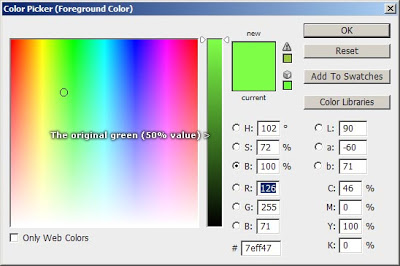
If you open up the color picker in photoshop you see this image if you click the circle by the "B" you are able to change it's value. I believe the B is how much black you're adding to the color you are picking at a 100% you are adding no black to the pigment you are picking. Now if you click the H and the S buttons you can adjust your hue and the amount of saturation in the pigment you are picking.
So, when you put a layer above your gray scale image and set it to multiply you are adding only the pure pigments and the multiply layer is adding the black from your gray scale image to those colors you picked.
So say you have the B value set to 50% when you work on your multiply layer....your adding more black to the color which you don't need to do because you've already got all the black you need in your value layer (If you've worked your values up correctly)
Does that explain it any better? Basically your adding no black to the colors you're picking. You're only picking the hue you want and how saturated you want it. Setting the layer above your image to multiply allows the colors you pick to use the black from the image below.
Replied by evilrobot on topic The Nexus Coloring Book
If you open up the color picker in photoshop you see this image if you click the circle by the "B" you are able to change it's value. I believe the B is how much black you're adding to the color you are picking at a 100% you are adding no black to the pigment you are picking. Now if you click the H and the S buttons you can adjust your hue and the amount of saturation in the pigment you are picking.
So, when you put a layer above your gray scale image and set it to multiply you are adding only the pure pigments and the multiply layer is adding the black from your gray scale image to those colors you picked.
So say you have the B value set to 50% when you work on your multiply layer....your adding more black to the color which you don't need to do because you've already got all the black you need in your value layer (If you've worked your values up correctly)
Does that explain it any better? Basically your adding no black to the colors you're picking. You're only picking the hue you want and how saturated you want it. Setting the layer above your image to multiply allows the colors you pick to use the black from the image below.
The following user(s) said Thank You: Charlotte
Please Log in or Create an account to join the conversation.
09 Jul 2014 09:25 #1234
by Charlotte
Any an all misspellings are henceforth blamed on the cats.
Replied by Charlotte on topic The Nexus Coloring Book
Yup that makes better sense. Now can you repeat all that for ArtRage? 
Btw it seemed a bit strange that B should be blackness if 100% was no black so I googled and apparently it's Brightness. So now I know that too (H and S being Hue and Saturation, which I could figure out all by myself!)
Btw it seemed a bit strange that B should be blackness if 100% was no black so I googled and apparently it's Brightness. So now I know that too (H and S being Hue and Saturation, which I could figure out all by myself!)
Any an all misspellings are henceforth blamed on the cats.
Please Log in or Create an account to join the conversation.
Facebook Feed
Member Statistics
- Total Users: 228
- Latest User: DanielWilson
- Online Users: 0
- Users Today: 0
- Users this Week: 0
- Users this Month: 0
- Users this Year: 2
NOTE! This site uses cookies and similar technologies.
By using this website you agree to the use of cookies and related data storage as detailed in our privacy policy. Learn more
I understand
Site design Mad Hamster Studios. All content is protected under © and the property of the various contributers and not to be reproduced without permission of the creator.