


 I don't remember exactly
 Oh where was the Bahari pile? N or S?
- Posts: 12091
- Thank you received: 516


The shoutbox is unavailable to non-members
Shoutbox History
 Taylin had already left the building. Well, maybe later. Enough Palia for now.
2 hours ago
I guess I'll just be all over the place anyway. Was planning to just get that and then go to elderwoods but... I'm already sidetracked.
3 hours ago
Important, change your password!
Go here for further information: https://cgartnexus.com/index.php/forum/announcements/840-hacked
Someone's gotta start this ball a-rolling!!
13 Mar 2015 15:43 #9557
by Valence
Replied by Valence on topic Someone's gotta start this ball a-rolling!!
I think the problem is that on the left picture the rings of lights have different degrees of curvature. Everything else seems ok.
If you want to draw perfect ellipses then Elements does have a vector Shape tool. It won't act as a constraint but you could just use it as a a guide on another layer to paint over.
If you want to draw perfect ellipses then Elements does have a vector Shape tool. It won't act as a constraint but you could just use it as a a guide on another layer to paint over.
Please Log in or Create an account to join the conversation.


13 Mar 2015 16:40 #9558
by kazky
Replied by kazky on topic Someone's gotta start this ball a-rolling!!
I'm not sure if it's the positioning of the nearest light Dom?
Please Log in or Create an account to join the conversation.
13 Mar 2015 20:32 #9564
by Domtopia
Does it?
I know I can use the elliptical marquee tool. I guess I could use that and then reduce the size as I follow the perspective back. It's tricky though.
Kaz, I reckon you're right. I think I'll try the liquefy tool.
Thanks to you both!
Everything's on the right!!!
It's like driving abroad!
Replied by Domtopia on topic Someone's gotta start this ball a-rolling!!
Valence wrote: If you want to draw perfect ellipses then Elements does have a vector Shape tool. It won't act as a constraint but you could just use it as a a guide on another layer to paint over.
Does it?
I know I can use the elliptical marquee tool. I guess I could use that and then reduce the size as I follow the perspective back. It's tricky though.
Kaz, I reckon you're right. I think I'll try the liquefy tool.
Thanks to you both!
Everything's on the right!!!
It's like driving abroad!
Please Log in or Create an account to join the conversation.
13 Mar 2015 20:43 #9566
by Valence
Replied by Valence on topic Someone's gotta start this ball a-rolling!!
It does.
You can do straight lines, rectangles and circles (and unconstrained as ellipses) along with other preset shapes.
This video explains the tool, although for different effects from what you want.
You can do straight lines, rectangles and circles (and unconstrained as ellipses) along with other preset shapes.
This video explains the tool, although for different effects from what you want.
Please Log in or Create an account to join the conversation.
13 Mar 2015 22:27 #9568
by Domtopia
Everything's on the right!!!
It's like driving abroad!
Replied by Domtopia on topic Someone's gotta start this ball a-rolling!!
I can't access the video. Nothing to do with the site though (before Banj jumps on it!) I have just disabled Youtube on my computer, so I can't view links to videos.
But, I know what you're on about now! I know it as the custom shape tool.
Yeah, I used those to make some of the panel lines on her legs and arms. The marquee tool does a similar thing too. The difference is that I can control the line weight with the marquee tool, but not with the custom shape tool. Like I said, it's fiddly, but I think I will just have to pull my finger out and put the effort in.
Thanks for the support Val!
But, I know what you're on about now! I know it as the custom shape tool.
Yeah, I used those to make some of the panel lines on her legs and arms. The marquee tool does a similar thing too. The difference is that I can control the line weight with the marquee tool, but not with the custom shape tool. Like I said, it's fiddly, but I think I will just have to pull my finger out and put the effort in.
Thanks for the support Val!
Everything's on the right!!!
It's like driving abroad!
Please Log in or Create an account to join the conversation.
- crankshaft
-

- Offline
- Platinum Member
-

Less
More
- Posts: 1564
- Thank you received: 55
14 Mar 2015 20:55 #9593
by crankshaft
Replied by crankshaft on topic Someone's gotta start this ball a-rolling!!
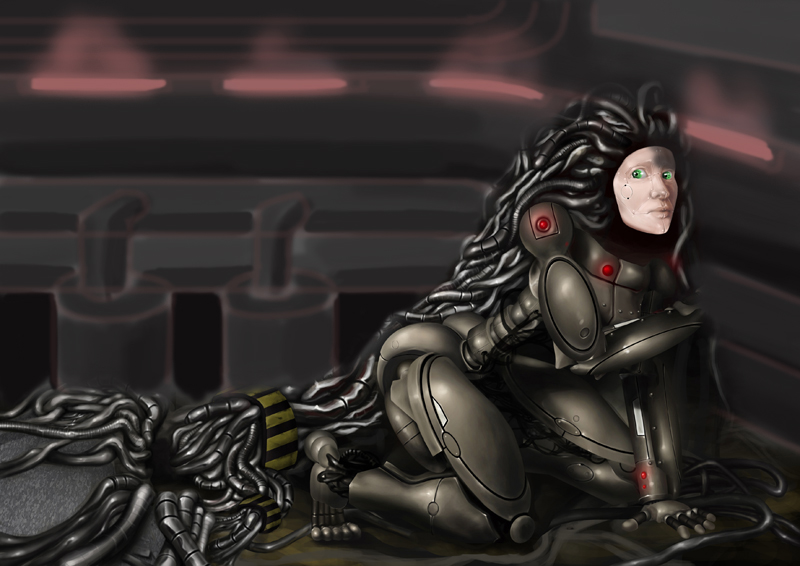
Love the rendering of the barrel Dom! Looks real! I think the lighting is a bit detached or compartmentalized as a whole. I was thinking, maybe try a series of horizontal lit pipes leading to her face instead? This way it would feel more unified and consistent. Hope this helps!
Please Log in or Create an account to join the conversation.
14 Mar 2015 22:01 #9596
by Domtopia
Everything's on the right!!!
It's like driving abroad!
Replied by Domtopia on topic Someone's gotta start this ball a-rolling!!
What do you mean crank?
The lights on the generator? Or the ambient light?
I have yet to get to the lighting, so there are a whole lot of cast shadows that I have yet to add. Plus, there is a lot of reflected light from all the secondary light sources too that needs to be added. Lots still to do!!
Plus, I don't understand what you mean by horizontal pipes. Where were you thinking of putting them?
Thanks for the feedback, but maybe a paintover might help me to understand what you are suggesting.
The lights on the generator? Or the ambient light?
I have yet to get to the lighting, so there are a whole lot of cast shadows that I have yet to add. Plus, there is a lot of reflected light from all the secondary light sources too that needs to be added. Lots still to do!!
Plus, I don't understand what you mean by horizontal pipes. Where were you thinking of putting them?
Thanks for the feedback, but maybe a paintover might help me to understand what you are suggesting.
Everything's on the right!!!
It's like driving abroad!
Please Log in or Create an account to join the conversation.
- crankshaft
-
- Offline
- Platinum Member
-
Less
More
- Posts: 1564
- Thank you received: 55
15 Mar 2015 19:51 - 15 Mar 2015 19:52 #9608
by crankshaft
Replied by crankshaft on topic Someone's gotta start this ball a-rolling!!
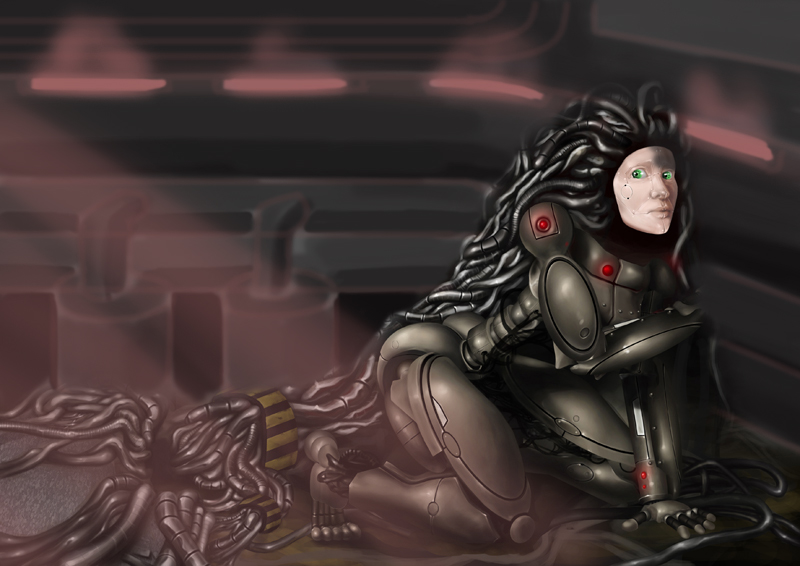
Hey Dom! Sorry for the confusion. Here's what I meant (first one). Also, since she's already looking to the left I did a po where the second image has light coming from the left, as if a door is opening.
Last edit: 15 Mar 2015 19:52 by crankshaft.
Please Log in or Create an account to join the conversation.
15 Mar 2015 20:49 #9609
by Domtopia
Everything's on the right!!!
It's like driving abroad!
Replied by Domtopia on topic Someone's gotta start this ball a-rolling!!
Wow! Thanks Crank! Took some doing to paint that!
I see what you mean now. You think a more direct and obvious light source would be best? I will see what I can do. It may become more clear as I add the lighting in after the basics are down.
Thanks for the feedback!
I see what you mean now. You think a more direct and obvious light source would be best? I will see what I can do. It may become more clear as I add the lighting in after the basics are down.
Thanks for the feedback!
Everything's on the right!!!
It's like driving abroad!
Please Log in or Create an account to join the conversation.
22 Mar 2015 21:35 #9781
by Domtopia
Everything's on the right!!!
It's like driving abroad!
Replied by Domtopia on topic Someone's gotta start this ball a-rolling!!
I reckon I am just about done with this.
Putting scratches on her face, exposed metal or dirt just didn't work, so I decided to keep her face the way it is (with a couple of rust spots). The brightness of her face works to draw the eye to that part of the image, which is what I want.
I can't see anything else that needs doing, but I have been staring at it for weeks now! If you guys can spot anything then please let me know!
Otherwise I will post this in my gallery.
Thanks everyone!!
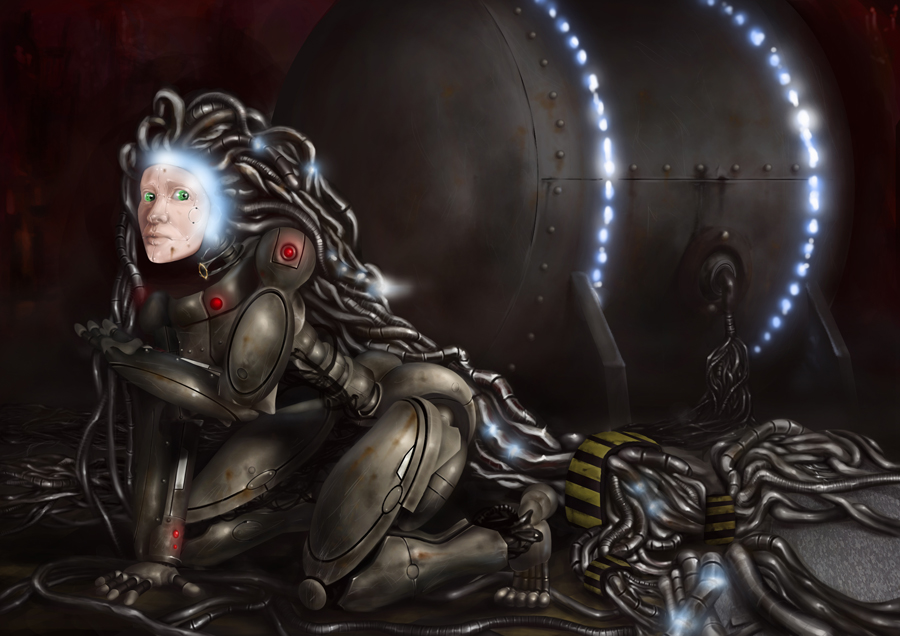
Putting scratches on her face, exposed metal or dirt just didn't work, so I decided to keep her face the way it is (with a couple of rust spots). The brightness of her face works to draw the eye to that part of the image, which is what I want.
I can't see anything else that needs doing, but I have been staring at it for weeks now! If you guys can spot anything then please let me know!
Otherwise I will post this in my gallery.
Thanks everyone!!
Everything's on the right!!!
It's like driving abroad!
Please Log in or Create an account to join the conversation.
Facebook Feed
Member Statistics
- Total Users: 227
- Latest User: greenreleafdispensary
- Online Users: 1
- Users Today: 0
- Users this Week: 1
- Users this Month: 1
- Users this Year: 1
Members Online
NOTE! This site uses cookies and similar technologies.
By using this website you agree to the use of cookies and related data storage as detailed in our privacy policy. Learn more
I understand
Site design Mad Hamster Studios. All content is protected under © and the property of the various contributers and not to be reproduced without permission of the creator.