


- Posts: 366
- Thank you received: 33


October Challenge: Horror rework
September entries: Legend
Important, change your password!
Go here for further information: https://cgartnexus.com/index.php/forum/announcements/840-hacked
Cherrys Fantasies
- CherryGraphics
-
 Topic Author
- Offline
- Junior Member
-

Less
More
06 Mar 2015 09:48 #9394
by CherryGraphics
Replied by CherryGraphics on topic Cherrys Fantasies
I actually do a complete paint over of her hair. I hate to copy another's work but the blue hair of the picture by Mucha has inspired me a lot 
Please Log in or Create an account to join the conversation.

06 Mar 2015 14:08 #9397
by Domtopia
Everything's on the right!!!
It's like driving abroad!
Replied by Domtopia on topic Cherrys Fantasies
Have I called the paintover Cherry's bottom??!!
Ooops, sorry Cherry!
Ooops, sorry Cherry!
Everything's on the right!!!
It's like driving abroad!
Please Log in or Create an account to join the conversation.
- CherryGraphics
-
Topic Author
- Offline
- Junior Member
-
Less
More
- Posts: 366
- Thank you received: 33
06 Mar 2015 14:43 #9401
by CherryGraphics
Replied by CherryGraphics on topic Cherrys Fantasies
When I read it in german - yes, you have. 

Please Log in or Create an account to join the conversation.
06 Mar 2015 15:20 #9403
by Domtopia

Everything's on the right!!!
It's like driving abroad!
Replied by Domtopia on topic Cherrys Fantasies
Everything's on the right!!!
It's like driving abroad!
Please Log in or Create an account to join the conversation.
- microscopi
-
- Offline
- Premium Member
-

Less
More
- Posts: 743
- Thank you received: 79
07 Mar 2015 17:40 #9416
by microscopi
Replied by microscopi on topic Cherrys Fantasies
I think having her eyes closed adds to the serenity of the piece, looking great so far Cherry, I don't know anything about art nouvoux and i'm sure I spelled it wrong too, but I like it !
Please Log in or Create an account to join the conversation.
- CherryGraphics
-
Topic Author
- Offline
- Junior Member
-
Less
More
- Posts: 366
- Thank you received: 33
17 Mar 2015 14:39 #9629
by CherryGraphics
Replied by CherryGraphics on topic Cherrys Fantasies
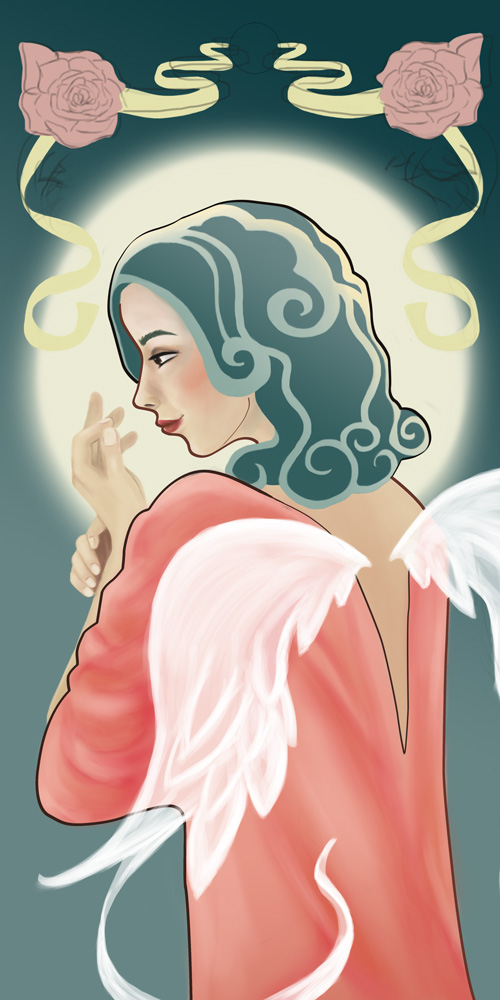
Cause I'm almost done with this month's challenge I thought I could work a bit more on this picture 
I like the eyes closed version of dom but I dunno if I paint her with eyes closed or not.
I changed her hair and began with her clothes... maybe I just print the picture out and and do the outlines with my own hands if I can't handle them right digital ^^
I like the eyes closed version of dom but I dunno if I paint her with eyes closed or not.
I changed her hair and began with her clothes... maybe I just print the picture out and and do the outlines with my own hands if I can't handle them right digital ^^
Please Log in or Create an account to join the conversation.
- microscopi
-
- Offline
- Premium Member
-
Less
More
- Posts: 743
- Thank you received: 79
17 Mar 2015 15:34 - 17 Mar 2015 15:37 #9630
by microscopi
Replied by microscopi on topic Cherrys Fantasies
I like how this is looking Cherry, the hard edge with the soft texture inside looks cool. Her hair looks much better now 
I think if her eyes are open they should have less contrast to make them seem to fade into the pic more, also the bottom of her is too square atm it seems, if you have the fabric follow that little hollow in the back of her waste line and give her a bit of a curve on her belly, it will give more of a flow to her body, keep it up !
I think if her eyes are open they should have less contrast to make them seem to fade into the pic more, also the bottom of her is too square atm it seems, if you have the fabric follow that little hollow in the back of her waste line and give her a bit of a curve on her belly, it will give more of a flow to her body, keep it up !
Last edit: 17 Mar 2015 15:37 by microscopi.
Please Log in or Create an account to join the conversation.
17 Mar 2015 16:17 #9633
by Thomgirl
Replied by Thomgirl on topic Cherrys Fantasies
Love Art Nouveau, so major props on playing with it in your work! I must say, I like the style of the hair in the previous renditions, but the blue hair is more interesting. Perhaps a mix of the two? Have it be partially up with sections fallen loose maybe?
I'm also wanting to see the fabric that's draped on her have a sense of sheerness to it. Not to where you can see the details of her body strongly, but just slightly. I think it might give it some depth.
As for regards to line work in PS, this is something I've been messing with for a while now. I do not turn off pen pressure, but I do like to have a sort of 'hand in the work' quality to my lines if I can. The key with successful line work in PS is your command Z function, also known as undo. You want to practice your strokes to be fast and sure, this will prevent any 'shakiness'.
I actually work similarly to this method, though he uses SAI instead of PS. The technique is the same though. grypwolf.deviantart.com/art/How-I-make-my-Lineart-326012466
There are a lot of tutorials on using the pen tool in PS too on google for doing line work. I don't use it personally, but if you're looking for super clean results, it might work well for you
I'm also wanting to see the fabric that's draped on her have a sense of sheerness to it. Not to where you can see the details of her body strongly, but just slightly. I think it might give it some depth.
As for regards to line work in PS, this is something I've been messing with for a while now. I do not turn off pen pressure, but I do like to have a sort of 'hand in the work' quality to my lines if I can. The key with successful line work in PS is your command Z function, also known as undo. You want to practice your strokes to be fast and sure, this will prevent any 'shakiness'.
I actually work similarly to this method, though he uses SAI instead of PS. The technique is the same though. grypwolf.deviantart.com/art/How-I-make-my-Lineart-326012466
There are a lot of tutorials on using the pen tool in PS too on google for doing line work. I don't use it personally, but if you're looking for super clean results, it might work well for you
Please Log in or Create an account to join the conversation.

17 Mar 2015 23:07 #9639
by Valence
Replied by Valence on topic Cherrys Fantasies
Looks lovely. As micro said, just pinch the waist in a little bit to give more shape to the body.
Also the wing opacity is inconsistent at the moment: the body's outline shows through at the bottom left but not at the top right.
Also the wing opacity is inconsistent at the moment: the body's outline shows through at the bottom left but not at the top right.
Please Log in or Create an account to join the conversation.
- CherryGraphics
-
Topic Author
- Offline
- Junior Member
-
Less
More
- Posts: 366
- Thank you received: 33
18 Mar 2015 13:29 #9654
by CherryGraphics
Replied by CherryGraphics on topic Cherrys Fantasies
Thanks a lot for the tips tomgirl!
I fixed the body's outline to have a more formed body than it was... thanks Val & micro
I printed it out today just to try drawing the lines oldschool with pen ... and it works so much better xD sometimes it seems better to do something with pen than digital. <<<< lesson for today: remember the roots. ^^
It's just the first try, I'll do more next time to clean the lines and work out the ornamental background a bit more.
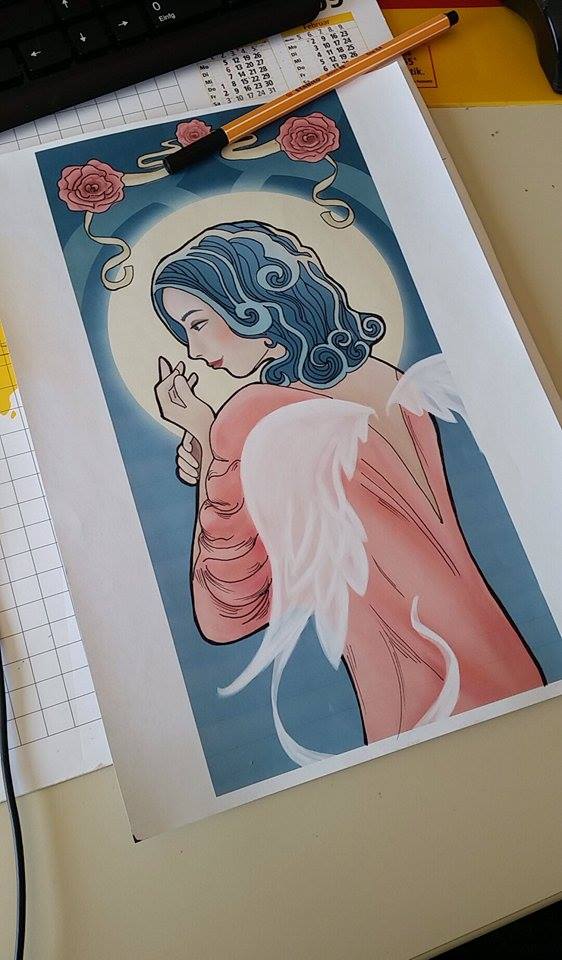
I fixed the body's outline to have a more formed body than it was... thanks Val & micro
I printed it out today just to try drawing the lines oldschool with pen ... and it works so much better xD sometimes it seems better to do something with pen than digital. <<<< lesson for today: remember the roots. ^^
It's just the first try, I'll do more next time to clean the lines and work out the ornamental background a bit more.
Please Log in or Create an account to join the conversation.
Facebook Feed
Member Statistics
- Total Users: 228
- Latest User: DanielWilson
- Online Users: 0
- Users Today: 0
- Users this Week: 0
- Users this Month: 0
- Users this Year: 2
NOTE! This site uses cookies and similar technologies.
By using this website you agree to the use of cookies and related data storage as detailed in our privacy policy. Learn more
I understand
Site design Mad Hamster Studios. All content is protected under © and the property of the various contributers and not to be reproduced without permission of the creator.