




- Posts: 2113
- Thank you received: 80


October Challenge: Horror rework
September entries: Legend
The shoutbox is unavailable to non-members
Shoutbox History
 System
Auto message: A new forum post has been submitted. You can view the message here
18 hours ago
Stoopid dart eels. And amber fishing spots. And distant loot bags all the way back where I started with only a piece of fur in them. 
19 hours ago
Important, change your password!
Go here for further information: https://cgartnexus.com/index.php/forum/announcements/840-hacked
Basic Software tips and usage.
05 Mar 2015 11:06 - 05 Mar 2015 11:10 #9366
by kazky
Basic Software tips and usage. was created by kazky
ok so I'm aware that most of us only access small parts of the software we use. I don't know how to use selection masks, the pen tool, etc etc. A few years ago banj told me a great tip using the unsharpen filter, which made a huge difference to my finished images.
So how about people adding tips that they've found useful that might be a help to others?
So how about people adding tips that they've found useful that might be a help to others?
Last edit: 05 Mar 2015 11:10 by kazky.
Please Log in or Create an account to join the conversation.

05 Mar 2015 12:37 - 05 Mar 2015 12:43 #9370
by Domtopia
Everything's on the right!!!
It's like driving abroad!
Replied by Domtopia on topic Basic Software tips and usage.
This is a great idea for a thread. Should have done this ages ago!!
Here's one I found using selection tools. I find this useful for all sorts of hard edged objects. It's formatted as a tutorial, but I don't want it to come across as condescending, it's just a step by step of how I do it.
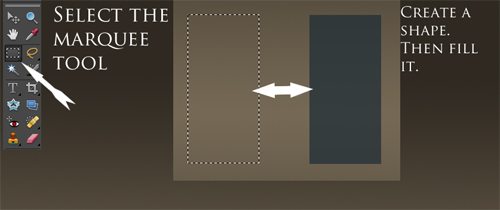
Just select the shape you want with the selection tools and fill it.
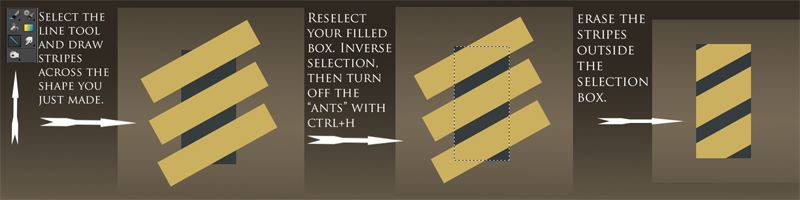
Then you can draw objects across it. In this case I wanted some yellow chevrons. Because it's selected it is masked and wont effect the rest of the drawing.
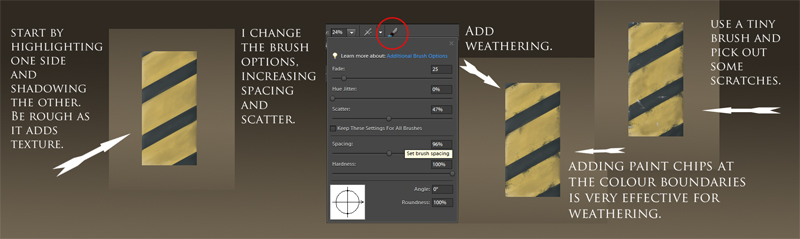
Then I added some weathering and details. Again, because it's masked I can take a large brush, or a soft brush (which usually bleeds into the surrounding painting) and happily paint the edges without worrying about cross contamination.
So, there's one tip I found useful. Hopefully that will start the ball rolling. This thread could be like the workshop or Q&A form IFX! Very useful!!
Here's one I found using selection tools. I find this useful for all sorts of hard edged objects. It's formatted as a tutorial, but I don't want it to come across as condescending, it's just a step by step of how I do it.
Just select the shape you want with the selection tools and fill it.
Then you can draw objects across it. In this case I wanted some yellow chevrons. Because it's selected it is masked and wont effect the rest of the drawing.
Then I added some weathering and details. Again, because it's masked I can take a large brush, or a soft brush (which usually bleeds into the surrounding painting) and happily paint the edges without worrying about cross contamination.
So, there's one tip I found useful. Hopefully that will start the ball rolling. This thread could be like the workshop or Q&A form IFX! Very useful!!
Everything's on the right!!!
It's like driving abroad!
Last edit: 05 Mar 2015 12:43 by Domtopia.
Please Log in or Create an account to join the conversation.
05 Mar 2015 14:36 #9373
by kazky
Replied by kazky on topic Basic Software tips and usage.
perfect Dom, just the sort of thing I was hoping for!
Please Log in or Create an account to join the conversation.

05 Mar 2015 14:37 - 05 Mar 2015 14:48 #9374
by Joe
Replied by Joe on topic Basic Software tips and usage.
Blur.
I basically use Guassian Blur and occasionally Motion Blur but I haven't really bothered to look at other members of the Blur family in Photoshop for a good few years. This was a mistake.
There are new types of blur that can be used to control and target blurs much more easily. This video shows a few. It's mostly Painter but he makes some adjustments by taking it into Photoshop.
Start at 4mins 30secs (Sorry, haven't worked out how to embed).
Blur Video
I basically use Guassian Blur and occasionally Motion Blur but I haven't really bothered to look at other members of the Blur family in Photoshop for a good few years. This was a mistake.
There are new types of blur that can be used to control and target blurs much more easily. This video shows a few. It's mostly Painter but he makes some adjustments by taking it into Photoshop.
Start at 4mins 30secs (Sorry, haven't worked out how to embed).
Blur Video
Last edit: 05 Mar 2015 14:48 by Joe.
Please Log in or Create an account to join the conversation.

05 Mar 2015 14:54 #9376
by Banj
The forum does it automatically, just paste the URL of the page directly into your post. e.g.
will give you...
Replied by Banj on topic Basic Software tips and usage.
Joe wrote: (Sorry, haven't worked out how to embed).
The forum does it automatically, just paste the URL of the page directly into your post. e.g.
Code:
https://www.youtube.com/watch?v=MIaBx5ki32o
The following user(s) said Thank You: Joe
Please Log in or Create an account to join the conversation.
05 Mar 2015 14:58 #9377
by Joe
Replied by Joe on topic Basic Software tips and usage.
Ok thanks Banj. I tried everything except that. Nothing should be that easy surely? Anyway, you have done it for me now.
Please Log in or Create an account to join the conversation.
06 Mar 2015 09:46 #9393
by kazky
Replied by kazky on topic Basic Software tips and usage.
ah that's a really useful bit of info Joe, I didn't know you could do that.
anyone got any tutorials on using layers to colour? I can never use greyscale to colour using overlay/colour layers etc. I'd like to actually see it in action.
anyone got any tutorials on using layers to colour? I can never use greyscale to colour using overlay/colour layers etc. I'd like to actually see it in action.
Please Log in or Create an account to join the conversation.
06 Mar 2015 15:17 #9402
by Domtopia
Everything's on the right!!!
It's like driving abroad!
Replied by Domtopia on topic Basic Software tips and usage.
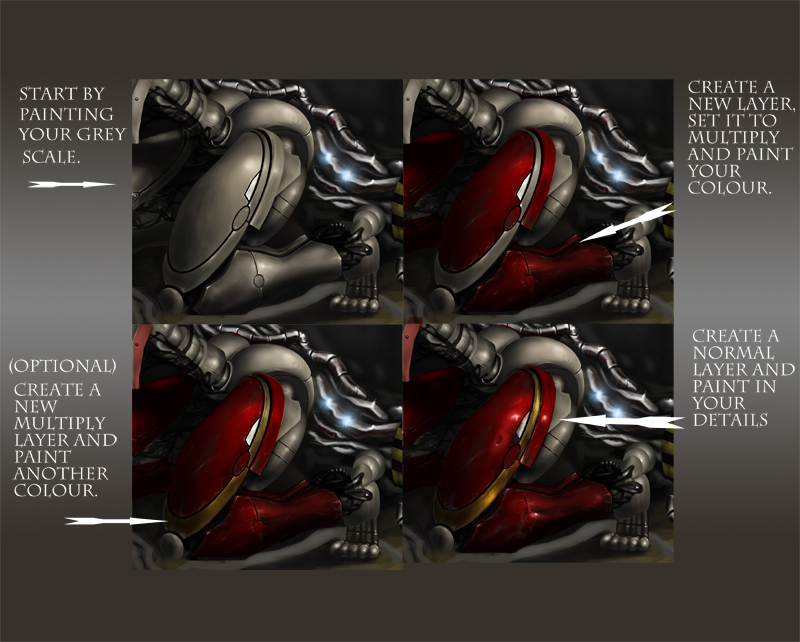
I used this recently on a metallic creation.
I find that this works best with bright colours and on non-organic objects. Painting skin is another matter!! But this could help to get you started, hopefully.
Anyway, here it is. After painting the greyscale, I added a new layer set to multiply and painted a colour in (red in this case) pretty roughly. So, it doesn't require a bucket fill or anything. At this stage I also added some scratches to the paint work. I set the eraser tool to 1 or 2 pixels and remove small areas around the edges, mimicking wear and tear.
The secondary colour is optional, but if you do decide to paint with another colour, do it on a new layer or you will quickly lose control of your colours.
Then create a new layer set normally and paint in your details, like bumps, dents and highlights. Again doing this on a new layer is easiest because layers set to other blend modes do weird and unpredictable things to additional colours. So if you want to add more colours, more light or shadow, I would recommend doing it on a new layer.
These are just my observations. I am sure there are much more competent artists out there who could tell you better, but this is the way I do it!
Hope that helps someone!
I find that this works best with bright colours and on non-organic objects. Painting skin is another matter!! But this could help to get you started, hopefully.
Anyway, here it is. After painting the greyscale, I added a new layer set to multiply and painted a colour in (red in this case) pretty roughly. So, it doesn't require a bucket fill or anything. At this stage I also added some scratches to the paint work. I set the eraser tool to 1 or 2 pixels and remove small areas around the edges, mimicking wear and tear.
The secondary colour is optional, but if you do decide to paint with another colour, do it on a new layer or you will quickly lose control of your colours.
Then create a new layer set normally and paint in your details, like bumps, dents and highlights. Again doing this on a new layer is easiest because layers set to other blend modes do weird and unpredictable things to additional colours. So if you want to add more colours, more light or shadow, I would recommend doing it on a new layer.
These are just my observations. I am sure there are much more competent artists out there who could tell you better, but this is the way I do it!
Hope that helps someone!
Everything's on the right!!!
It's like driving abroad!
The following user(s) said Thank You: Thomgirl
Please Log in or Create an account to join the conversation.
06 Mar 2015 15:55 - 06 Mar 2015 15:57 #9404
by Banj
Replied by Banj on topic Basic Software tips and usage.
Greyscale to colour
A couple of videos by Scott Robertson -
Colourizing and weathering a greyscale sketch:
Adding value and colour to a line drawing:
(Thanks HAL, at least I know that message works now you overprotective nut)
A couple of videos by Scott Robertson -
Colourizing and weathering a greyscale sketch:
Adding value and colour to a line drawing:
(Thanks HAL, at least I know that message works now you overprotective nut)
Last edit: 06 Mar 2015 15:57 by Banj.
The following user(s) said Thank You: Thomgirl
Please Log in or Create an account to join the conversation.

06 Mar 2015 21:03 #9405
by Thomgirl
Replied by Thomgirl on topic Basic Software tips and usage.
I know when I first started using this method, I just stopped at the multiply layer. It's REALLY important to use it more as a foundation for laying down color to work with your values and then do additional layers to bring the color detail in. Some people do a lot of layers also using color dodge, overlay, hard light, and so on, testing to get certain color effects too on top of the multiply. I personally use multiply and then do a normal layer to hammer out the color details myself when using this method.
Please Log in or Create an account to join the conversation.
Facebook Feed
Member Statistics
- Total Users: 228
- Latest User: DanielWilson
- Online Users: 0
- Users Today: 0
- Users this Week: 0
- Users this Month: 0
- Users this Year: 2
NOTE! This site uses cookies and similar technologies.
By using this website you agree to the use of cookies and related data storage as detailed in our privacy policy. Learn more
I understand
Site design Mad Hamster Studios. All content is protected under © and the property of the various contributers and not to be reproduced without permission of the creator.