


- Posts: 132
- Thank you received: 15


October Challenge: Horror rework
September entries: Legend
Important, change your password!
Go here for further information: https://cgartnexus.com/index.php/forum/announcements/840-hacked
CGAN Mar 2015 Challenge - Tribute to Nimoy - WIPs
- hobbyhorse
-
- Offline
- Junior Member
-

Less
More
23 Mar 2015 18:53 #9796
by hobbyhorse
Replied by hobbyhorse on topic CGAN Mar 2015 Challenge - Tribute to Nimoy - WIPs
Thanks microscopi, think that's what drew me to the photo in the first place.
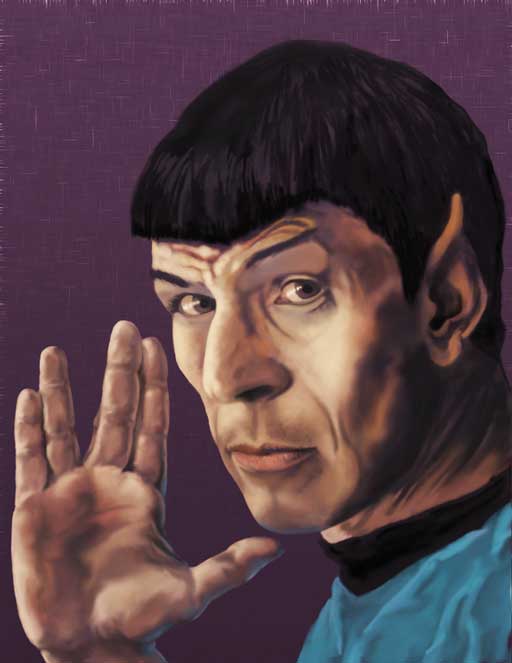
Cherry, thanks, does this look better even if I keep the brightness the same? I kind of like the low key coloring on it.
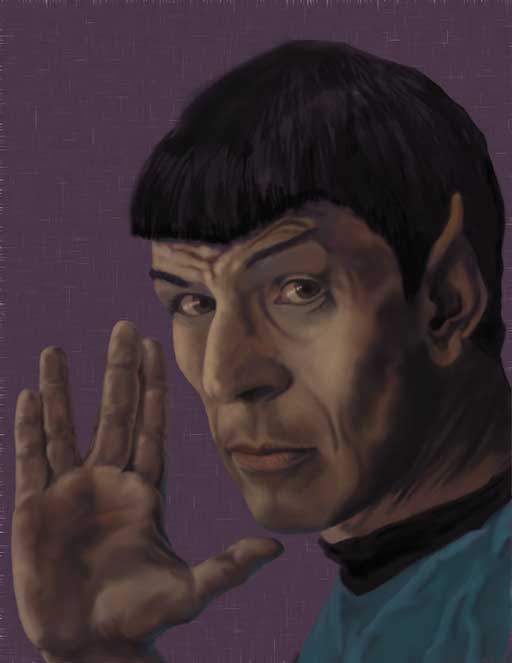
OK, Added a bit more detail and clarity around the eyes with brighter shine on them, Smoothed out some of the value changes in the hand..so not so busy. Added a basic texture in background, and some 'pores' to the face.
jessie - turned out wonderfully
Cherry, thanks, does this look better even if I keep the brightness the same? I kind of like the low key coloring on it.
OK, Added a bit more detail and clarity around the eyes with brighter shine on them, Smoothed out some of the value changes in the hand..so not so busy. Added a basic texture in background, and some 'pores' to the face.
jessie - turned out wonderfully
Please Log in or Create an account to join the conversation.
- hobbyhorse
-
- Offline
- Junior Member
-
Less
More
- Posts: 132
- Thank you received: 15
25 Mar 2015 12:49 - 25 Mar 2015 12:53 #9810
by hobbyhorse
Replied by hobbyhorse on topic CGAN Mar 2015 Challenge - Tribute to Nimoy - WIPs
OK Went to work and checked what it looked like on their monitor. Very dark...not at all how I see it on mine. So after adjusting my monitor's brightness did a couple of adjustment layers. This rendition look better?
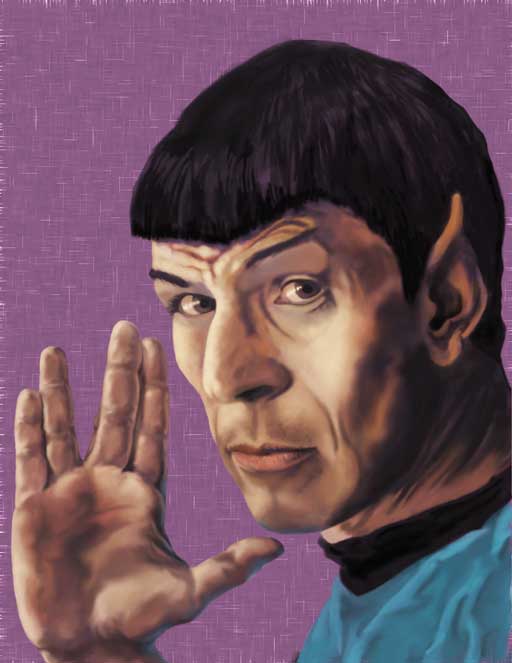
This is what I was seeing on my monitor...turned my monitor level all the way down...is this where others have their's? I have a Mac.
This is what I was seeing on my monitor...turned my monitor level all the way down...is this where others have their's? I have a Mac.
Last edit: 25 Mar 2015 12:53 by hobbyhorse.
Please Log in or Create an account to join the conversation.
- CherryGraphics
-

- Offline
- Junior Member
-
Less
More
- Posts: 366
- Thank you received: 33
25 Mar 2015 14:19 #9812
by CherryGraphics
Replied by CherryGraphics on topic CGAN Mar 2015 Challenge - Tribute to Nimoy - WIPs
I also have an iMac at home and I always thought it shows me the colors almost the right way....
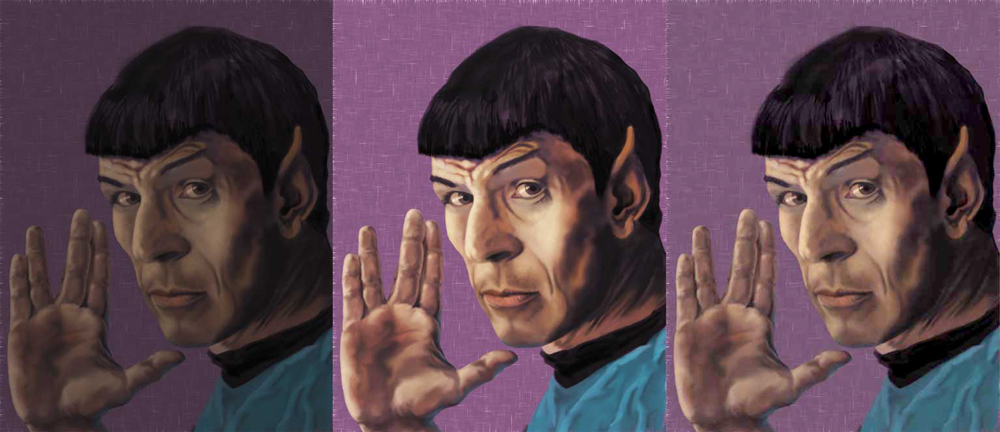
I don't know if you can see it correctly on your display... left is your first, middle is your last and right is the one I played with a little bit.
If you want your brightness and contrast strong the middle is good on my display. But you said you like the low key coloring on it so the right might be more what you want.
I don't know if you can see it correctly on your display... left is your first, middle is your last and right is the one I played with a little bit.
If you want your brightness and contrast strong the middle is good on my display. But you said you like the low key coloring on it so the right might be more what you want.
Please Log in or Create an account to join the conversation.


25 Mar 2015 19:35 - 25 Mar 2015 19:36 #9815
by Valence
Replied by Valence on topic CGAN Mar 2015 Challenge - Tribute to Nimoy - WIPs
I think I have the opposite problem as I have difficulty seeing darker pictures rather than them appearing too bright. With both Charlotte's Cersei picture and Dom's recent Robo-Rapunzel image I couldn't see the backgrounds at all on my PC. (And I have an old CRT that's deeper than it is wide! And it has varying aspect ratio across the screen  ) But I am aware of the issue and always try to compensate. I also make a point of checking all images on my tablet too before posting and making any big changes. It's always good to have a second screen. Another thing I always do at the end of a painting session is to do an Auto-Colour-Balance in Photoshop (Ctrl-Shift-B on mine) as this always helps me to see where I'm going wrong with the brightness and any colour casts, and it gives me a better idea of the changes I have to make during the next session.
The Spock picture looks good with your changes. Although I do accept that it was dark I still liked the tones of the original, it had a kind of sepia/nostalgic look to it. The brighter version does look better as a portrait though. However I'd prefer the background to be a bit darker, brightening it by the same amount as the face pushes it a bit too far forward.
) But I am aware of the issue and always try to compensate. I also make a point of checking all images on my tablet too before posting and making any big changes. It's always good to have a second screen. Another thing I always do at the end of a painting session is to do an Auto-Colour-Balance in Photoshop (Ctrl-Shift-B on mine) as this always helps me to see where I'm going wrong with the brightness and any colour casts, and it gives me a better idea of the changes I have to make during the next session.The Spock picture looks good with your changes. Although I do accept that it was dark I still liked the tones of the original, it had a kind of sepia/nostalgic look to it. The brighter version does look better as a portrait though. However I'd prefer the background to be a bit darker, brightening it by the same amount as the face pushes it a bit too far forward.
Last edit: 25 Mar 2015 19:36 by Valence.
Please Log in or Create an account to join the conversation.
- hobbyhorse
-
- Offline
- Junior Member
-
Less
More
- Posts: 132
- Thank you received: 15
26 Mar 2015 01:18 - 26 Mar 2015 01:32 #9816
by hobbyhorse
Replied by hobbyhorse on topic CGAN Mar 2015 Challenge - Tribute to Nimoy - WIPs
Thank's cherry, the middle one is close to what I was viewing on my monitor (at least the face and hand) while I was painting the piece, but when it was mentioned that it might need to be lighter I checked it's look on my work place monitors and saw an image much darker than at home. Back at home I lowered the brightness on the monitor to match, as best as I could remember, how the work one looked like and then made an adjustment layer to brighten. This brightened the background a bit more then I want but it's an easy fix since it's on a separate layer
...so yes Valence I will darken the background. By the way can you increase your monitor brightness so you can see a more true rendition of people's work and your own as well without having to double check it on your tablet?
With the monitor brightness turned down hopefully this will help for future paintings.
Thanks again for all your helpful comments
...so yes Valence I will darken the background. By the way can you increase your monitor brightness so you can see a more true rendition of people's work and your own as well without having to double check it on your tablet?
With the monitor brightness turned down hopefully this will help for future paintings.
Thanks again for all your helpful comments
Last edit: 26 Mar 2015 01:32 by hobbyhorse.
Please Log in or Create an account to join the conversation.
26 Mar 2015 19:19 #9841
by Valence
Replied by Valence on topic CGAN Mar 2015 Challenge - Tribute to Nimoy - WIPs
Looking much better now, hobbyhorse!
Personally I always struggle with bright monitors, they give me shocking headaches when I'm trying to read stuff so I've always tended to go towards The Dark Side (cue the Imperial March!) and learned to compensate.
Also Colour Calibration is a tedious chore. I actually did calibrate my monitor many moons ago with Adobe Gamma (and the defunct nature of that software should give a clue to exactly how long ago) and having got used to it as it is I'm now scared of twiddling any more knobs. Of course if you're a professional person the best thing to do is throw away lots of money on one of those ColorMunki type devices that do the job for you, or you can just trust your own eye with one of those calibration charts which are easily Googleable.
Personally I always struggle with bright monitors, they give me shocking headaches when I'm trying to read stuff so I've always tended to go towards The Dark Side (cue the Imperial March!) and learned to compensate.
Also Colour Calibration is a tedious chore. I actually did calibrate my monitor many moons ago with Adobe Gamma (and the defunct nature of that software should give a clue to exactly how long ago) and having got used to it as it is I'm now scared of twiddling any more knobs. Of course if you're a professional person the best thing to do is throw away lots of money on one of those ColorMunki type devices that do the job for you, or you can just trust your own eye with one of those calibration charts which are easily Googleable.
Please Log in or Create an account to join the conversation.

26 Mar 2015 23:03 #9845
by Domtopia
Everything's on the right!!!
It's like driving abroad!
Replied by Domtopia on topic CGAN Mar 2015 Challenge - Tribute to Nimoy - WIPs
I like the skin rendering on yours Horsey!
The subsurface scattering looks great and the composition is strong. Nice work indeed!
The subsurface scattering looks great and the composition is strong. Nice work indeed!
Everything's on the right!!!
It's like driving abroad!
Please Log in or Create an account to join the conversation.
- CherryGraphics
-
- Offline
- Junior Member
-
Less
More
- Posts: 366
- Thank you received: 33
27 Mar 2015 12:22 #9848
by CherryGraphics
Replied by CherryGraphics on topic CGAN Mar 2015 Challenge - Tribute to Nimoy - WIPs
Is it just me or is this month so much longer than the other ones? I want to start the new challenge! NOW. *whine 
Please Log in or Create an account to join the conversation.


27 Mar 2015 13:33 - 27 Mar 2015 13:33 #9849
by kazky
Replied by kazky on topic CGAN Mar 2015 Challenge - Tribute to Nimoy - WIPs
whut? well it was longer than the last month  Cherry, you're on fire
Cherry, you're on fire
Last edit: 27 Mar 2015 13:33 by kazky.
Please Log in or Create an account to join the conversation.
27 Mar 2015 20:31 - 28 Mar 2015 02:18 #9850
by Valence
Replied by Valence on topic CGAN Mar 2015 Challenge - Tribute to Nimoy - WIPs
I prefer longer months. That February Challenge was a bit frantic at the end for me.
Anywaaay... here are my two virtually finished versions (unless I spot any last minute gaffes or do some colour correction.)
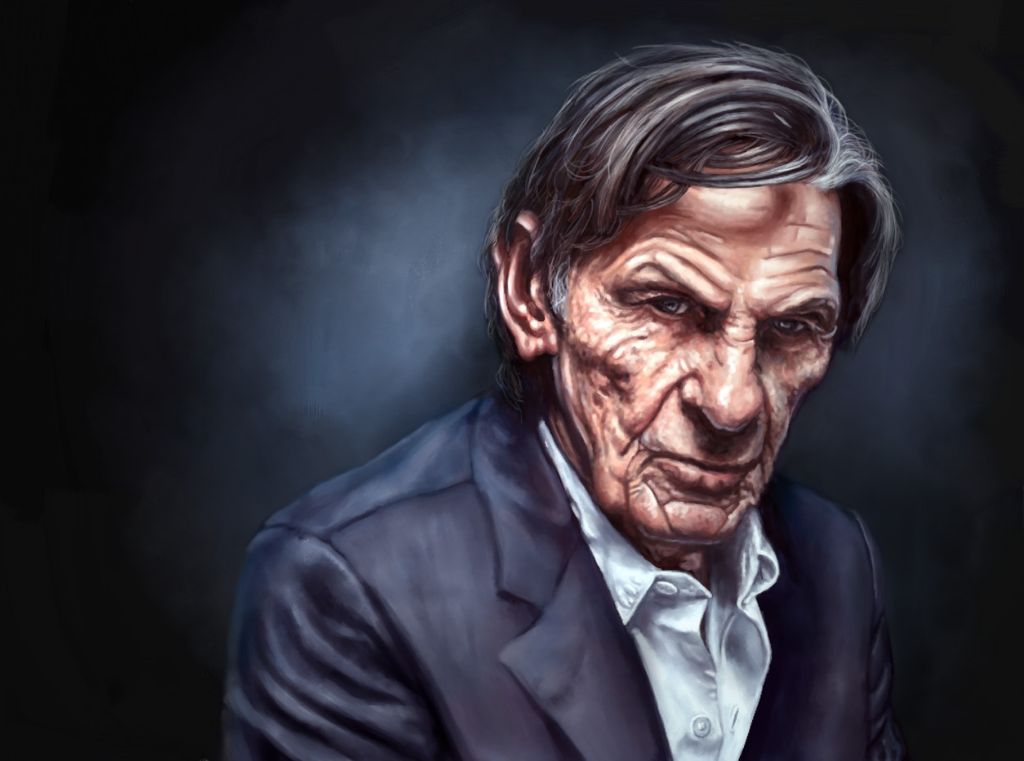
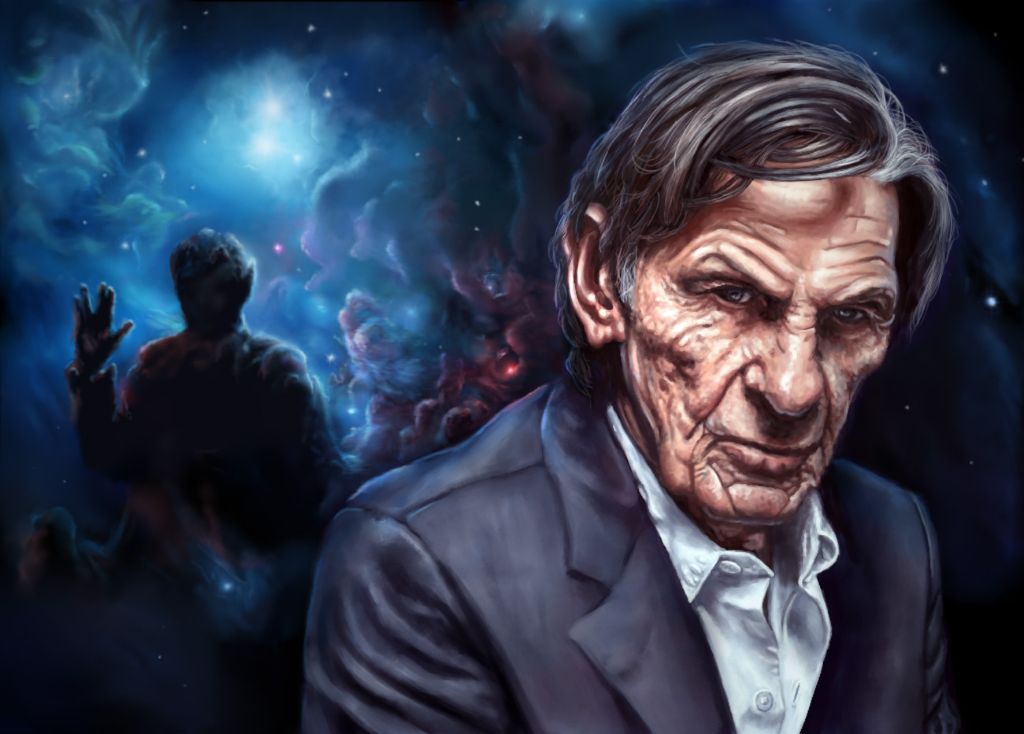
I just need to make my decision over the weekend before posting in the finals, but I'm pretty sure which one it'll be. As I said before I think the plain one is the better picture, the simplicity makes it more poignant and more intimate and for that reason I thought I'd post that one here too. However I do like the the nebula one, even though it's a little more contrived and the dual nature of it ruins the effect of the lighting, it does though have a more narrative quality that explains how people will remember him. Also I did enjoy doing it: learning something from scratch in a few days and then having it work out happens so rarely these days that I can't help but prefer that version on those grounds even though I acknowledge that any viewer won't see it from that point of view.
Sadly I couldn't wean myself away from the Spock-Uniform-Blue colour, even though I accept the critique was correct, so I tried to add some more reds and purples and a bit of green to the nebula to break it up in a subtle way while contrasting that by toning down the blue in the outfit and using more rim light to "turn" the edges. It sort of works but not necessarily in the way that was suggested; sorry. I also added some brighter clouds to get rid of the two-handed wave illusion. Thanks to hobbyhorse for spotting that, I was nowhere near noticing it but as soon as it was mentioned I couldn't take my eyes of it.
Also let me add that for anyone else wanting to learn how to do a space nebula let me direct you to the fantastic works and tutorials of Tim Barton on his YouTube channel here and his DA page here (for those that understand deviantArt?!) His pictures are amazing and his techniques really work! Really!
Anywaaay... here are my two virtually finished versions (unless I spot any last minute gaffes or do some colour correction.)
I just need to make my decision over the weekend before posting in the finals, but I'm pretty sure which one it'll be. As I said before I think the plain one is the better picture, the simplicity makes it more poignant and more intimate and for that reason I thought I'd post that one here too. However I do like the the nebula one, even though it's a little more contrived and the dual nature of it ruins the effect of the lighting, it does though have a more narrative quality that explains how people will remember him. Also I did enjoy doing it: learning something from scratch in a few days and then having it work out happens so rarely these days that I can't help but prefer that version on those grounds even though I acknowledge that any viewer won't see it from that point of view.
Sadly I couldn't wean myself away from the Spock-Uniform-Blue colour, even though I accept the critique was correct, so I tried to add some more reds and purples and a bit of green to the nebula to break it up in a subtle way while contrasting that by toning down the blue in the outfit and using more rim light to "turn" the edges. It sort of works but not necessarily in the way that was suggested; sorry. I also added some brighter clouds to get rid of the two-handed wave illusion. Thanks to hobbyhorse for spotting that, I was nowhere near noticing it but as soon as it was mentioned I couldn't take my eyes of it.
Also let me add that for anyone else wanting to learn how to do a space nebula let me direct you to the fantastic works and tutorials of Tim Barton on his YouTube channel here and his DA page here (for those that understand deviantArt?!) His pictures are amazing and his techniques really work! Really!
Last edit: 28 Mar 2015 02:18 by Valence.
Please Log in or Create an account to join the conversation.
Facebook Feed
Member Statistics
- Total Users: 228
- Latest User: DanielWilson
- Online Users: 0
- Users Today: 0
- Users this Week: 0
- Users this Month: 0
- Users this Year: 2
NOTE! This site uses cookies and similar technologies.
By using this website you agree to the use of cookies and related data storage as detailed in our privacy policy. Learn more
I understand
Site design Mad Hamster Studios. All content is protected under © and the property of the various contributers and not to be reproduced without permission of the creator.