




- Posts: 11988
- Thank you received: 514


June challenge here: The Leprechaun
May entries - Submarine
Adventures across the 3rd dimension
09 Feb 2025 21:32 - 09 Feb 2025 21:34 #53554
by Valence
Replied by Valence on topic Adventures across the 3rd dimension
...also can you actually see where these rotation points are in Blender?
EDIT: Oh dear. I should have edited that last comment instead of splitting questions over two pages.
EDIT: Oh dear. I should have edited that last comment instead of splitting questions over two pages.
Last edit: 09 Feb 2025 21:34 by Valence.
Please Log in or Create an account to join the conversation.


09 Feb 2025 21:34 #53555
by Charlotte
Any an all misspellings are henceforth blamed on the cats.
Replied by Charlotte on topic Adventures across the 3rd dimension
Doesn't seem like it. I originally didn't even think about it and it worked fine anyway, seems I should just need to position the wanted rotation point aligned with the ninode that's linked to the animation. But instead, either works for one node and neither for the other. 
I posted again on discord, but they haven't managed to figure it out for me before so I'm not very hopeful. Maybe I'll just skip the latches all together. (well, the animations).
I posted again on discord, but they haven't managed to figure it out for me before so I'm not very hopeful. Maybe I'll just skip the latches all together. (well, the animations).
Any an all misspellings are henceforth blamed on the cats.
Please Log in or Create an account to join the conversation.
09 Feb 2025 21:35 #53556
by Charlotte
Any an all misspellings are henceforth blamed on the cats.
Replied by Charlotte on topic Adventures across the 3rd dimension
No, I only see those points in nifskope as they are not part of my blender model.
Any an all misspellings are henceforth blamed on the cats.
Please Log in or Create an account to join the conversation.
09 Feb 2025 21:46 - 09 Feb 2025 21:47 #53557
by Valence
Replied by Valence on topic Adventures across the 3rd dimension
If you know the coordinates of the rotation nodes then you could mark them in Blender with a temporary object or an Empty to see if that helps you align things.
I have been experimenting a bit in Blender, which is a bit difficult without knowing how nif exports and NifSkope work...
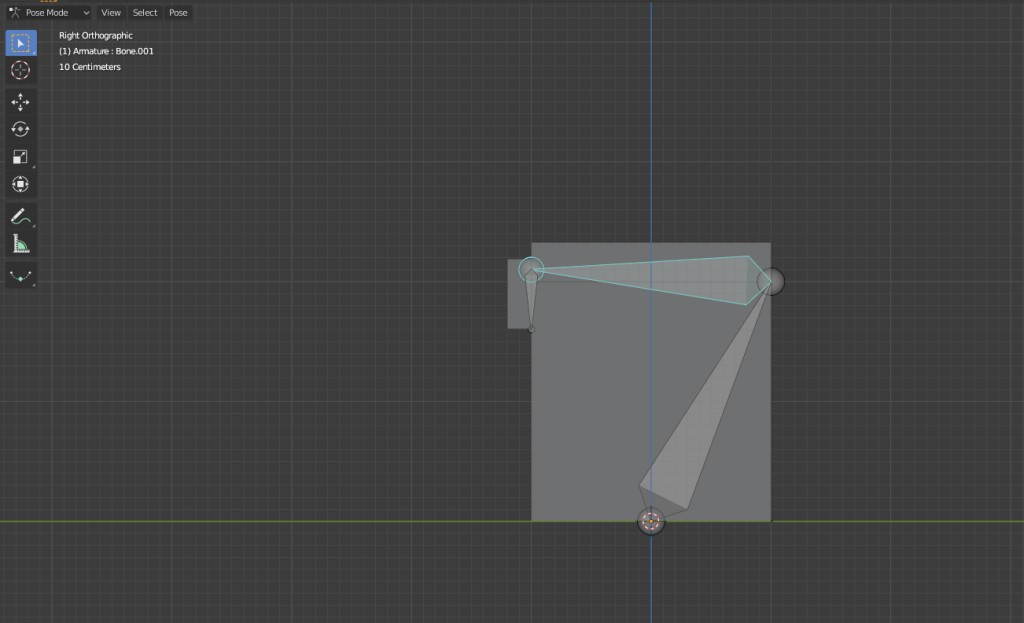
and it took a while to work out that the lid rotation node needs to align with the top and back of the chest but the latch node seems to be a bit higher
And when varying those points to see what happens the hinge node seems to create the biggest differences with the latch than moving the latch node.
But maybe that's a quirk of using Blender's bones.
I have been experimenting a bit in Blender, which is a bit difficult without knowing how nif exports and NifSkope work...
and it took a while to work out that the lid rotation node needs to align with the top and back of the chest but the latch node seems to be a bit higher
And when varying those points to see what happens the hinge node seems to create the biggest differences with the latch than moving the latch node.
But maybe that's a quirk of using Blender's bones.
Last edit: 09 Feb 2025 21:47 by Valence.
Please Log in or Create an account to join the conversation.
09 Feb 2025 21:50 #53558
by Charlotte
Any an all misspellings are henceforth blamed on the cats.
Replied by Charlotte on topic Adventures across the 3rd dimension
Well the hinges are already positioned where the rotation nodes should be... And my model is slightly different from the original chest so my hinge nodes are at the exact same height just opposite sides of the lid. I think the main issue is that the CK just seems to react to changes in one of the nodes and not the other.
But for now I am watching Night Country with Jodie Foster
But for now I am watching Night Country with Jodie Foster
Any an all misspellings are henceforth blamed on the cats.
Please Log in or Create an account to join the conversation.
09 Feb 2025 21:58 - 09 Feb 2025 21:59 #53559
by Valence
Replied by Valence on topic Adventures across the 3rd dimension
It's a hierarchical thing though. The hinge node will be the parent of the latch node and seems to have greater movement/rotation in the animation.
Oh and that reminds me to mention that the images you've posted of all your open chests show much more rotation of the lid than I get in the Creation Kit. I wonder if that's just a Special Edition thing.
One more question, not that it will help in any way Do you have to parent the three objects in Blender before exporting?
I just thought of that cos I've just tweaked that Blender experiment to remove the bones and do the same thing with Parenting and setting the origins to the rotation points of the bones.
Oh and that reminds me to mention that the images you've posted of all your open chests show much more rotation of the lid than I get in the Creation Kit. I wonder if that's just a Special Edition thing.
One more question, not that it will help in any way
Do you have to parent the three objects in Blender before exporting?I just thought of that cos I've just tweaked that Blender experiment to remove the bones and do the same thing with Parenting and setting the origins to the rotation points of the bones.
Last edit: 09 Feb 2025 21:59 by Valence.
Please Log in or Create an account to join the conversation.
09 Feb 2025 22:02 - 09 Feb 2025 22:05 #53560
by Charlotte
Any an all misspellings are henceforth blamed on the cats.
Replied by Charlotte on topic Adventures across the 3rd dimension
The nodes are already "nested" so yeah, I know the opening of the lid affects the hinge. The problem is the hinge doesn't seem to want to change position at all.
And no, I don't think I need to worry about parentling. I don't seem to need to worry about whether I made each part of the chest one object or several pieces either, it all seems to settle itself when I copy them into nifskope. That's sort of where the whole structure already is anyway.
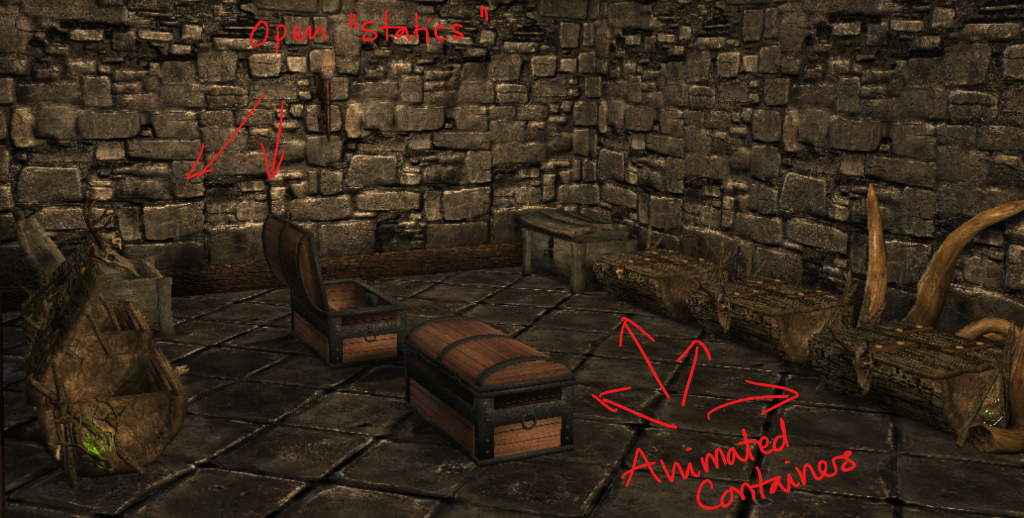
As for my open chest images, those are static ones, not the animated ones. In game, there's one open static chest (not containers), but as a modders' resource thing I'm adding open versions of the chest replacers I'm making. They use all the same bits anyway. Except for the collision part.
Edit:
All of them:
And no, I don't think I need to worry about parentling. I don't seem to need to worry about whether I made each part of the chest one object or several pieces either, it all seems to settle itself when I copy them into nifskope. That's sort of where the whole structure already is anyway.
As for my open chest images, those are static ones, not the animated ones. In game, there's one open static chest (not containers), but as a modders' resource thing I'm adding open versions of the chest replacers I'm making. They use all the same bits anyway. Except for the collision part.
Edit:
All of them:
Any an all misspellings are henceforth blamed on the cats.
Last edit: 09 Feb 2025 22:05 by Charlotte.
Please Log in or Create an account to join the conversation.
09 Feb 2025 22:31 #53561
by Valence
Replied by Valence on topic Adventures across the 3rd dimension
They look fantastic when you see them in context! 
And that makes more sense having fully open statics. I understand now.
That's odd though. If you can put them all as one object then the origin/translations of separate versions wouldn't matter at all. Does this mean that the Ninodes have an "envelope" like bones and the mesh has to intersect that?
Or does it automatically separate unlinked meshes?
This is confusing.
And that makes more sense having fully open statics. I understand now.
I don't seem to need to worry about whether I made each part of the chest one object or several pieces either, it all seems to settle itself when I copy them into nifskope.
That's odd though. If you can put them all as one object then the origin/translations of separate versions wouldn't matter at all. Does this mean that the Ninodes have an "envelope" like bones and the mesh has to intersect that?
Or does it automatically separate unlinked meshes?
This is confusing.
Please Log in or Create an account to join the conversation.
09 Feb 2025 22:36 #53562
by Charlotte
Any an all misspellings are henceforth blamed on the cats.
Replied by Charlotte on topic Adventures across the 3rd dimension
The Lid ninode contains the lid parts and the latch ninode, the latch ninode contains the latch mesh. So it's a kind of nested structure. The lid ninode transform affects the latch, but all the other separate lid pieces can be translated any which way without affecting each other. Make sense? 
Any an all misspellings are henceforth blamed on the cats.
Please Log in or Create an account to join the conversation.
09 Feb 2025 23:14 #53564
by Valence
Replied by Valence on topic Adventures across the 3rd dimension
But if you export it all as one object from Blender how does it know?
Clearly this is all due to my ignorance of the import/export process and I shouldn't worry about it.
Clearly this is all due to my ignorance of the import/export process and I shouldn't worry about it.
Please Log in or Create an account to join the conversation.
Facebook Feed
Member Statistics
- Total Users: 226
- Latest User: norajohnson
- Online Users: 3
- Users Today: 0
- Users this Week: 0
- Users this Month: 0
- Users this Year: 0
NOTE! This site uses cookies and similar technologies.
By using this website you agree to the use of cookies and related data storage as detailed in our privacy policy. Learn more
I understand
Site design Mad Hamster Studios. All content is protected under © and the property of the various contributers and not to be reproduced without permission of the creator.