




- Posts: 11987
- Thank you received: 514


June challenge here: The Leprechaun
May entries - Submarine
The shoutbox is unavailable to non-members
Shoutbox History
 System
Auto message: A new forum post has been submitted. You can view the message here
17 hours ago
System
Auto message: A new forum post has been submitted. You can view the message here
19 hours ago
System
Auto message: A new forum post has been submitted. You can view the message here
19 hours ago
System
Auto message: A new forum post has been submitted. You can view the message here
19 hours ago
Adventures across the 3rd dimension
29 Sep 2024 11:11 #51887
by Valence
Replied by Valence on topic Adventures across the 3rd dimension
What method are you using to make new holes?
If the walls are indeed made of unconnected planks/logs then I'm not sure how the knife would work with that.
It might be better to use the Boolean modifier and create a window-hole-sized cube to subtract from the wall.
And I dread to think what all of this is doing to the UVs.
If the walls are indeed made of unconnected planks/logs then I'm not sure how the knife would work with that.
It might be better to use the Boolean modifier and create a window-hole-sized cube to subtract from the wall.
And I dread to think what all of this is doing to the UVs.
Please Log in or Create an account to join the conversation.


29 Sep 2024 13:17 - 29 Sep 2024 13:18 #51890
by Charlotte
Any an all misspellings are henceforth blamed on the cats.
Replied by Charlotte on topic Adventures across the 3rd dimension
Uhm, I think I addressed that in my previous post. Or did I forgot to post it? 
I can't use boolean, because the wall isn't a solid shape. And I used the knife tool. Maybe I need to adjust one "log" at a time... But I think the UV's are fine. I'll have to check, of course. Once things look decent. If that ever happens.
After filling in the empty windows it was fine, Blender just filled in the corresponding texture area for me.
I did come here to complain about how every online answer/tutorial assumes you want to make a ROUND hole. (For some techniques it doesn't matter, but it still bugs me...)
Edit: It seems you never saw my previous edit.
I can't use boolean, because the wall isn't a solid shape. And I used the knife tool. Maybe I need to adjust one "log" at a time...
But I think the UV's are fine. I'll have to check, of course. Once things look decent. If that ever happens.After filling in the empty windows it was fine, Blender just filled in the corresponding texture area for me.
I did come here to complain about how every online answer/tutorial assumes you want to make a ROUND hole.
(For some techniques it doesn't matter, but it still bugs me...)Edit: It seems you never saw my previous edit.
Any an all misspellings are henceforth blamed on the cats.
Last edit: 29 Sep 2024 13:18 by Charlotte.
Please Log in or Create an account to join the conversation.
29 Sep 2024 14:24 - 29 Sep 2024 14:27 #51891
by Valence
Replied by Valence on topic Adventures across the 3rd dimension
I think the edit came after my post. 
You can do a sort-of Boolean within edit mode even with planes.
Go into edit mode. Add a cube and put it where the window will be. Make sure the cube is selected and nothing else and then goto the menu and select Face>Intersect(Knife)
If you then select and delete the cube it should leave some faces in the wall where the window is. You can then delete those faces.
Maybe.
Edit: And to select only the cube in edit mode just select one face/edge/vertex and press L for Select Linked. This is also good for finding out which parts of your object are connected/unconnected.
You can do a sort-of Boolean within edit mode even with planes.
Go into edit mode. Add a cube and put it where the window will be. Make sure the cube is selected and nothing else and then goto the menu and select Face>Intersect(Knife)
If you then select and delete the cube it should leave some faces in the wall where the window is. You can then delete those faces.
Maybe.
Edit: And to select only the cube in edit mode just select one face/edge/vertex and press L for Select Linked. This is also good for finding out which parts of your object are connected/unconnected.
Last edit: 29 Sep 2024 14:27 by Valence.
Please Log in or Create an account to join the conversation.
29 Sep 2024 16:58 #51892
by Charlotte
Any an all misspellings are henceforth blamed on the cats.
Replied by Charlotte on topic Adventures across the 3rd dimension
Oh yeah I think one of the answers I found mentioned the cube thing (but with a sphere or cylinder because holes have to be round) but I didn't really understand what they were saying.
I'm not sure how this would make a difference compared to the knife cutting tool thingy but it's worth a try. And if that doesn't work I'll see if I can make all the triangles into squares before cutting and then retriangulate... Not sure that would work either but some of the guides mentioned things having to be quads, so...
I'm not sure how this would make a difference compared to the knife cutting tool thingy but it's worth a try. And if that doesn't work I'll see if I can make all the triangles into squares before cutting and then retriangulate... Not sure that would work either but some of the guides mentioned things having to be quads, so...
Any an all misspellings are henceforth blamed on the cats.
Please Log in or Create an account to join the conversation.
29 Sep 2024 18:51 - 29 Sep 2024 19:22 #51894
by Charlotte
Any an all misspellings are henceforth blamed on the cats.
Replied by Charlotte on topic Adventures across the 3rd dimension
OK so... The intersect face thing worked in a way, but it still messed up the wall so I guess I do need to go over the entire wall and make all the triangles into quads instead. I wonder if there's a quick way to do that?
Edit: Nope. I mean yes, there was a quick "Triangles to quads" option, but it didn't help. The wall is irreparably screwed up anyway. *sigh*
Edit 2:
Ripping vertices don't seem to be doing what I thought it would be doing.
(Actually it doesn't seem to be doing anything...)
Edit: Nope. I mean yes, there was a quick "Triangles to quads" option, but it didn't help. The wall is irreparably screwed up anyway. *sigh*
Edit 2:
Ripping vertices don't seem to be doing what I thought it would be doing.
(Actually it doesn't seem to be doing anything...)
Any an all misspellings are henceforth blamed on the cats.
Last edit: 29 Sep 2024 19:22 by Charlotte.
Please Log in or Create an account to join the conversation.
29 Sep 2024 19:31 #51895
by Charlotte
Any an all misspellings are henceforth blamed on the cats.
Replied by Charlotte on topic Adventures across the 3rd dimension
I don't suppose there's a way to copy a set of vertices and move them sideways relative the the originals while simultaneously creating new faces between the two sets? (I was hoping rip and fill would do that but it just seemed to move the selected vertices: alternately I was hoping I could make a gap by duplicating a row of vertices and then just fill the parts of the gap I wanted filled... but while I can make new vertices, they're not connected to the existing mesh so I'd still have to fiddle with every one of these stupid faces...  )
)
) Any an all misspellings are henceforth blamed on the cats.
Please Log in or Create an account to join the conversation.
29 Sep 2024 19:41 #51896
by Valence
Replied by Valence on topic Adventures across the 3rd dimension
I don't understand what Rip does. I've tried it. I don't understand it.
I was hoping Bevel vertices would do the thing you wanted. But it doesn't.
Going back a few steps now... Does the knife tool work for you?
When I tried it earlier with my "made up" wall it wouldn't cut across the unconnected parts but I've just tried it again now and it DID work.

If it does work then you can cut a window and keep it all quads by extending the cuts to the edge of the wall and then just deleting the inner faces like this...
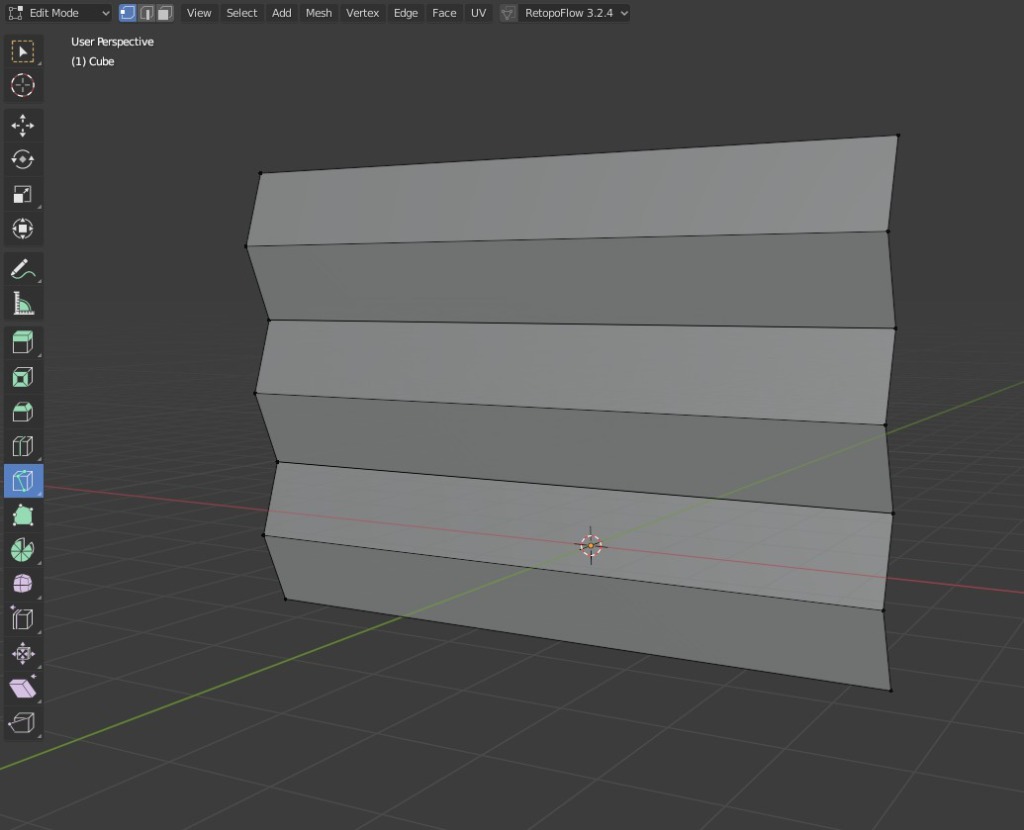
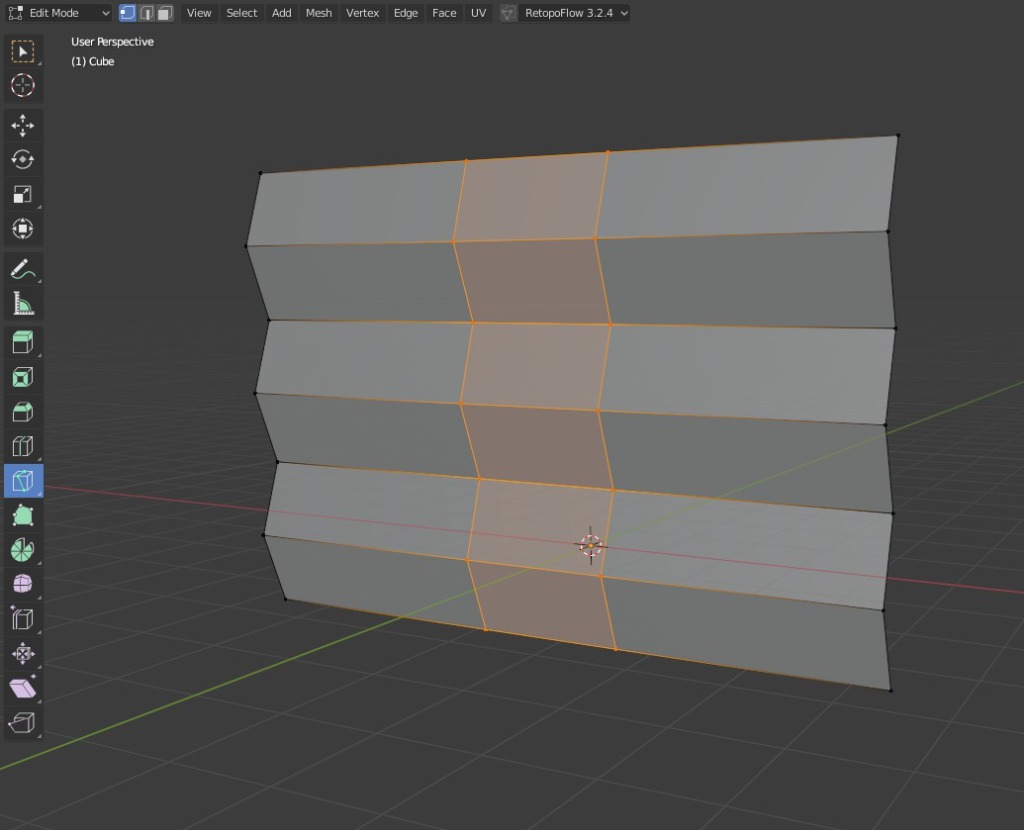
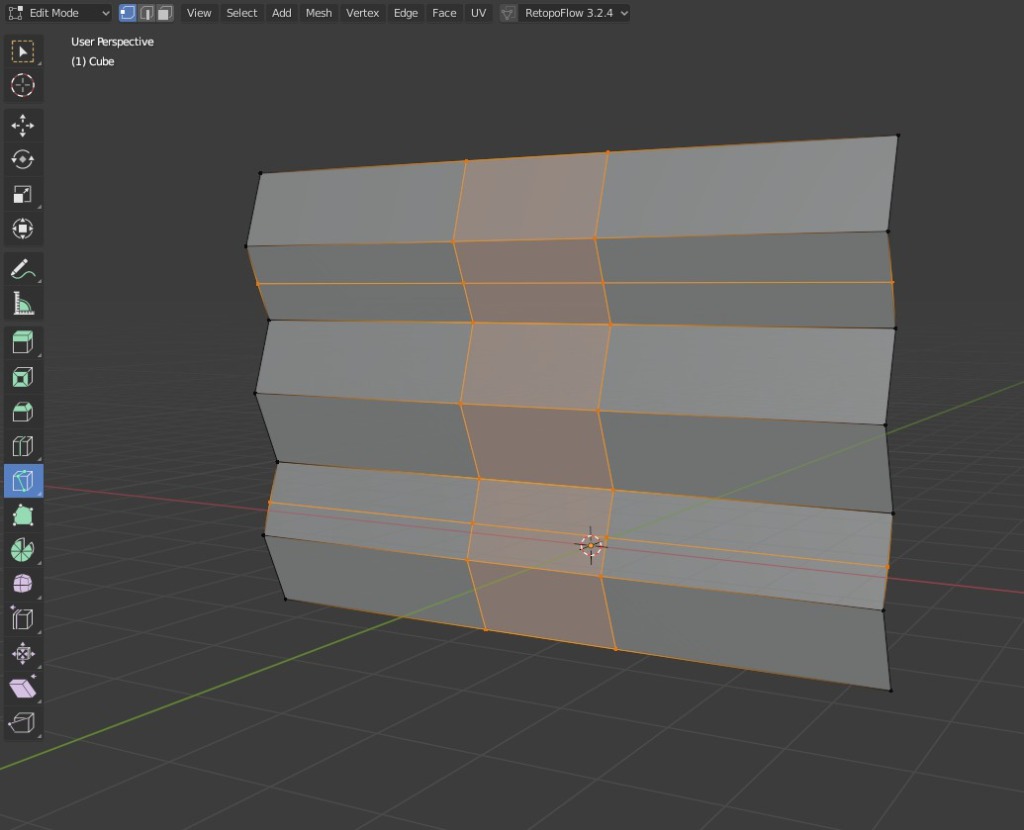
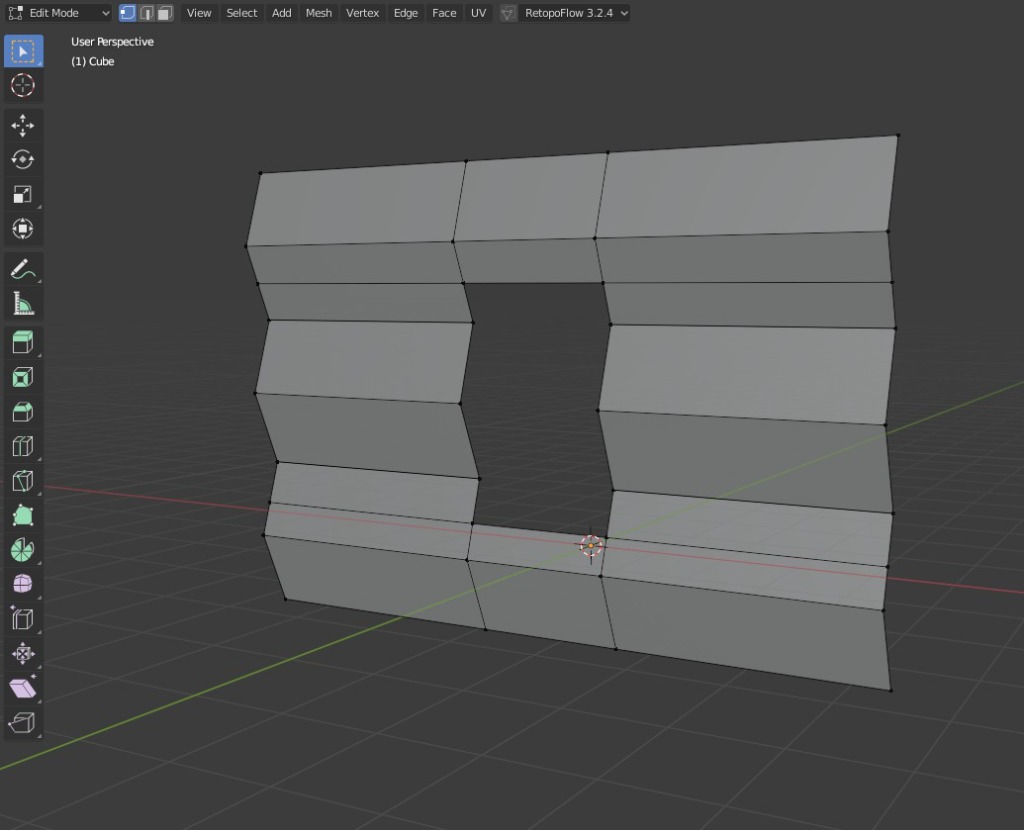
and it kept the shading too.
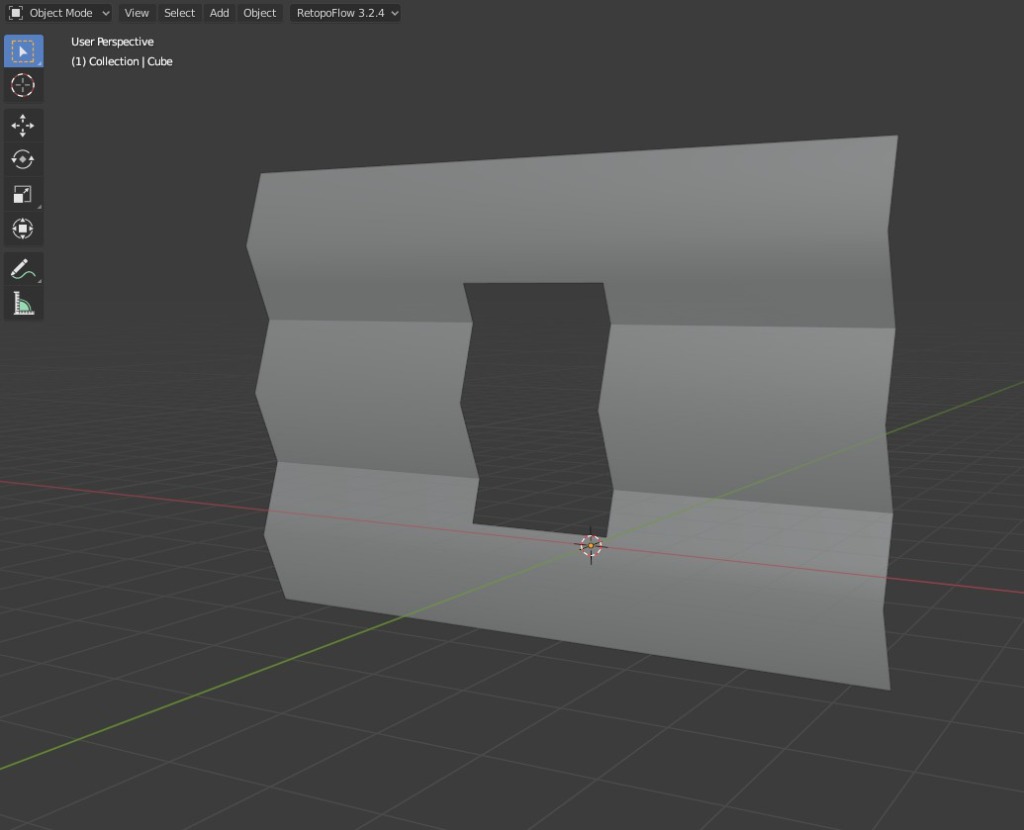
And like before, this is three unconnected "logs/planks" in a single Object.
I was hoping Bevel vertices would do the thing you wanted. But it doesn't.
Going back a few steps now... Does the knife tool work for you?
When I tried it earlier with my "made up" wall it wouldn't cut across the unconnected parts but I've just tried it again now and it DID work.
If it does work then you can cut a window and keep it all quads by extending the cuts to the edge of the wall and then just deleting the inner faces like this...
and it kept the shading too.
And like before, this is three unconnected "logs/planks" in a single Object.
Please Log in or Create an account to join the conversation.
29 Sep 2024 19:46 #51897
by Charlotte
Any an all misspellings are henceforth blamed on the cats.
Replied by Charlotte on topic Adventures across the 3rd dimension
I've tried that several times. The knife usually works (though at one point it would only cut through half of the intersected lines??? ) but every time I use it it messes up the shading. I tried just selecting the edge vertices and moving them (there are two lines in the corners, so the edge was still there) and that worked, so basically keeping all the vertices in the exact same spots seem to work, but making new vertices on the existing edges/lines doesn't... which is why I was hoping I could duplicate those selected edge vertices and move them in place AND have the spaces between them auto filled but I guess I can just get the vertices and then need to redo all the faces? Which risks upsetting the shading again anyhow.
Any an all misspellings are henceforth blamed on the cats.
Please Log in or Create an account to join the conversation.
29 Sep 2024 20:18 #51898
by Valence
Replied by Valence on topic Adventures across the 3rd dimension
This is becoming hard to follow again. 
Can you just subdivide the edge to make the new vertices?
Or maybe use the rip and extend (Alt-D) with the edge vertices?
Sorry if this is very wrong. Like I said it's hard to visualise from just descriptions.
Can you just subdivide the edge to make the new vertices?
Or maybe use the rip and extend (Alt-D) with the edge vertices?
Sorry if this is very wrong. Like I said it's hard to visualise from just descriptions.
Please Log in or Create an account to join the conversation.
29 Sep 2024 20:55 #51899
by Charlotte
Any an all misspellings are henceforth blamed on the cats.
Replied by Charlotte on topic Adventures across the 3rd dimension
What exactly does Alt + D dothat rip doesn't?
If I subdivide the edges the divisions end up way to the side of where the window is and moving them would once again upset the shading... It was the very first thing I tried I think. I can't even remember anymore
If I subdivide the edges the divisions end up way to the side of where the window is and moving them would once again upset the shading... It was the very first thing I tried
I think. I can't even remember anymore Any an all misspellings are henceforth blamed on the cats.
Please Log in or Create an account to join the conversation.
Facebook Feed
Member Statistics
- Total Users: 226
- Latest User: norajohnson
- Online Users: 1
- Users Today: 0
- Users this Week: 0
- Users this Month: 0
- Users this Year: 0
Members Online
NOTE! This site uses cookies and similar technologies.
By using this website you agree to the use of cookies and related data storage as detailed in our privacy policy. Learn more
I understand
Site design Mad Hamster Studios. All content is protected under © and the property of the various contributers and not to be reproduced without permission of the creator.