




- Posts: 11987
- Thank you received: 514


June challenge here: The Leprechaun
May entries - Submarine
The shoutbox is unavailable to non-members
Shoutbox History
 System
Auto message: A new forum post has been submitted. You can view the message here
17 hours ago
System
Auto message: A new forum post has been submitted. You can view the message here
19 hours ago
System
Auto message: A new forum post has been submitted. You can view the message here
19 hours ago
System
Auto message: A new forum post has been submitted. You can view the message here
19 hours ago
Adventures across the 3rd dimension
21 Sep 2024 18:40 #51795
by Valence
Replied by Valence on topic Adventures across the 3rd dimension
Yesterday I had the bright idea of creating a load of procedural textures/materials in Blender and saving them all in a single file so that I could access them easily, like the asset browser in later versions. I spent a couple of hours working through tutorials, setting up complex node trees and bumps/displacements on the default cube. It was all going well so I saved the file and felt very smug. 
Went back later to add another one and... they'd all gone. Well, all but one.
Apparently, when saving the blend file, this version of Blender deletes all materials that aren't linked with specific meshes.
It seems I should have duplicated the cube for each new material I created.
Went back later to add another one and... they'd all gone. Well, all but one.
Apparently, when saving the blend file, this version of Blender deletes all materials that aren't linked with specific meshes.
It seems I should have duplicated the cube for each new material I created.
Please Log in or Create an account to join the conversation.


22 Sep 2024 00:01 #51797
by Charlotte

I lay awake half of last night thinking up themes for children's books to add to the orphanage (there's basically only one children's book in Skyrim...) but then I procrastinated all day on actually writing any of it down... And started working on the top floor(s) of the orphanage. Which revealed that there was a distinct shortage of walls that can actually be used, so I had to make a few more versions (I used the "second floor walls" but there are no "interior interior" walls of that kind and none with doorways, also all of them include a ceiling and I wanted to add a small attic which just wasn't possible because of all the little stuff that needs to add up but can only add up one or two ways
Anyway, I just took the existing walls and removed the ceiling bits and saved, and at first they worked. Then one broke. So I fixed that, and the other two broke I knew they wouldn't be "finished" today as I didn't look at collisions etc at all, but it was kind of weird how they'd be there one second and then just turn into a big red sign to show something's wrong (either with mesh or textures). And now it's 2 am  Not sure how that happened
Any an all misspellings are henceforth blamed on the cats.
Replied by Charlotte on topic Adventures across the 3rd dimension
I lay awake half of last night thinking up themes for children's books to add to the orphanage (there's basically only one children's book in Skyrim...) but then I procrastinated all day on actually writing any of it down...
And started working on the top floor(s) of the orphanage. Which revealed that there was a distinct shortage of walls that can actually be used, so I had to make a few more versions (I used the "second floor walls" but there are no "interior interior" walls of that kind and none with doorways, also all of them include a ceiling and I wanted to add a small attic which just wasn't possible because of all the little stuff that needs to add up but can only add up one or two ways Anyway, I just took the existing walls and removed the ceiling bits and saved, and at first they worked. Then one broke. So I fixed that, and the other two broke
I knew they wouldn't be "finished" today as I didn't look at collisions etc at all, but it was kind of weird how they'd be there one second and then just turn into a big red sign to show something's wrong (either with mesh or textures). And now it's 2 am Not sure how that happened Any an all misspellings are henceforth blamed on the cats.
Please Log in or Create an account to join the conversation.
22 Sep 2024 09:20 #51799
by Charlotte

Any an all misspellings are henceforth blamed on the cats.
Replied by Charlotte on topic Adventures across the 3rd dimension
Any an all misspellings are henceforth blamed on the cats.
Please Log in or Create an account to join the conversation.
22 Sep 2024 11:05 #51800
by Valence
Replied by Valence on topic Adventures across the 3rd dimension
Please Log in or Create an account to join the conversation.
22 Sep 2024 12:01 - 22 Sep 2024 12:29 #51801
by Charlotte
And then someone on Discord gave me the advice to convert my things to LE and back again and they magically worked. And then I realised I had been stupid anyway and I have to redo everything. Except one thing that I never had to do at all.
Edit: and now that I've redone it all as well as I can, the textures are still wrong.
I guess I need to check if the UV mapping is different, in Blender...
After a nap
Any an all misspellings are henceforth blamed on the cats.
Replied by Charlotte on topic Adventures across the 3rd dimension
And then someone on Discord gave me the advice to convert my things to LE and back again and they magically worked. And then I realised I had been stupid anyway and I have to redo everything. Except one thing that I never had to do at all.
Edit: and now that I've redone it all as well as I can, the textures are still wrong.
I guess I need to check if the UV mapping is different, in Blender...
After a nap
Any an all misspellings are henceforth blamed on the cats.
Last edit: 22 Sep 2024 12:29 by Charlotte.
Please Log in or Create an account to join the conversation.
22 Sep 2024 16:42 #51802
by Valence

*continues to avoid using that UV stuff*

Replied by Valence on topic Adventures across the 3rd dimension
I guess I need to check if the UV mapping is different, in Blender...
*continues to avoid using that UV stuff*
Please Log in or Create an account to join the conversation.
22 Sep 2024 18:23 - 22 Sep 2024 19:24 #51803
by Charlotte
I realised there were two textures with the same name but 01 and 02 at the end, and I had missed changing the 1 to a 2, which is easily enough done in Nifskope. So I didn't need to use Blender and go through all the fiddling because Blender loses the collision data etc...
Except when I previewed them in CK this time, the texture was rotated 90 degrees
So I have to fix them in Blender anyway. Poop.
Edit: Fixed them, got back in the CK, and realise that another texture was also wrong. Go back and fix that (only nifskope and the SSE/LE/SSE conversions though) and then realise that the doorway that I have now redone a couple of times, is too small and lack the wooden beams on the sides that the other wall pieces have, leaving gaps everywhere.
Might be an easy fix. Might not.
Edit2: Not an easy fix, no...
And it really bugs me that I originally made the doorway wider and with those wooden things that are now missing. And probably slightly taller too. (It's rather baffling why, when I just copied an existing piece and changed textures, it's ever so slightly too small? All pieces are supposed to be the same size! )
Edit3: Turns out I still had the old blend file and could export that bit again so it was a failry easy fix. Except I forgot the shadow bits so I have to do it again. (At least I realised why the shadow went poof, as I was writing this )
Any an all misspellings are henceforth blamed on the cats.
Replied by Charlotte on topic Adventures across the 3rd dimension
I realised there were two textures with the same name but 01 and 02 at the end, and I had missed changing the 1 to a 2, which is easily enough done in Nifskope. So I didn't need to use Blender and go through all the fiddling because Blender loses the collision data etc...
Except when I previewed them in CK this time, the texture was rotated 90 degrees
So I have to fix them in Blender anyway. Poop.
Edit: Fixed them, got back in the CK, and realise that another texture was also wrong. Go back and fix that (only nifskope and the SSE/LE/SSE conversions though) and then realise that the doorway that I have now redone a couple of times, is too small and lack the wooden beams on the sides that the other wall pieces have, leaving gaps everywhere.
Might be an easy fix. Might not.
Edit2: Not an easy fix, no...
And it really bugs me that I originally made the doorway wider and with those wooden things that are now missing. And probably slightly taller too. (It's rather baffling why, when I just copied an existing piece and changed textures, it's ever so slightly too small? All pieces are supposed to be the same size!
)Edit3: Turns out I still had the old blend file and could export that bit again so it was a failry easy fix. Except I forgot the shadow bits so I have to do it again. (At least I realised why the shadow went poof, as I was writing this
) Any an all misspellings are henceforth blamed on the cats.
Last edit: 22 Sep 2024 19:24 by Charlotte.
Please Log in or Create an account to join the conversation.
27 Sep 2024 19:39 - 27 Sep 2024 20:35 #51863
by Charlotte
Any an all misspellings are henceforth blamed on the cats.
Replied by Charlotte on topic Adventures across the 3rd dimension
Why is this happening?
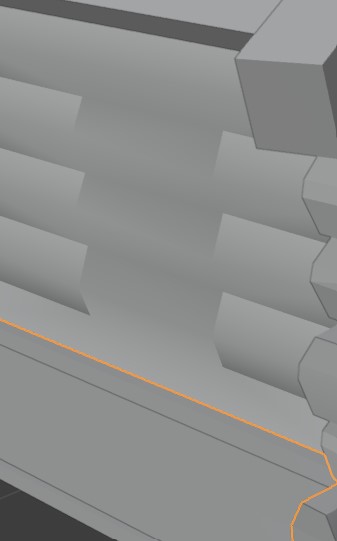
I filled in a window by removing the window mesh and then adjusting the wall mesh by adding new faces where the window once was. I've tried various smooth and flat settings and I've made sure the faces face the right direction and normals don't need to be flipped. I'm out of ideas. You?
Edit: I have now ruined more walls (this time by making holes for windows. Or one hole, but I'll need more windows later...) - I'm now considering whether it would be easier to just rebuild the darn walls from scratch.
I filled in a window by removing the window mesh and then adjusting the wall mesh by adding new faces where the window once was. I've tried various smooth and flat settings and I've made sure the faces face the right direction and normals don't need to be flipped. I'm out of ideas. You?
Edit: I have now ruined more walls (this time by making holes for windows. Or one hole, but I'll need more windows later...) - I'm now considering whether it would be easier to just rebuild the darn walls from scratch.
Any an all misspellings are henceforth blamed on the cats.
Last edit: 27 Sep 2024 20:35 by Charlotte.
Please Log in or Create an account to join the conversation.
27 Sep 2024 20:53 #51864
by Valence
Replied by Valence on topic Adventures across the 3rd dimension
Are there still faces going inwards from the wall at the corners where the window was? 
Please Log in or Create an account to join the conversation.
27 Sep 2024 21:29 #51865
by Charlotte
Any an all misspellings are henceforth blamed on the cats.
Replied by Charlotte on topic Adventures across the 3rd dimension
No, there was only the outwards facing bits. The inwards stuff was part of the window mesh. And trying to line up the vertices from the new hole in the wall exactly with the vertices from another mesh... horrid. Though I guess there are a few ways I could get them to be in the exact same spots. Just not sure I can be bothered if I can't get the rest of it to look right...
For the filled in windows I'm considering getting rid of those faces again and redo the old faces to cover that area too, but that would probably also end up looking wonky somehow.
For the filled in windows I'm considering getting rid of those faces again and redo the old faces to cover that area too, but that would probably also end up looking wonky somehow.
Any an all misspellings are henceforth blamed on the cats.
Please Log in or Create an account to join the conversation.
Facebook Feed
Member Statistics
- Total Users: 226
- Latest User: norajohnson
- Online Users: 1
- Users Today: 0
- Users this Week: 0
- Users this Month: 0
- Users this Year: 0
Members Online
NOTE! This site uses cookies and similar technologies.
By using this website you agree to the use of cookies and related data storage as detailed in our privacy policy. Learn more
I understand
Site design Mad Hamster Studios. All content is protected under © and the property of the various contributers and not to be reproduced without permission of the creator.