




- Posts: 11987
- Thank you received: 514


June challenge here: The Leprechaun
May entries - Submarine
The shoutbox is unavailable to non-members
Shoutbox History
 System
Auto message: A new forum post has been submitted. You can view the message here
17 hours ago
System
Auto message: A new forum post has been submitted. You can view the message here
19 hours ago
System
Auto message: A new forum post has been submitted. You can view the message here
19 hours ago
System
Auto message: A new forum post has been submitted. You can view the message here
19 hours ago
Adventures across the 3rd dimension
27 Sep 2024 23:00 #51866
by Valence
Replied by Valence on topic Adventures across the 3rd dimension
Oh, so the "flat" bit was a separate object?
This is very confusing.
You should be able to get the exact vertices into another mesh/object by selecting them, pressing Shift-D and then clicking Mesh>Separate>Selection from the menu.
This is very confusing.
You should be able to get the exact vertices into another mesh/object by selecting them, pressing Shift-D and then clicking Mesh>Separate>Selection from the menu.
Please Log in or Create an account to join the conversation.


28 Sep 2024 10:17 #51867
by Banj
Replied by Banj on topic Adventures across the 3rd dimension
I'm having a hard time working out from the screenshot what I am looking at and which part is the problem area
Please Log in or Create an account to join the conversation.

28 Sep 2024 10:19 #51868
by Charlotte
Any an all misspellings are henceforth blamed on the cats.
Replied by Charlotte on topic Adventures across the 3rd dimension
Thanks, that was one of the things I considered doing, but I didn't know how, exactly 
Still not sure whether to copy wall vertices to window or window vertices to walls, though.
For the added window I tried "cutting up" the wall as it was basically one long shape with horisontal very thin triangles. So I made new vertices/edges behind the beams of another mesh but the weird shading issues continue anyway. And in that location some faces seem to overlap for some reason, though I think I've replaced those by now. But it feels like I might need to start over from the beginning. Again.
Not sure what you mean by flat bit being a separate object. The window was on the timber wall which is kind of... serrated. The new faces are just tying existing vertices together and following the same serrated topography, but the shading looks off anyway. I realised some of the vertices were "doubles" (lots of those in skyrim meshes, though I'm not sure they're originally there or added by blender) so I merged those just in case but it made no difference for the shading. I've tried flat shading but obviously the original isn't "flat", and I tried smooth shading and I've tried changing the angle of the smooth shading though that doesn't seem to be altered for the original mesh. And changing the angle makes no difference to how much it stands out compared to the rest of the wall.
I've also tried to "recalculate normals on the outside" which didn't make any difference either.
Well, I guess I'll have another go at it, today.
Still not sure whether to copy wall vertices to window or window vertices to walls, though.
For the added window I tried "cutting up" the wall as it was basically one long shape with horisontal very thin triangles. So I made new vertices/edges behind the beams of another mesh but the weird shading issues continue anyway. And in that location some faces seem to overlap for some reason, though I think I've replaced those by now. But it feels like I might need to start over from the beginning. Again.
Not sure what you mean by flat bit being a separate object. The window was on the timber wall which is kind of... serrated. The new faces are just tying existing vertices together and following the same serrated topography, but the shading looks off anyway. I realised some of the vertices were "doubles" (lots of those in skyrim meshes, though I'm not sure they're originally there or added by blender) so I merged those just in case but it made no difference for the shading. I've tried flat shading but obviously the original isn't "flat", and I tried smooth shading and I've tried changing the angle of the smooth shading though that doesn't seem to be altered for the original mesh. And changing the angle makes no difference to how much it stands out compared to the rest of the wall.
I've also tried to "recalculate normals on the outside" which didn't make any difference either.
Well, I guess I'll have another go at it, today.
Any an all misspellings are henceforth blamed on the cats.
Please Log in or Create an account to join the conversation.
28 Sep 2024 19:38 #51873
by Charlotte

no no no no
I think I have to start over. Again.

Any an all misspellings are henceforth blamed on the cats.
Replied by Charlotte on topic Adventures across the 3rd dimension
no no no no
I think I have to start over. Again.
Any an all misspellings are henceforth blamed on the cats.
Please Log in or Create an account to join the conversation.
28 Sep 2024 20:37 #51875
by Valence
Replied by Valence on topic Adventures across the 3rd dimension
Save often. 
Have you worked out the shading thingy yet?
And what I was asking was... Are the faces that you added to fill the window part of the same object as the wall? Cos if they're a separate object then it would be unlikely that the shading would match.
Have you worked out the shading thingy yet?
And what I was asking was... Are the faces that you added to fill the window part of the same object as the wall? Cos if they're a separate object then it would be unlikely that the shading would match.
Please Log in or Create an account to join the conversation.
28 Sep 2024 20:54 - 28 Sep 2024 20:55 #51876
by Charlotte
Any an all misspellings are henceforth blamed on the cats.
Replied by Charlotte on topic Adventures across the 3rd dimension
It's part of the same object, using the vertices already there...
Edit: and it's saving often that leads me to having to start over when I realise I can't undo everything I've tried
Edit: and it's saving often that leads me to having to start over when I realise I can't undo everything I've tried
Any an all misspellings are henceforth blamed on the cats.
Last edit: 28 Sep 2024 20:55 by Charlotte.
Please Log in or Create an account to join the conversation.
28 Sep 2024 21:40 #51882
by Charlotte
Any an all misspellings are henceforth blamed on the cats.
Replied by Charlotte on topic Adventures across the 3rd dimension
I posted a question about the blender face thing in the discord modding guild too, but so far not a single reply 

Well, I seem to have figured out a way to remove the holes in the walls and make it look OK. Though I still need to redo it since I have removed some of the vertices while fiddling with one of the windows
So, I have to start over again, anyway. And I still need to figure out how to add a new hole.
And I'm hungry although I've been eating all evening.
And it's bedtime and I haven't achieved a thing today.
Well, I seem to have figured out a way to remove the holes in the walls and make it look OK. Though I still need to redo it since I have removed some of the vertices while fiddling with one of the windows
So, I have to start over again, anyway. And I still need to figure out how to add a new hole.
And I'm hungry although I've been eating all evening.
And it's bedtime and I haven't achieved a thing today.
Any an all misspellings are henceforth blamed on the cats.
Please Log in or Create an account to join the conversation.
28 Sep 2024 21:45 #51883
by Charlotte
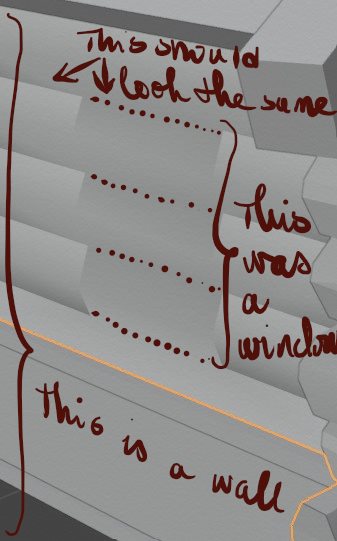
Clear as sausage borth, now, no?
Any an all misspellings are henceforth blamed on the cats.
Replied by Charlotte on topic Adventures across the 3rd dimension
Sorry, I totally missed this post.. Here's a new image to provide masses of clarification.I'm having a hard time working out from the screenshot what I am looking at and which part is the problem area
Clear as sausage borth, now, no?
Any an all misspellings are henceforth blamed on the cats.
Please Log in or Create an account to join the conversation.
28 Sep 2024 22:02 - 28 Sep 2024 22:41 #51884
by Valence
Replied by Valence on topic Adventures across the 3rd dimension
Can you show a similar screenshot in Edit mode?
Also, how are you creating the faces in the window?
Are you selecting vertices and pressing F? Or using a menu option?
Instead of selecting vertices, switch to edge mode by pressing 2 and try selecting opposing edges on the left and right of the window before pressing F and see if that helps. Then you won't be selecting the doubled vertices.
EDIT: And the reason I say this is that I've been messing about trying to create similar objects and the only way I can get these lines between the smooth shaded bits here on your screenshot is to have doubled, unconnected vertices on each of those rows.
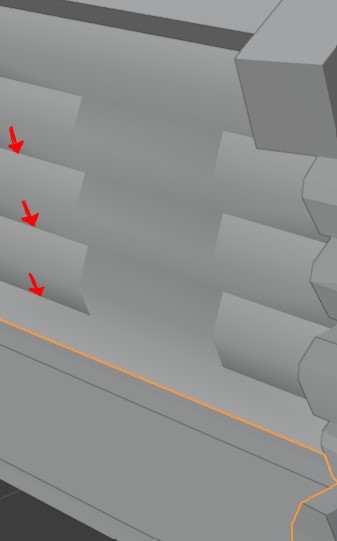
Unless they're doing something to mark those horizontal edges as being sharp, but when I do that then they light up blue in Edit Mode.
EDIT2: Right bear with me as I try to explain better with pics. I've done this thing here which consists of three rows that are not connected to each other, ie. there are double vertices on those horizontals. And I've deleted two faces for the "window".
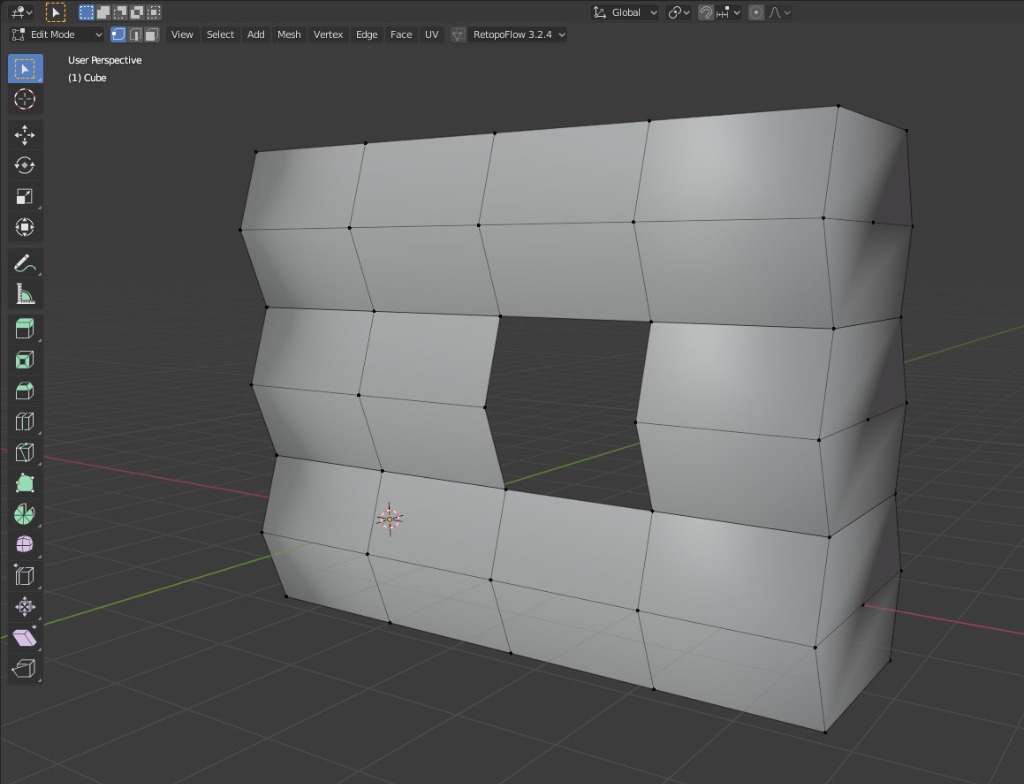
If I try to fill the hole by selecting vertices and pressing F I end up with this...
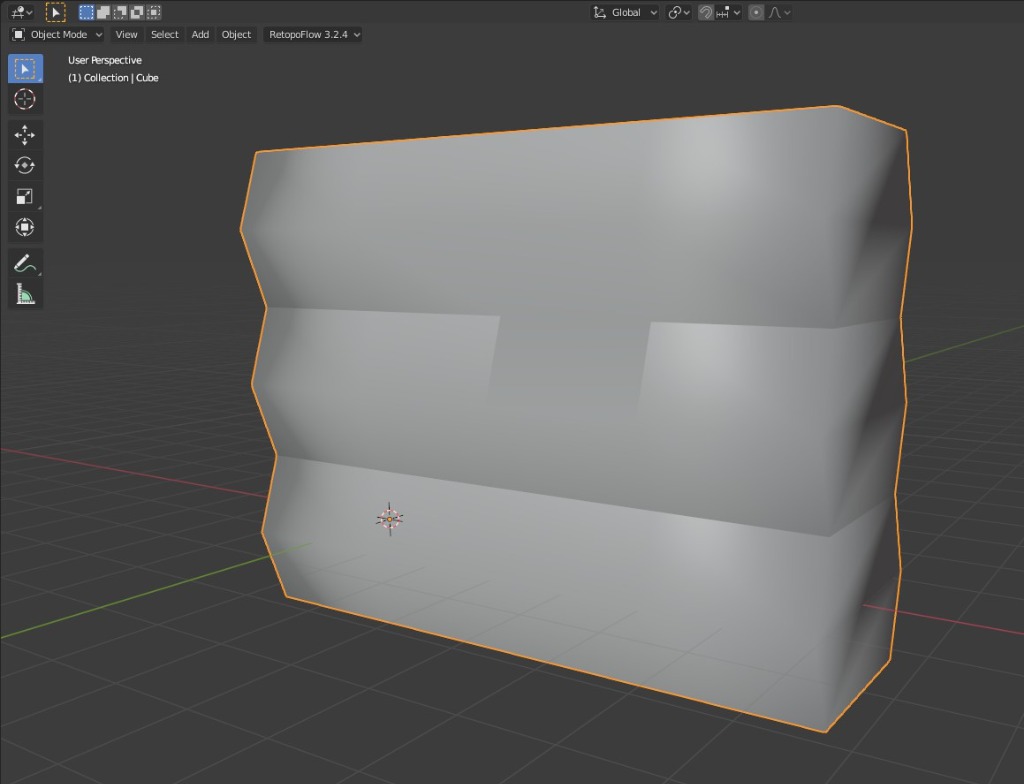
But if I select edges instead of vertices before pressing F like this...
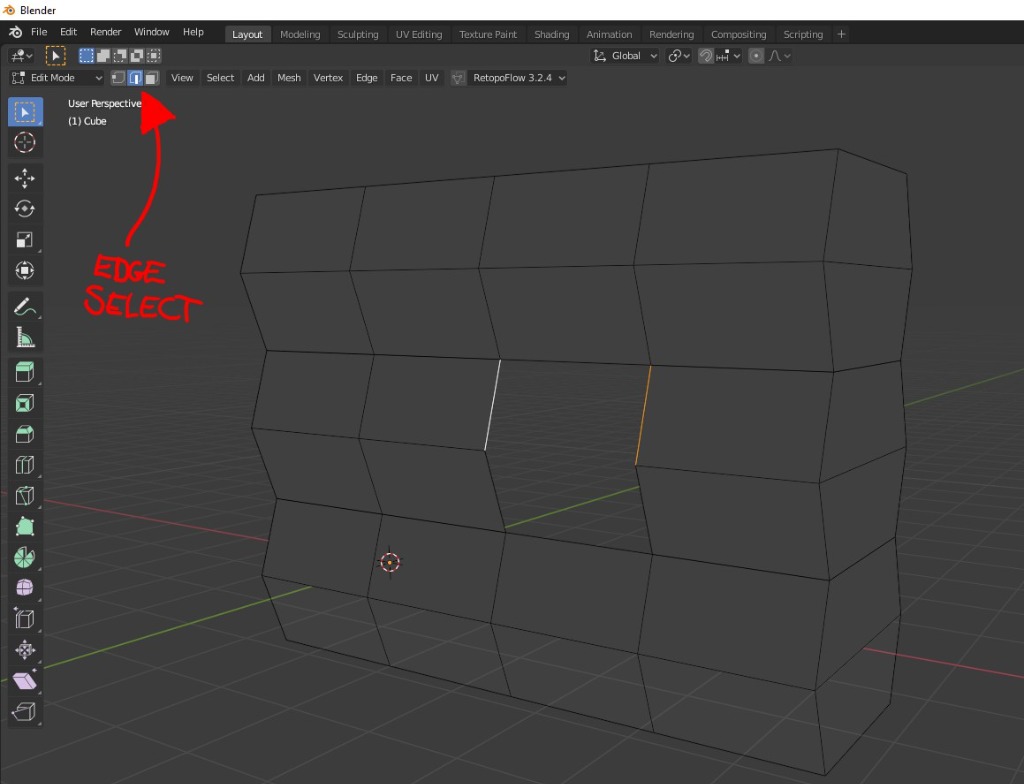
...and do it for each face, then I end up with this which retains the shading of the bits either side.
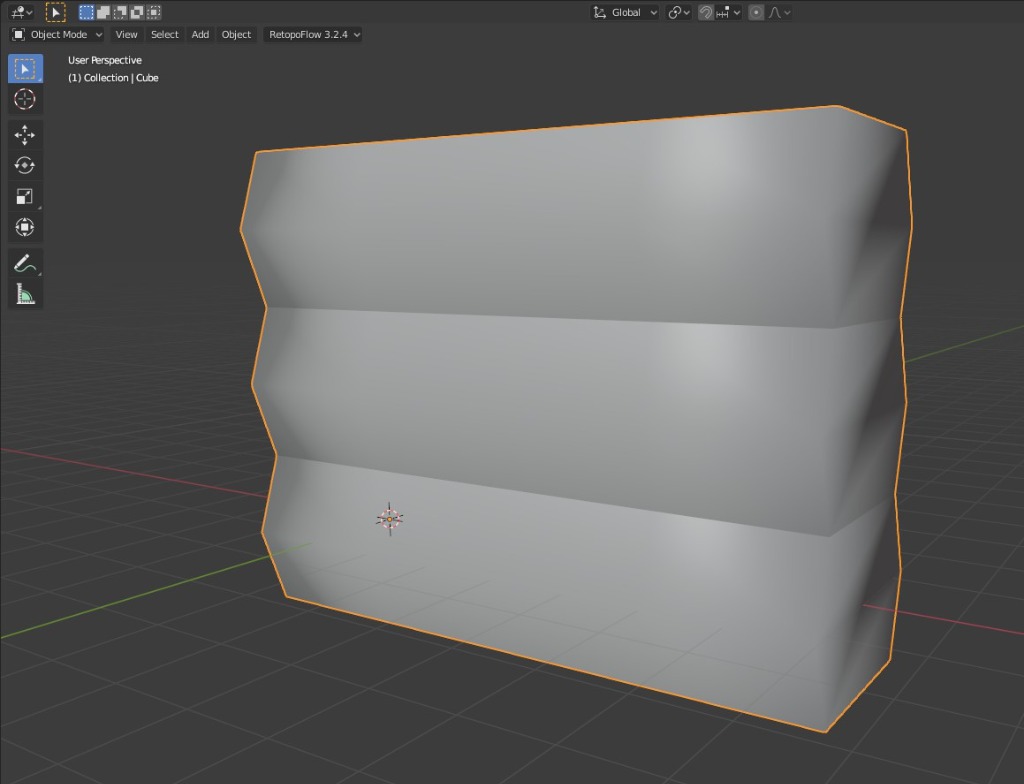
I have no idea if this is the kind of problem you're experiencing but I do suspect those unconnected vertices may be at the heart of the issue.
Also, how are you creating the faces in the window?
Are you selecting vertices and pressing F? Or using a menu option?
Instead of selecting vertices, switch to edge mode by pressing 2 and try selecting opposing edges on the left and right of the window before pressing F and see if that helps. Then you won't be selecting the doubled vertices.
EDIT: And the reason I say this is that I've been messing about trying to create similar objects and the only way I can get these lines between the smooth shaded bits here on your screenshot is to have doubled, unconnected vertices on each of those rows.
Unless they're doing something to mark those horizontal edges as being sharp, but when I do that then they light up blue in Edit Mode.
EDIT2: Right bear with me as I try to explain better with pics. I've done this thing here which consists of three rows that are not connected to each other, ie. there are double vertices on those horizontals. And I've deleted two faces for the "window".
If I try to fill the hole by selecting vertices and pressing F I end up with this...
But if I select edges instead of vertices before pressing F like this...
...and do it for each face, then I end up with this which retains the shading of the bits either side.
I have no idea if this is the kind of problem you're experiencing but I do suspect those unconnected vertices may be at the heart of the issue.
Last edit: 28 Sep 2024 22:41 by Valence.
Please Log in or Create an account to join the conversation.
29 Sep 2024 09:17 - 29 Sep 2024 11:20 #51885
by Charlotte
Any an all misspellings are henceforth blamed on the cats.
Replied by Charlotte on topic Adventures across the 3rd dimension
Sounds like you might be right! I'll try it. Although it's be yet another fix for the holes and not making new windows 
I suspect the issues might be connected though - when I make a new hole for a window I guess those double vertex edge thingies get messed up too.
(Thanks for the images although I actually did get your point from the first explanation )
Edit: This definitely fixed the holes after removed windows, but I'm still struggling with adding a new window. Since the walls aren't solid shapes I can't just use a box and boolean cut-out... I've tried using the "knife" but the moment I start moving things around (and I only managed to make a straight knife cut the last time and I have no idea how I did it... ) the faces/shading gets messed up. Well, I need to go see my dad for a bit so... I'll have to continue this struggle later.
And to think all I wanted was to add a second floor and instead I can't even finish the "small" edits on the first/ground floor.
I suspect the issues might be connected though - when I make a new hole for a window I guess those double vertex edge thingies get messed up too.
(Thanks for the images although I actually did get your point from the first explanation
)Edit: This definitely fixed the holes after removed windows, but I'm still struggling with adding a new window. Since the walls aren't solid shapes I can't just use a box and boolean cut-out... I've tried using the "knife" but the moment I start moving things around (and I only managed to make a straight knife cut the last time and I have no idea how I did it...
) the faces/shading gets messed up. Well, I need to go see my dad for a bit so... I'll have to continue this struggle later. And to think all I wanted was to add a second floor and instead I can't even finish the "small" edits on the first/ground floor.
Any an all misspellings are henceforth blamed on the cats.
Last edit: 29 Sep 2024 11:20 by Charlotte.
Please Log in or Create an account to join the conversation.
Facebook Feed
Member Statistics
- Total Users: 226
- Latest User: norajohnson
- Online Users: 1
- Users Today: 0
- Users this Week: 0
- Users this Month: 0
- Users this Year: 0
Members Online
NOTE! This site uses cookies and similar technologies.
By using this website you agree to the use of cookies and related data storage as detailed in our privacy policy. Learn more
I understand
Site design Mad Hamster Studios. All content is protected under © and the property of the various contributers and not to be reproduced without permission of the creator.