


- Posts: 2247
- Thank you received: 163


August Challenge: Bug Hunt
July entries (entry): Cyber crime
The shoutbox is unavailable to non-members
Shoutbox History
 System
Auto message: A new forum post has been submitted. You can view the message here
23 minutes ago
Important, change your password!
Go here for further information: https://cgartnexus.com/index.php/forum/announcements/840-hacked
Well, this is very, very strange!
- Digital Dave
-
 Topic Author
- Offline
- Platinum Member
-

Less
More
25 Jan 2015 23:38 - 25 Jan 2015 23:43 #8393
by Digital Dave
I get sketchy around pencils! ...
Well, this is very, very strange! was created by Digital Dave
Well, this is a first, and quite screwed up at that! 
Though I didn't have many to begin with, (maybe a dozen folders or so) but apparently I somehow lost ALL my PS brushes! I mean, they are all just gone? ... In fact, the only brushes I still have, are the small group of brushes I usually use, which were still loading up in PS (which is a good thing) but loosing everything else really sucks. I even had to re-save this last brush set, since that packet too was gone?
These are the only brushes I have left now?
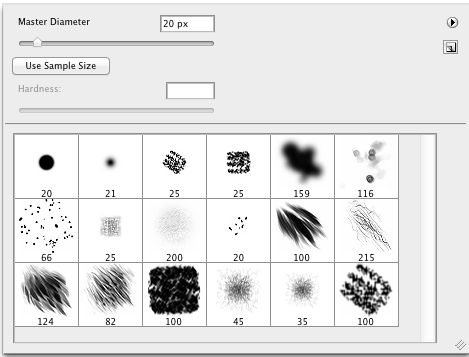
After searching the entire computer, there are no brush set/files to be located??? Has anyone else ever had this happen before? - In case you wondering, I haven't upgraded, installed or made any changes that would have caused this. Though I haven't done any artwork in a while, I'm not sure when this happened? All I know is that they are no longer where they used to be, which was a single folder I had in the sidebar for quick access. And from what I can find through searching, they have not been moved or relocated, but are no longer anywhere on the computer?
Like I said, this really sucks and though I didn't use many of the others much, I did have a few packets set up for special things, such as when I wanted to add some vegetation in the far back of a BG, etc. ... Just very odd.
Though I didn't have many to begin with, (maybe a dozen folders or so) but apparently I somehow lost ALL my PS brushes! I mean, they are all just gone?
... In fact, the only brushes I still have, are the small group of brushes I usually use, which were still loading up in PS (which is a good thing) but loosing everything else really sucks. I even had to re-save this last brush set, since that packet too was gone?These are the only brushes I have left now?
After searching the entire computer, there are no brush set/files to be located??? Has anyone else ever had this happen before? - In case you wondering, I haven't upgraded, installed or made any changes that would have caused this. Though I haven't done any artwork in a while, I'm not sure when this happened? All I know is that they are no longer where they used to be, which was a single folder I had in the sidebar for quick access. And from what I can find through searching, they have not been moved or relocated, but are no longer anywhere on the computer?
Like I said, this really sucks and though I didn't use many of the others much, I did have a few packets set up for special things, such as when I wanted to add some vegetation in the far back of a BG, etc. ... Just very odd.
I get sketchy around pencils! ...
Last edit: 25 Jan 2015 23:43 by Digital Dave.
Please Log in or Create an account to join the conversation.


26 Jan 2015 07:23 #8398
by Charlotte
Any an all misspellings are henceforth blamed on the cats.
Replied by Charlotte on topic Well, this is very, very strange!
Any an all misspellings are henceforth blamed on the cats.
Please Log in or Create an account to join the conversation.

26 Jan 2015 08:23 #8402
by kazky
Replied by kazky on topic Well, this is very, very strange!
I've had it where PS somehow loses settings before, but the brushes have never disappeared of my hard drive. Weird?
Please Log in or Create an account to join the conversation.

26 Jan 2015 19:34 #8417
by Valence
Replied by Valence on topic Well, this is very, very strange!
I've never had brushes disappear but several times Photoshop has corrupted my brush-set files, especially when I use the Preset Manager (is that what it's called?) I'm now super careful and have backup copies of them stored in several directories.
Although I don't know why I bother, unless the picture really requires it I only really use three brushes: Hard Round, Soft Round and Scattering Smudge.
Did it delete all the default brushes too or just your own custom sets?
Although I don't know why I bother, unless the picture really requires it I only really use three brushes: Hard Round, Soft Round and Scattering Smudge.
Did it delete all the default brushes too or just your own custom sets?
Please Log in or Create an account to join the conversation.
- Digital Dave
-
Topic Author
- Offline
- Platinum Member
-
Less
More
- Posts: 2247
- Thank you received: 163
26 Jan 2015 20:38 #8420
by Digital Dave
I get sketchy around pencils! ...
Replied by Digital Dave on topic Well, this is very, very strange!
I honestly have no idea on what could have happened to have caused this? And I've been trying to figure it out. ... Like Kaz stated, I too have had settings lost in PS before, but never whole brush sets. And actually, I had to reset my settings not long ago, when I noticed some of the settings/functions I had in place were no longer working. (But I don't think that could have caused this?)
Valence, ALL brush sets are now gone. - I had about 6 sets (files) I put together, and there were another 6 or so I had downloaded but hadn't fooled with yet. But none of them are anywhere to be found now? I've ran searches on 5 that I know the names to, and nothing shows up on the entire computer? ... Like you stated, I pretty much only use 3 brushes for the most part. Hard round set at 85%, and two of the sponge type brushes shown in the pic above. (the Dark Square and angled square above it) But I did on occasionally grab a brush from one of the sets for either adding some textures, or maybe throwing in some vegetation, usually in the BG. I just find it strange, and don't recall deleting anything in a long time, other then old mail? So I can't fathom how they could have been deleted in error?
Valence, ALL brush sets are now gone. - I had about 6 sets (files) I put together, and there were another 6 or so I had downloaded but hadn't fooled with yet. But none of them are anywhere to be found now? I've ran searches on 5 that I know the names to, and nothing shows up on the entire computer? ... Like you stated, I pretty much only use 3 brushes for the most part. Hard round set at 85%, and two of the sponge type brushes shown in the pic above. (the Dark Square and angled square above it) But I did on occasionally grab a brush from one of the sets for either adding some textures, or maybe throwing in some vegetation, usually in the BG. I just find it strange, and don't recall deleting anything in a long time, other then old mail? So I can't fathom how they could have been deleted in error?
I get sketchy around pencils! ...
Please Log in or Create an account to join the conversation.
- hobbyhorse
-
- Offline
- Junior Member
-

Less
More
- Posts: 132
- Thank you received: 15
28 Jan 2015 03:35 #8488
by hobbyhorse
Replied by hobbyhorse on topic Well, this is very, very strange!
Could it have been caused by an automatic update? Can you do a search for the file extension .abr ( I think that's the brushes)?
Please Log in or Create an account to join the conversation.
- Digital Dave
-
Topic Author
- Offline
- Platinum Member
-
Less
More
- Posts: 2247
- Thank you received: 163
28 Jan 2015 14:00 #8498
by Digital Dave
 I was wondering the same? Or maybe now if it was somehow tied to when I restored my old wacom settings as I mentioned above? Would be nice to know, so I can try to avoid it happening again. But I also plan to start backing up the brush files as well. ... But yep, after searching for those specific file names that I knew, I also searched for simply .abr and that's when I realized they were indeed gone from the computer. I think during the searches, one folder pulled up titled 'Brushes', but was empty. And one titled 'PS Brushes', that had a couple wacom basic or default brushes? (Sorry, presently at work, so trying to remember) ... But that was the only thing that pulled up related to brushes?
I've since searched on-line for anything that might give me some insight, but haven't had any luck. Since I don't move folders and stuff around on my computer much, the chance that I could have accidentally deleted them is pretty slim indeed. Hell, I wish I did, at least I would know what happened!
Oh well? Guess some things will just stay a mystery?
I get sketchy around pencils! ...
Replied by Digital Dave on topic Well, this is very, very strange!
hobbyhorse wrote: Could it have been caused by an automatic update? Can you do a search for the file extension .abr ( I think that's the brushes)?
I was wondering the same? Or maybe now if it was somehow tied to when I restored my old wacom settings as I mentioned above? Would be nice to know, so I can try to avoid it happening again. But I also plan to start backing up the brush files as well. ... But yep, after searching for those specific file names that I knew, I also searched for simply .abr and that's when I realized they were indeed gone from the computer. I think during the searches, one folder pulled up titled 'Brushes', but was empty. And one titled 'PS Brushes', that had a couple wacom basic or default brushes? (Sorry, presently at work, so trying to remember) ... But that was the only thing that pulled up related to brushes?I've since searched on-line for anything that might give me some insight, but haven't had any luck. Since I don't move folders and stuff around on my computer much, the chance that I could have accidentally deleted them is pretty slim indeed. Hell, I wish I did, at least I would know what happened!
Oh well? Guess some things will just stay a mystery?
I get sketchy around pencils! ...
Please Log in or Create an account to join the conversation.
- hobbyhorse
-
- Offline
- Junior Member
-
Less
More
- Posts: 132
- Thank you received: 15
29 Jan 2015 15:23 #8544
by hobbyhorse
Replied by hobbyhorse on topic Well, this is very, very strange!
I would think it would be pretty hard to accidentally delete them and all the libraries that are part of PS, but stranger things have happened.
Please Log in or Create an account to join the conversation.
- Digital Dave
-
Topic Author
- Offline
- Platinum Member
-
Less
More
- Posts: 2247
- Thank you received: 163
30 Jan 2015 00:25 #8558
by Digital Dave
I get sketchy around pencils! ...
Replied by Digital Dave on topic Well, this is very, very strange!
Yeah, that was my thinking too. I can't see how they could have been accidentally deleted.
I get sketchy around pencils! ...
Please Log in or Create an account to join the conversation.
Facebook Feed
Member Statistics
- Total Users: 226
- Latest User: norajohnson
- Online Users: 5
- Users Today: 0
- Users this Week: 0
- Users this Month: 0
- Users this Year: 0
NOTE! This site uses cookies and similar technologies.
By using this website you agree to the use of cookies and related data storage as detailed in our privacy policy. Learn more
I understand
Site design Mad Hamster Studios. All content is protected under © and the property of the various contributers and not to be reproduced without permission of the creator.