


- Posts: 366
- Thank you received: 33


The shoutbox is unavailable to non-members
Shoutbox History
 System
Auto message: A new forum post has been submitted. You can view the message here
20 hours ago
I now have a Valhäst or hast as they decided to call them. "Whalehaste"?  I did not name mine Valence, either. It did not seem to fit.
I did not name mine Valence, either. It did not seem to fit.
22 hours ago
Important, change your password!
Go here for further information: https://cgartnexus.com/index.php/forum/announcements/840-hacked
CGAN Nov. 2014 Challenge: Zombie Proof House, WIPs
- CherryGraphics
-

- Offline
- Junior Member
-

Less
More
18 Nov 2014 07:15 #7241
by CherryGraphics
Replied by CherryGraphics on topic CGAN Nov. 2014 Challenge: Zombie Proof House, WIPs
Valence this is a nice start  It's good to see one member trying to beat this challenge. ^^ I thought about it myself but I always just have sketchy ideas in mind to keep the zombies out of the house ....
  don't know if I'm able to push them a bit further.
It's good to see one member trying to beat this challenge. ^^ I thought about it myself but I always just have sketchy ideas in mind to keep the zombies out of the house .... don't know if I'm able to push them a bit further. Please Log in or Create an account to join the conversation.

18 Nov 2014 08:31 #7242
by Charlotte
Any an all misspellings are henceforth blamed on the cats.
Replied by Charlotte on topic CGAN Nov. 2014 Challenge: Zombie Proof House, WIPs
try!
Any an all misspellings are henceforth blamed on the cats.
Please Log in or Create an account to join the conversation.

18 Nov 2014 12:39 #7243
by Valence
Replied by Valence on topic CGAN Nov. 2014 Challenge: Zombie Proof House, WIPs
Even though it's gone a bit quiet in this thread I am still working on this but progress is very slow indeed. Seeing as I'm not very good at this kind of thing I'm having to learn some new techniques as I go along and this has led to some wrong decisions that forced me to go back to previous saved versions. One step forward, two steps back etc. But it's coming along (slowly) and I'll try and post another wip when I've corrected some embarrassing perspective gaffes.
And it now looks more like Lego than Minecraft.
And it now looks more like Lego than Minecraft.
Please Log in or Create an account to join the conversation.
18 Nov 2014 20:32 #7245
by Charlotte

Any an all misspellings are henceforth blamed on the cats.
Replied by Charlotte on topic CGAN Nov. 2014 Challenge: Zombie Proof House, WIPs
Any an all misspellings are henceforth blamed on the cats.
Please Log in or Create an account to join the conversation.
19 Nov 2014 19:48 - 20 Nov 2014 01:12 #7247
by Valence
Replied by Valence on topic CGAN Nov. 2014 Challenge: Zombie Proof House, WIPs
So, here goes the next WIP. It's still not up to the standard I'd like but as I said before I am learning some new stuff as I go, which is always good regardless of the quality of the outcome. And as such I may as well share what I've learned:
1: Square brush. This sounds a bit silly, I know, but I am a slave to my Basic Round brushes in Photoshop and when you're trying to paint edges and corners they really don't do the job.
But even with the square brush I still find it hard to do really detailed work in perspective. After much reading of magazines and searching videos on YouTube I stumbled across my next tip. (I did watch one really good video that I was going to link to but now I can't find it. If I do locate it again I'll edit the link in afterwards.)
2: Paint the building details (ie doors, windows, bricks, texture etc) on a new layer and (this is the good bit) paint them flat as if you're looking straight at them. Then transform this layer into the correct perspective and merge down. It allows you to paint nice details and keep strong horizontal and vertical edges and helps you to integrate it into the three-dimensional environment. One downside of this is that you can end up with something that looks like a 10-year old, pre-bumpmapping video game (You'll see what I mean when you look at the picture) so it's important to go back in and paint some more detail on top after transforming and just keep on layering the texture.
3: The third tip is to use layers. I know everyone seems to do this anyway but I'm one of those people who paints mostly on just one base layer apart from odd exceptions when I know I'm gonna have to move something around.
4: The fourth thing I've learnt from this is when you're doing architecture and complex city/street scenes you really have to plan ahead. And again, I'm sure professional people do this already but I always just tend to get stuck in with the doodling and sketching and "see what happens". And so, if I were starting this from scratch I think I'd probably set it all out in Sketch-Up or Blender and use that as a framework for my painting. But I'm not painting it from scratch at this late stage so I'll just have to muddle along and try to correct things as I go.
And so... Here's the thing.
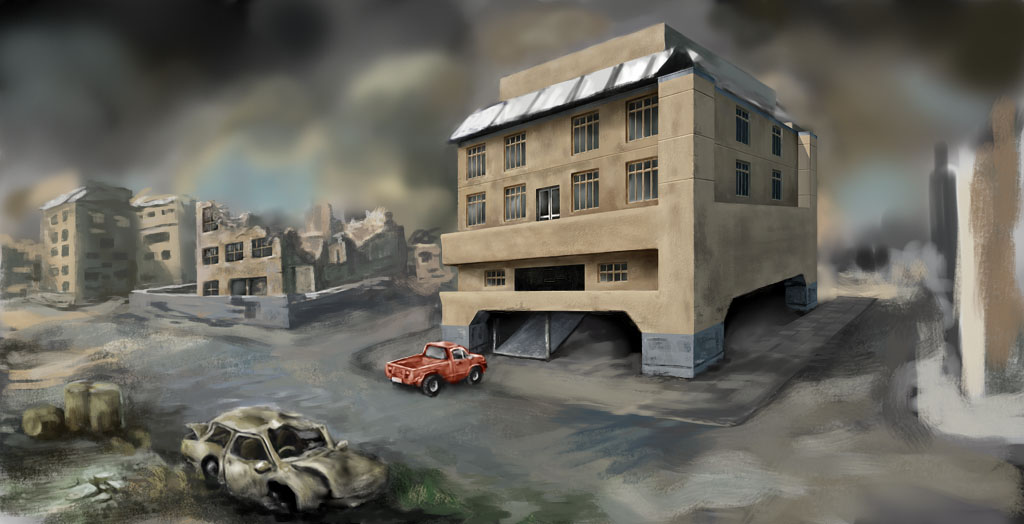
There's much more detail to put in and I'm not sure how much of that I'll achieve in the time but I'll give it a go. Also note that I deliberately did a very wide picture knowing that I could always crop it down later to emphasize the good (?) bits (I remembered how well it worked in the last challenge!) The little pick-up truck looks very ropey at the moment so I think I'll enlarge it to paint it at a higher resolution and then shrink it back down. I need to add some streetlights and posts and cables and stuff just to "dress the set" as it were and also put the solar panels in again (I've done them once but had to take them out for a little perspective tweak.)
And what else... Yeah, I'm not too happy with the lighting and sky. It worked OK in the first few hours but now I think it needs a little more drama ... somehow. And finally when I do get nearer the end I want to overlay some blueprint-style graphics and floating text to help explain the features of the building.
1: Square brush. This sounds a bit silly, I know, but I am a slave to my Basic Round brushes in Photoshop and when you're trying to paint edges and corners they really don't do the job.
But even with the square brush I still find it hard to do really detailed work in perspective. After much reading of magazines and searching videos on YouTube I stumbled across my next tip. (I did watch one really good video that I was going to link to but now I can't find it. If I do locate it again I'll edit the link in afterwards.)
2: Paint the building details (ie doors, windows, bricks, texture etc) on a new layer and (this is the good bit) paint them flat as if you're looking straight at them. Then transform this layer into the correct perspective and merge down. It allows you to paint nice details and keep strong horizontal and vertical edges and helps you to integrate it into the three-dimensional environment. One downside of this is that you can end up with something that looks like a 10-year old, pre-bumpmapping video game (You'll see what I mean when you look at the picture) so it's important to go back in and paint some more detail on top after transforming and just keep on layering the texture.
3: The third tip is to use layers. I know everyone seems to do this anyway but I'm one of those people who paints mostly on just one base layer apart from odd exceptions when I know I'm gonna have to move something around.
4: The fourth thing I've learnt from this is when you're doing architecture and complex city/street scenes you really have to plan ahead. And again, I'm sure professional people do this already but I always just tend to get stuck in with the doodling and sketching and "see what happens". And so, if I were starting this from scratch I think I'd probably set it all out in Sketch-Up or Blender and use that as a framework for my painting. But I'm not painting it from scratch at this late stage so I'll just have to muddle along and try to correct things as I go.
And so... Here's the thing.
There's much more detail to put in and I'm not sure how much of that I'll achieve in the time but I'll give it a go. Also note that I deliberately did a very wide picture knowing that I could always crop it down later to emphasize the good (?) bits (I remembered how well it worked in the last challenge!) The little pick-up truck looks very ropey at the moment so I think I'll enlarge it to paint it at a higher resolution and then shrink it back down. I need to add some streetlights and posts and cables and stuff just to "dress the set" as it were and also put the solar panels in again (I've done them once but had to take them out for a little perspective tweak.)
And what else... Yeah, I'm not too happy with the lighting and sky. It worked OK in the first few hours but now I think it needs a little more drama ... somehow. And finally when I do get nearer the end I want to overlay some blueprint-style graphics and floating text to help explain the features of the building.
Last edit: 20 Nov 2014 01:12 by Valence.
Please Log in or Create an account to join the conversation.
19 Nov 2014 21:58 - 19 Nov 2014 22:01 #7248
by Valence
Replied by Valence on topic CGAN Nov. 2014 Challenge: Zombie Proof House, WIPs
I've now found that video I mentioned so here's the link.
Even though the isometric game-art it portrays is different from the perspective concept style I was attempting I was still fascinated by the transform techniques used and the end result is fantastic (and way beyond anything I'm going to achieve.)
Hmm won't play on my tablet so I'll try a CLICKY as well.
Even though the isometric game-art it portrays is different from the perspective concept style I was attempting I was still fascinated by the transform techniques used and the end result is fantastic (and way beyond anything I'm going to achieve.)
Hmm won't play on my tablet so I'll try a CLICKY as well.
Last edit: 19 Nov 2014 22:01 by Valence.
The following user(s) said Thank You: Charlotte
Please Log in or Create an account to join the conversation.
20 Nov 2014 18:15 #7262
by Charlotte
Any an all misspellings are henceforth blamed on the cats.
Replied by Charlotte on topic CGAN Nov. 2014 Challenge: Zombie Proof House, WIPs
I think it's really shaping up Valence and it's great to read all your thoughts and insights as well! And thanks for the video (it played on my desktop 'puter) that was real fun to see. It looks so easy! 
Any an all misspellings are henceforth blamed on the cats.
Please Log in or Create an account to join the conversation.

20 Nov 2014 19:22 - 20 Nov 2014 20:01 #7266
by Banj
On mine, clicking on Youtube videos embedded on the forum opens the Youtube app and they play directly in there.
Replied by Banj on topic CGAN Nov. 2014 Challenge: Zombie Proof House, WIPs
Valence wrote: Hmm won't play on my tablet
On mine, clicking on Youtube videos embedded on the forum opens the Youtube app and they play directly in there.
Last edit: 20 Nov 2014 20:01 by Charlotte. Reason: Banj can't quote
Please Log in or Create an account to join the conversation.
20 Nov 2014 20:32 #7271
by Valence
Twas browser nonsense at my end.
Replied by Valence on topic CGAN Nov. 2014 Challenge: Zombie Proof House, WIPs
Banj wrote:
Valence wrote: Hmm won't play on my tablet
On mine, clicking on Youtube videos embedded on the forum opens the Youtube app and they play directly in there.
Twas browser nonsense at my end.
Please Log in or Create an account to join the conversation.
- Digital Dave
-
- Offline
- Platinum Member
-

Less
More
- Posts: 2247
- Thank you received: 163
21 Nov 2014 00:59 #7277
by Digital Dave
I get sketchy around pencils! ...
Replied by Digital Dave on topic CGAN Nov. 2014 Challenge: Zombie Proof House, WIPs
Yep, played for me as well.
Pic's coming along nicely too, Valence. Hope some more people put something up as well.
Pic's coming along nicely too, Valence. Hope some more people put something up as well.
I get sketchy around pencils! ...
Please Log in or Create an account to join the conversation.
Facebook Feed
Member Statistics
- Total Users: 228
- Latest User: DanielWilson
- Online Users: 2
- Users Today: 0
- Users this Week: 1
- Users this Month: 2
- Users this Year: 2
NOTE! This site uses cookies and similar technologies.
By using this website you agree to the use of cookies and related data storage as detailed in our privacy policy. Learn more
I understand
Site design Mad Hamster Studios. All content is protected under © and the property of the various contributers and not to be reproduced without permission of the creator.