




- Posts: 11987
- Thank you received: 514


June challenge here: The Leprechaun
May entries - Submarine
The shoutbox is unavailable to non-members
Shoutbox History
 System
Auto message: A new forum post has been submitted. You can view the message here
32 minutes ago
Adventures across the 3rd dimension
11 Oct 2021 19:23 #37186
by Valence
Replied by Valence on topic Adventures across the 3rd dimension
Won't repeat myself by posting the pic here too but straps are done. 
Annoyingly the QuadFlow option wasn't there in the remesh settings this time. WHY???
Of course the voxels turned the diagonal edge into jaggy cubes again so I just went with the normal Catmull-Clark subdivision thingie and that did the job.
Not sure about that metallic gold texture for the ring. May have to research the accurate material settings instead of that trial-and-error sliding of sliders that I do.
Annoyingly the QuadFlow option wasn't there in the remesh settings this time. WHY???
Of course the voxels turned the diagonal edge into jaggy cubes again so I just went with the normal Catmull-Clark subdivision thingie and that did the job.
Not sure about that metallic gold texture for the ring. May have to research the accurate material settings instead of that trial-and-error sliding of sliders that I do.
Please Log in or Create an account to join the conversation.


11 Oct 2021 20:24 #37187
by Charlotte
Any an all misspellings are henceforth blamed on the cats.
Replied by Charlotte on topic Adventures across the 3rd dimension
You're speaking that weird demonic tongue again, Val. I don't think anyone here understands you. Or if they do.... they must be demons! 
(But I'm not, I don't understand a word.)
I've been doing some stuff in Blender too. Mainly struggling with a modifier that insisted on removing the shape I wanted to keep, from the shape I wanted to remove, but refusing to do the opposite. I remembered it doesn't work with "open" shapes and I had removed some faces that wouldn't be visible, so I had to put them back in but it still wouldn't work. Then I figured maybe modifiers won't work on linked copies? I'm not sure if I was trying to use it on the copy or if it just isn't possible whichever way they're linked but anyway, I unlinked, deleted the copy, applied the modifier and made a new linked copy. And it worked. (Rinse and repeat as I had another piece that needed the same treatment.)
But mostly I have been watching Hansel and Gretel...
(But I'm not, I don't understand a word.)
I've been doing some stuff in Blender too. Mainly struggling with a modifier that insisted on removing the shape I wanted to keep, from the shape I wanted to remove, but refusing to do the opposite. I remembered it doesn't work with "open" shapes and I had removed some faces that wouldn't be visible, so I had to put them back in but it still wouldn't work. Then I figured maybe modifiers won't work on linked copies? I'm not sure if I was trying to use it on the copy or if it just isn't possible whichever way they're linked but anyway, I unlinked, deleted the copy, applied the modifier and made a new linked copy. And it worked. (Rinse and repeat as I had another piece that needed the same treatment.)
But mostly I have been watching Hansel and Gretel...
Any an all misspellings are henceforth blamed on the cats.
Please Log in or Create an account to join the conversation.
11 Oct 2021 20:54 #37191
by Valence
Replied by Valence on topic Adventures across the 3rd dimension
Devilish Definitions... 
Remesh fills the volume of your model with more vertices so that you can sculpt with more detail.
Voxel option makes it into lots of tiny cubes that look like 3D pixels.
Quadflow turns it into rectangles that follow the edges of the model.
And the subdivision thingie... just subdivides.
I haven't tried anything that requires linked copies so I guess that's something I don't understand.
I think the next thing I'll be trying to add to my Orc is some kind of weapon. An axe perhaps.
Remesh fills the volume of your model with more vertices so that you can sculpt with more detail.
Voxel option makes it into lots of tiny cubes that look like 3D pixels.
Quadflow turns it into rectangles that follow the edges of the model.
And the subdivision thingie... just subdivides.
I haven't tried anything that requires linked copies so I guess that's something I don't understand.
I think the next thing I'll be trying to add to my Orc is some kind of weapon. An axe perhaps.
Please Log in or Create an account to join the conversation.
11 Oct 2021 21:00 #37193
by Charlotte
Any an all misspellings are henceforth blamed on the cats.
Replied by Charlotte on topic Adventures across the 3rd dimension
I think he's more of a mace guy Or flail? Whip.... something or other with a BDSM vibe to it. 
Or flail? Whip.... something or other with a BDSM vibe to it. Any an all misspellings are henceforth blamed on the cats.
Please Log in or Create an account to join the conversation.
11 Oct 2021 21:24 #37194
by Valence
Replied by Valence on topic Adventures across the 3rd dimension
He really just needs a leather hat, a big moustache and then I can pose him doing the YMCA dance. 
But considering how he's developed so far he'll end up with whatever weapon I'm able to make.
After a few failures it'll probably just be a big wooden stick.
But considering how he's developed so far he'll end up with whatever weapon I'm able to make.
After a few failures it'll probably just be a big wooden stick.
Please Log in or Create an account to join the conversation.
11 Oct 2021 22:11 #37195
by Charlotte
Any an all misspellings are henceforth blamed on the cats.
Replied by Charlotte on topic Adventures across the 3rd dimension
I made a knife! 
(not for orc use, it's just to pin the pirate flag to the wall.)
(not for orc use, it's just to pin the pirate flag to the wall.)
Any an all misspellings are henceforth blamed on the cats.
Please Log in or Create an account to join the conversation.

12 Oct 2021 08:49 - 12 Oct 2021 08:54 #37196
by Banj
Replied by Banj on topic Adventures across the 3rd dimension
That's basically what I did at the very end of that video I posted.I just went with the normal Catmull-Clark subdivision thingie and that did the job.
Backs slowly out of this thread as well.I made a knife!
Last edit: 12 Oct 2021 08:54 by Banj.
Please Log in or Create an account to join the conversation.
12 Oct 2021 11:30 - 12 Oct 2021 11:32 #37197
by Valence
Replied by Valence on topic Adventures across the 3rd dimension
I still don't understand why the Quadflow option is only there "sometimes". 
Is it one of those lovely Blender bugs or does it only appear if you have a specific type of mesh?
Apart from a couple of comparison videos there's very little information about it on the Internet (which implies it's a new addition) but it worked very well during the single time I got to use it.
Edit: And let's see the knife!
I may need tips/inspiration.
Is it one of those lovely Blender bugs or does it only appear if you have a specific type of mesh?
Apart from a couple of comparison videos there's very little information about it on the Internet (which implies it's a new addition) but it worked very well during the single time I got to use it.
Edit: And let's see the knife!
I may need tips/inspiration.
Last edit: 12 Oct 2021 11:32 by Valence.
Please Log in or Create an account to join the conversation.
12 Oct 2021 12:04 - 12 Oct 2021 12:07 #37198
by Banj
Replied by Banj on topic Adventures across the 3rd dimension
Well I had to just look up what Quadflow was, and now I know its the auto retopology thing in Blender, my guess is it is only available under certain conditions. In Zbrush, ZRemesher (which I would say is the equivalent) only works on base geometry, so you can't have any additional subdivisions applied to the mesh to use it. I would assume that Quadflow can't be applied if you have any additional subdivisions or modifiers applied at the time.
EDIT - The Blender docs say:
So that would be why.
EDIT - The Blender docs say:
Limitations:
- Remeshing only works on the original mesh data and ignores generated geometry from modifiers, shape keys, rigging, etc.
- Remeshing will not work with the Multiresolution Modifier
So that would be why.
Last edit: 12 Oct 2021 12:07 by Banj.
Please Log in or Create an account to join the conversation.
12 Oct 2021 13:49 - 12 Oct 2021 13:50 #37200
by Charlotte
Any an all misspellings are henceforth blamed on the cats.
Replied by Charlotte on topic Adventures across the 3rd dimension
Not really much to see, it's very simple... (not coloured yet either as I do that in Unity - EDIT: I have assigned two different materials to it, though)
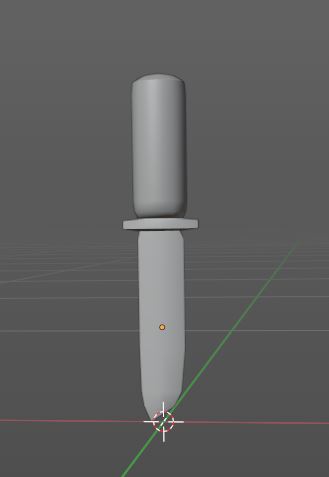
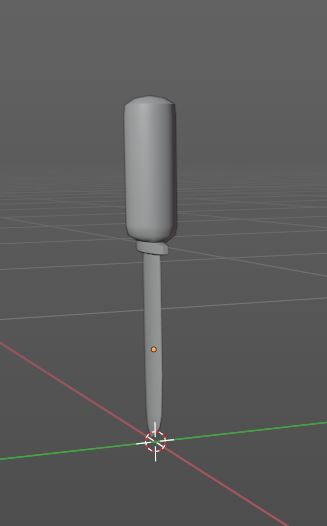
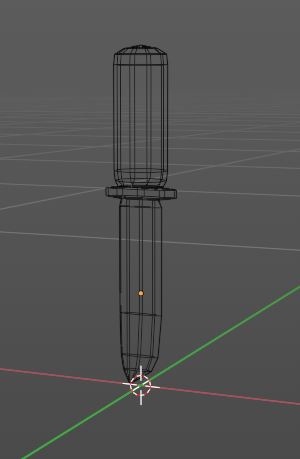
It's basically just a cylinder with some subdivisions and scaling and such... (and not very carefully done either as it will be a small part of an item nobody can see too clearly in game anyhow. If I can get the flag to where I'm happy with it...)
It's basically just a cylinder with some subdivisions and scaling and such... (and not very carefully done either as it will be a small part of an item nobody can see too clearly in game anyhow. If I can get the flag to where I'm happy with it...)
Any an all misspellings are henceforth blamed on the cats.
Last edit: 12 Oct 2021 13:50 by Charlotte.
Please Log in or Create an account to join the conversation.
Facebook Feed
Member Statistics
- Total Users: 226
- Latest User: norajohnson
- Online Users: 2
- Users Today: 0
- Users this Week: 0
- Users this Month: 0
- Users this Year: 0
NOTE! This site uses cookies and similar technologies.
By using this website you agree to the use of cookies and related data storage as detailed in our privacy policy. Learn more
I understand
Site design Mad Hamster Studios. All content is protected under © and the property of the various contributers and not to be reproduced without permission of the creator.